Okuma görünümü

How I Do SEO for New Websites

LLaunching a new website is exciting, but it’s also when SEO plays a crucial role in ensuring long-term success.

New website coming SOON

Here’s a step-by-step breakdown of how I approach SEO for new websites:

Understand the Purpose and Audience

Before diving into technical SEO, I focus on understanding the website’s purpose and target audience.

Define objectives: Is the website meant to generate leads, sell products, or provide information?

Identify the audience: Who will visit the website? Their preferences, problems, and search behaviour guide my strategy.

Keyword Research

Effective keyword research is the backbone of SEO. For a new website.

  • Use tools like SEMRush, Ahrefs, or Google Keyword Planner.
  • Target low-competition, long-tail keywords to quickly gain traction.
  • Analyze competitor keywords and gaps.
  • Create a seed list of primary, secondary, and LSI (Latent Semantic Indexing) keywords.

Structure the Website

Site structure impacts SEO and user experience.

My process includes:

  • Flat structure: Ensures every page is accessible within 3 clicks.
  • Logical hierarchy: Groups pages into categories for clarity.
  • SEO-friendly URLs: Keep them short, descriptive, and keyword-optimized.
  • Internal linking: Helps Google understand relationships between pages.

Technical SEO Setup

The technical foundation is essential for search engines to crawl and index the site. I focus on:

  • Installing Google Analytics and Google Search Console.
  • Submitting an XML Sitemap to Search Console.
  • Setting up a robots.txt file to control crawling.
  • Ensuring the website is mobile-friendly with responsive design.
  • Improving Core Web Vitals: Optimize load time, interactivity, and visual stability.
  • Enabling HTTPS for a secure browsing experience.

Content Creation

Content drives organic traffic, so I prioritise:

  • Writing SEO-optimized blog posts targeting keywords.
  • Creating cornerstone content that answers key user queries.
  • Ensuring content is informative, actionable, and engaging.
  • Using multimedia (images, videos, infographics) to boost user interaction.

On-Page SEO Optimization

Every page is optimized to rank effectively. My on-page checklist includes:

  • Crafting compelling title tags and meta descriptions.
  • Using header tags (H1, H2, H3) for better readability and keyword placement.
  • Optimizing images with alt tags and compressed file sizes.
  • Adding internal and external links to boost authority.

Building Backlinks

Backlinks signal authority to search engines. For a new website

  • Build citations and directory links for local businesses.
  • Leverage guest blogging on niche-relevant sites.
  • Conduct outreach campaigns for high-quality backlinks.
  • Avoid spammy or black-hat link-building practices.

Regular Monitoring and Optimization

SEO is a continuous process. Post-launch

  • Track performance: Use tools like Google Analytics and Ahrefs to measure organic traffic and keyword rankings.
  • Analyze user behavior to identify bounce rates, exit pages, and session durations.
  • Update content regularly to stay relevant.
  • Fix crawl errors, broken links, or duplicate content to maintain site health.

Local SEO (If Applicable)

For businesses targeting specific locations

  • Set up Google My Business and optimise the profile.
  • Add NAP (Name, Address, Phone Number) consistency across citations.
  • Encourage customer reviews for credibility.

Remember

SEO for a new website requires a strong foundation, strategic planning, and consistent effort.

From technical optimizations to creating valuable content and building backlinks, I ensure every step aligns with the website’s goals and audience needs.

  •  

Complete SEO Guide For Beginners: Learn SEO with Pravindra Yadav

Introduction to SEO

SEO (Search Engine Optimisation) is the process of optimising your website so that it appears higher in search engine results pages (SERPs).

It helps to:

  • Increase website traffic
  • Generate more leads
  • Improve brand awareness
  • Boost your online sales

Concepts We’ll Cover

  • SEO Basics
  • Types of SEO
  • Keyword Research
  • Search Engine Mechanics
  • SEO Tools
  • Advanced Tactics

Do You Want to Learn SEO Practically?

What You Will Learn in This Article?

  • How Search Engines work (SEO Basics)
  • How to do in-depth SEO Audit
  • How To Do Keyword Research
  • SEO Strategies used by Agencies
  • How to Rank on the 1st page of Google for Target Keywords
  • Master Technical SEO to beat your competitors
  • How to create high-quality backlinks
  • How to use AI to scale your SEO Efforts

What is SEO?

SEO stands for Search Engine Optimization, which is a process to help search engines understand your website content and help users find your site.

Key Goals:

  • Boost Website Traffic
  • Enhance Visibility
  • Drive Conversions

SEO’s Impact on Business Growth:

Businesses prioritising SEO grow faster, showing a 14.6% conversion rate from SEO-driven leads. So, What Kinds of SEO You Need.

Types of SEO

It’s important to understand and implement all types of SEO. Together they play an important role in improving your site’s ranking and visibility.

3 Types of SEO

  • Off-Page SEO
  • On-Page SEO
  • Technical SEO

On-Page SEO

  • Focuses on keyword optimization and high-quality content
  • Improves user experience through meta tags and headers

Off-Page SEO

  • Builds authority with backlinks
  • Enhances reputation through external site interactions

Technical SEO

  • Optimizes site speed and mobile-friendliness
  • Fixes crawlability and indexing issues

We have just scratched the surface. It’s time to take a deep dive into the world of SEO. Ready to 🔒 lock the secrets of SEO and boost your online visibility?

How Search Engines Work

  • Crawling: Search engines scan the web to discover new and updated content.
  • Indexing: The collected content is stored and organized in the search engine’s database.
  • Retrieval: The search engine retrieves and ranks the most relevant content from its index for a user query.
  • Ranking: Based on algorithms, search engines rank indexed content to show the most relevant results for a query.

Importance of Algorithms

Algorithms determine which content ranks first in search results. Google uses 200+ factors, including:

  • Keyword Relevance
  • Mobile-Friendliness
  • Backlink Quality

Ensures the most accurate and relevant results for users.

Organic vs. Paid Search Results

PaidOrganic
Paid ads (PPC) for quick visibilityFree, earned through SEO
Appear at the top of search resultsRanked by relevance and content quality
Short-TermLong-Term

You’ve put in a lot of effort in learning key SEO basics. Give yourself a break!

In the meantime, here are some fun SEO marketing facts:

  • The top 5 search results get over 75% of all clicks.
  • Over 3.5 billion searches are conducted on Google every day!
  • Content including visual elements like images or videos can drive up to 94% more views

What is Keyword Research?

Keyword research finds and analyses the search terms people use on search engines. It ranks your content higher, attracting relevant traffic.

  • Identifies popular search terms and phrases
  • Helps understand user intent and behaviour
  • Guides content creation for better SEO
  • Improves visibility by targeting relevant keywords
  • Crucial for both organic and paid search strategies

3 Tools for Keyword Research

  • Google Keyword Planner
  • Ahrefs
  • SEMRush

Types of Keywords

  • Informational: Keywords used to find information or answers (e.g., “how to bake a cake”)
  • Navigational: Keywords used to find a specific website or page (e.g., “Facebook login”)
  • Commercial: Keywords showing interest in a product or service (e.g., “best DSLR cameras”)
  • Transactional: Keywords indicating purchase intent (e.g., “buy iPhone 14 online”)

Identifying High-Value Keywords

  • Search Volume: Choose keywords with significant search traffic potential.
  • Competition: Target keywords with low competition for easier ranking.
  • Relevance: Ensure the keyword aligns with your content and business goals.
  • User Intent: Focus on keywords that match what your audience is looking for.
  • Conversion Potential: Prioritize keywords likely to drive conversions or sales.

Types of Search Intent

  • Informational
  • Navigational
  • Transactional
  • Commercial

How to Align Content with Search Intent

  • Informational: Offer in-depth, helpful content like blogs, guides, or FAQs.
  • Navigational: Create clear, accessible content that leads users to your site.
  • Transactional: Optimize product pages, pricing info, and calls-to-action to encourage purchases.
  • Commercial: Use comparison pages, reviews, and guides to aid purchase decisions.

⏸ Take a Quick Break!

You’ve been learning a lot about SEO – great job so far! Take a moment to relax, stretch, or grab some coffee. When you’re ready, we’ll dive into some core concepts. Get set for practical, actionable insights you can implement immediately!

All About On-Page SEO

The SEO best practices of optimizing web page content for search engines and users is on-page SEO.

  • Directly impacts search rankings by optimizing individual pages
  • Enhances user experience and improves content visibility
  • Ensures your site is relevant and accessible for both users and search engines

Key Elements of On-Page SEO

  • Meta Tags (Title, Description): Optimise titles and descriptions for keyword relevance and clarity.
  • Content Quality: Focus on creating valuable, relevant, and keyword-rich content.
  • Image SEO: Use descriptive alt text, optimize file size for faster loading.

On-Page Optimization Techniques

  • Internal Linking: Create a clear, logical internal link structure to guide users and bots.
  • URL Structure: Keep URLs short, descriptive, and keyword-rich.
  • Mobile-Friendliness: Ensure your site is responsive on all devices.
  • Page Load Speed: Optimize for faster load times to improve rankings and user experience.

Off-Page SEO Basics

Off-Page SEO focuses on actions taken outside your website to improve rankings. It helps build your site’s authority and credibility through external factors.

  • Builds trust and credibility with search engines and users
  • Increases site authority through quality backlinks and external references
  • Improves rankings by signaling relevance and reliability to search engines

Link Building Strategies

Link building involves acquiring high-quality external links to boost your site’s authority and rankings.

Key Strategies

  • Influencer Outreach: Collaborating with influencers to promote content and gain links
  • Guest Blogging: Publish on reputable sites to gain backlinks and reach new audiences
  • Social Sharing: Social media increases visibility, attracting more visitors and enhancing backlink opportunities

Technical SEO Basics

Importance of Technical SEO

Technical SEO helps to improve a website’s technical aspects to help search engines crawl and index it more effectively.

Benefits:

  • Higher search engine rankings
  • Increased traffic
  • More conversions

Elements of Technical SEO

  • Site Architecture and XML Sitemaps: Structured site with sitemaps for better indexing
  • Robots.txt and Crawlability: Control which pages search engines can crawl for indexing
  • HTTPS vs. HTTP: Best for enhanced security and improved trustworthiness
  • Structured Data (Schema Markup): Add schema markup to help search engines understand and display your content.
  • Fixing Broken Links (404s): Address broken links to improve user experience and maintain SEO health.

Time to Chill!

Congratulations! You’ve mastered all the types of SEO. Good work! Now it’s time to take some rest. Next, we’ll explore the strategies and tools that’ll help you put it all into practice! Relax for a moment, and learn the essential gear for your SEO journey! 🚀

Introducing SEO Tools

5 Important SEO Tools

Unlock SEO power with essential tools for analyzing performance, tracking rankings, and optimizing your website.

Tools

  • Google Search Console: Monitors website performance and provides insights on search queries and indexing.
  • Google Analytics: Analyzes website traffic and user behavior for data-driven decisions.
  • ahrefs: Performs backlink analysis, keyword research, and competitive analysis
  • SEMRUSH: Tracks keywords, conducts site audits, and analyzes content strategy
  • MOZ: Offers link building tools, keyword exploration, and site audits

SEO Strategies: A Short Overview

Importance of an SEO Strategy

Why SEO Strategy Matters

  • Drives organic traffic and improves rankings
  • Aligns SEO efforts with business goals

Key Benefits of SEO Strategy

  • Increases visibility, brand recognition, and ROI
  • Builds long-term trust and authority

Key Components

  •  Keyword research, on-page and technical SEO

1. Content Marketing and SEO

SEO and Content Synergy:

  • Quality content targets keywords and boosts rankings

Optimization Tips:

  • Naturally integrate keywords
  • Solve user queries via blogs, guides, and articles

Content Types:

  •  Use blogs, videos, infographics, and podcasts

2. Local SEO Strategies

Importance of Local SEO:

  • Crucial for businesses with physical locations
  • Optimizing your website for localized terms to targeted traffic and better leads

Key Tactics:

  • Optimize Google My Business
  • Include local keywords, build citations, and manage reviews

Mobile Optimisation:

  •  Ensure the site is mobile-user friendly

3. Voice Search Optimization

Why Voice Search Matters:

  • 27% of users use voice search; optimize for conversational queries

Optimization Tips:

  • Use natural language and long-tail keywords
  • Prioritize mobile, site speed, and featured snippets

Long-term SEO vs. Short-term Tactics

AspectsLong-Term SEO
FocusSustainable growthQuick, temporary gains
ApproachQuality content, authorityPaid ads, keyword stuffing
TimeframeSlow, steady resultsImmediate but short-lived
RiskLow, compliant strategiesHigh, risk of penalties

9 Social Media Influencers to Follow for SEO

  • Brian Dean: Founder and CEO of Backlinko
  • Neil Patel: Co-Founder Of Neil Patel Digital
  • Barry Schwartz: SEO and Content Marketing Columnist of Search Engine Land
    President of Pilot Holding
  • Danny Sullivan: Google Search Liaison
  • Rand Fishkin: SEO Visionary & Former CEO of Moz.com
  • Pravindra Yadav: Founder and CEO of DML Training

6 YouTube Channels to Watch to Learn SEO

8 Blogs to Read to Learn SEO

  1. BACKLINKO
  2. Ahrefs
  3. Yoast
  4. Google Search Central
  5. SEMRUSH
  6. Search Engine Journal
  7. MOZ
  8. DML Training

Related blog: How I Do SEO for New Websites

  •  

39 Point New Website Launch SEO Checklist

LLaunching a website is cool, but honestly, just putting a site live doesn’t do anything. If you want traffic, rankings, or even basic visibility, you need some SEO setup from day one. Here’s the simple version of what actually matters.

1. Pre-Launch SEO Setup

Before you make the site public, get these basics done:

  • Domain Name: Keep it short and easy. If it fits your niche, even better.
  • Hosting: Don’t cheap out here. Pick something stable so the site doesn’t lag.
  • SSL Certificate: Make sure the site is HTTPS. Google doesn’t like non-secure sites.

A few more things before launch:

  • Mobile-Friendly: Your site should work properly on phone, tablet, laptop – everything.
  • Robots.txt: Tell search engines what they can and can’t crawl.
  • XML Sitemap: Upload it in Search Console so Google understands your site layout.

2. Keyword Research: Build the Base

This part decides what you’ll rank for.

  • Primary Keywords: Use tools like Keyword Planner to find keywords with good volume.
  • Long-Tail Keywords: These get fewer searches but convert way better.
  • Competitor Research: Look at what your top competitors rank for and figure out the gaps.

3. On-Page SEO: Basic Page Optimization

  • Title Tags: Keep them short and use the main keyword.
  • Meta Descriptions: Write simple, clear descriptions so people know what the page is about.
  • Heading Structure: Use H1 for the main topic, H2/H3 for sections. Keep it clean.

More on-page stuff:

  • URLs: Short, clean URLs. No weird numbers or random strings.
  • Images: Compress them and add alt text.
  • Internal Links: Link related pages so users and Google can navigate your site better.

4. Technical SEO: Fix the Backend Stuff

  • Speed: Use PageSpeed Insights and fix whatever slows your site.
  • Mobile-First: Google checks mobile performance first, so don’t ignore it.
  • Schema: Add structured data so your content is easier for Google to understand.
  • Canonical Tags: Avoid duplicate content issues with proper canonicals.

5. Content Strategy: Don’t Just Publish for the Sake of It

  • Quality Content: Write something useful. Not fluff. Not filler. Something that actually helps.
  • E-A-T: Show expertise. Link credible sources. Prove you know your stuff.
  • Blog/Resources: Publish content regularly – consistency is what works.

Content tips:

  • Longer content (1000+ words) usually performs better because it covers topics in detail.
  • User Intent: Understand what people actually want when they search – then write for that.

6. Off-Page SEO: Build Authority Slowly

  • Backlinks: Earn good links through outreach, guest posts, PR, etc.
  • Social Presence: Share your content so at least someone sees it at the start.
  • Brand Mentions: Track unlinked mentions and turn them into backlinks when you can.

7. Local SEO (If your business serves a local area)

  • Google Business Profile: Keep your info updated and consistent.
  • Local Citations: Same NAP (name, address, phone) everywhere.
  • Reviews: Get real customer reviews – they help with rankings and trust.

8. Analytics & Tracking

  • Google Analytics: Check traffic and user behavior.
  • Search Console: Look at indexing, search queries, and any errors.
  • Monthly Audits: Clean up issues regularly so they don’t pile up.

9. Post-Launch SEO

  • Indexing: Make sure Google actually indexes your pages.
  • Broken Links: Fix them using tools like Screaming Frog.
  • Content Refresh: Keep updating old content – it matters more than people think.

10. Stay Updated

  • Follow new Google updates – things change often.
  • Stay connected with SEO communities.
  • Don’t stick to old strategies; update your approach when needed.

Final Thoughts

If you follow this checklist properly, your website won’t just “exist”, it’ll actually start performing. SEO isn’t a one-time thing. You build it slowly, you fix things regularly, and over time, the site grows.

So the real question is: Are you planning for a launch or planning for long-term growth?

Related blog: How I Do SEO for New Websites

  •  

83 Best Websites for SEO in 2025

IIf you’ve ever tried to improve your website’s visibility on Google, you already know SEO isn’t simple. Between constant algorithm updates, new competitors entering the space, and dozens of ranking factors to keep in mind, it can feel overwhelming. The good news? You don’t have to figure it all out alone.

There are plenty of tools out there designed to make SEO easier, faster, and more effective. From keyword research and backlink tracking to site audits and content optimization, the right platform can save you hours of work and point you in the right direction.

That’s why I’ve pulled together this list of the 83 best SEO websites to use in 2025. Think of it as your go-to toolbox-whether you’re a beginner trying to get your first rankings or a marketer managing multiple client sites, you’ll find something here that makes your SEO journey a lot smoother.

83 best SEO websites

  1. semrush.com – SEO toolkit (free trial in comments)
  2. ahrefs.com – backlink and keyword research
  3. LongTailPro.com – long-tail keywords tool
  4. BrightLocal.com – local SEO management
  5. HitTail.com – long-tail keyword suggestions
  6. rankalyzer.io – SEO competitor analysis
  7. moz.com – SEO software suite
  8. majestic.com – link analysis tool
  9. localfalcon.com – local rank tracking
  10. plerdy.com – conversion rate optimization
  11. Serpstat.com – growth hacking tool for SEO
  12. clearscope.io – content optimization
  13. KeywordTool.io – keyword finder
  14. woorank.com – SEO & website analysis
  15. Conductor.com – SEO platform for enterprises
  16. RankMath.com – WordPress SEO plugin
  17. Grammarly.com – content proofreading for SEO
  18. AccuRanker.com – accurate keyword ranking
  19. DeepCrawl.com – technical SEO platform
  20. Yoast.com – WordPress SEO plugin
  21. Sitebulb.com – website auditing
  22. Linkody.com – backlink tracker
  23. KWFinder.com – SEO keyword tool
  24. ContentKingApp.com – real-time SEO auditing
  25. SerpWatch.io – track search engine positions
  26. SeedKeywords.com – find valuable keywords
  27. WebsiteGrader.com – site performance review
  28. PageOptimizer.pro – on-page optimization tool
  29. Botify.com – end-to-end SEO platform
  30. CognitiveSEO.com – complete SEO tool
  31. SEOquake.com – browser-based SEO analytics
  32. CanIRank.com – AI SEO software
  33. serpbook.com – keyword rank tracking
  34. Coschedule.com – content marketing calendar
  35. SEOToolSet.com – suite of SEO tools
  36. RavenTools.com – SEO reports & research
  37. SEORadar.com – monitor SEO changes
  38. OnCrawl.com – SEO crawler and log analyzer
  39. TrafficTravis.com – free SEO software
  40. MarketMuse.com – AI content planning
  41. SEOClarity.net – SEO platform
  42. SiteChecker.pro – on-page SEO checker
  43. SurferSEO.com – data-driven content optimization
  44. PanguinTool.com – Google algorithm update checker
  45. SearchMetrics.com – SEO & content marketing platform
  46. NetpeakSoftware.com – SEO tool suite
  47. TheHoth.com – SEO and content marketing
  48. ContentHarmony.com – content planning
  49. Link-Assistant.com – link management
  50. KeywordRevealer.com – keyword research tool
  51. GShiftLabs.com – web presence analytics
  52. GreenlaneSEO.com – SEO tools and services
  53. KeywordEye.com – keyword & competitor research
  54. SERPwoo.com – niche SEO & ORM tool
  55. SEObility.net – SEO audit and monitoring
  56. AuthorityLabs.com – SEO rank monitoring
  57. MonitorBacklinks.com – backlink tracking
  58. NinjaOutreach.com – influencer marketing + SEO tool
  59. Databox.com – SEO performance tracking
  60. AdvancedWebRanking.com – cloud-based SEO tool
  61. TextTools.net – semantic SEO tool
  62. RankWatch.com – SEO management platform
  63. Sistrix.com – SEO analytics and visibility index
  64. SimilarWeb.com – website traffic and analytics
  65. STATSearchAnalytics.com – SERP analytics
  66. URLProfiler.com – audit and content tool
  67. Pitchbox.com – outreach and link building
  68. Copyscape.com – plagiarism checker for SEO
  69. LinkResearchTools.com – backlink analysis tool
  70. Zutrix.com – keyword rank tracker
  71. Nightwatch.io – SEO tracker and reporting tool
  72. SEOReseller.com – white label SEO platform
  73. NobleSamurai.com – keyword research + SEO software
  74. WordTracker.com – keyword research tool
  75. SEOBox.com – Spanish SEO platform
  76. SerpYou.com – clean and simple SERP tracker
  77. AgencyAnalytics.com – SEO reporting tool for agencies
  78. RankActive.com – versatile SEO toolkit
  79. SERanking.com – all-inclusive SEO software
  80. Sightliner.com – interlinking and duplicate content tool
  81. Lipperhey.com – SEO & website analyzer
  82. SheerSEO.com – SEO and online marketing software
  83. Pulno.com – website audit tool

Conclusion

At the end of the day, SEO is a long game. No single tool will magically shoot you to the top of Google, but combining the right ones can give you a serious edge. The websites in this list cover just about every area you’ll need help with-keywords, content, backlinks, technical fixes, and more.

My advice? Don’t try to use all 83 at once. Start with two or three that match your immediate needs-maybe a keyword tool, a site audit tool, and a content optimizer-and build from there. As your SEO skills grow, you’ll naturally start adding more advanced tools to your stack.

SEO in 2025 is all about working smarter, not harder. With the right tools in your corner, you can cut through the noise, stay ahead of competitors, and actually enjoy the process of growing your site.

  •  

51 Types of SEO Every Marketer Should Know

WWhen we hear the word SEO, most of us think about just optimizing websites with keywords or building backlinks. But SEO is so much more than that. In fact, it has grown into dozens of specialized practices-each with its own goals, techniques, and tools.

If you’re a marketer, recruiter, business owner, or content creator, understanding the different types of SEO can help you choose the right strategy for your goals. Let’s break down the 51 types of SEO into categories.

General SEO

These are the foundations of search engine optimization:

1. On-page SEO: Optimizing page content, meta tags, titles, and internal linking.
2. Off-page SEO: Building backlinks, brand mentions, and authority outside your website.
3. Technical SEO: Making sure your website’s backend is search-engine friendly (site speed, indexing, crawlability, etc.).

Technical SEO Variations

Technology shapes how search engines crawl and understand websites. Here are some specialized branches:

4. Mobile SEO: Ensuring websites are mobile-friendly.
5. Accessibility SEO: Optimizing for users with disabilities (e.g., screen readers).
6. Edge SEO: Using server-side optimizations and edge computing.
7. JavaScript SEO: Making JS-heavy websites crawlable.
8. React SEO / Next.js SEO / Headless SEO: SEO for modern frameworks and headless CMS platforms.

Content SEO

Content is still king, but SEO helps it shine:

9. Landing Page SEO: Optimizing pages designed to convert.
10. Blog SEO: Structuring blog content for both readers and search engines.
11. Content SEO: Overall content strategy for keyword ratio relevance.
12. Semantic SEO: Targeting search intent and meaning behind queries.
13. Multimedia SEO: Optimizing images, videos, and infographics.

Local & International SEO

Businesses with physical locations or global reach need specialized strategies:

14. Local SEO: Getting found in Google Maps and “near me” searches.
15. International SEO: Targeting global markets.
16. Multi-lingual SEO: Optimizing websites in multiple languages.

Platform-Specific SEO

Different platforms need different strategies:

17. eCommerce SEO: Optimizing online stores.
18. YouTube SEO: Ranking videos on YouTube and Google.
19. App Store SEO (ASO): Making apps visible in app stores.
20. Amazon SEO / Etsy SEO / Shopify SEO / Squarespace SEO / WordPress SEO / Wix SEO: Tailoring strategies to specific platforms.
21. Social Media SEO: Boosting visibility of social content.
22. News SEO / Google Discover SEO: Getting content featured in news and discovery feeds.
23. Yep SEO 😉: A fun nod to Ahrefs’ own search engine!

Specialized SEO Types

These focus on unique use cases:

24. Image SEO / Video SEO:Optimizing media for search.
25. Programmatic SEO: Scaling SEO with automation.
26. Holiday SEO: Seasonal campaigns (Black Friday, Christmas, etc.).
27. Featured Snippet SEO: Winning position zero.
28. Long-tail SEO: Targeting niche queries with lower competition.
29. SaaS SEO / Enterprise SEO / Niche SEO: Tailored to business models.
30. Voice SEO: Preparing for voice search queries.
31. AI SEO: Leveraging artificial intelligence tools.
32. Taxonomy SEO: Structuring site categories and tags.

SEO Philosophies

Finally, SEO isn’t just about tactics—it’s also about approach:

33. White Hat SEO: Ethical, long-term strategies.
34. Black Hat SEO: Aggressive, often risky tactics.
35. Grey Hat SEO: A mix of both worlds.
36. Negative SEO: Harmful tactics used against competitors.
37. Sustainable SEO: Eco-conscious, long-term strategies.
38. Continuous SEO: Ongoing optimization.
39. DIY SEO: Do-it-yourself SEO for small businesses.
40. Holistic SEO: Looking at SEO as part of a bigger digital ecosystem.

Final Thoughts

SEO is no longer a “one-size-fits-all” discipline. Whether you’re running an online store, growing a SaaS company, or just trying to get more visibility for your blog, there’s a specific type of SEO that can help.

The key is to choose the right mix of strategies, stay updated with trends, and always focus on adding value to your audience.

  •  

How to Audit Your Website Using Google Search Console

IIf you’ve been following me for some time, you know I post a lot about GSC, and for good reason too; it’s probably one of the most powerful tools in SEO

Google Search Console

This audit will help you find any issues with indexing, crawling, discovery, rendering, ranking, and content quality on your site

Let’s jump right in

Indexing

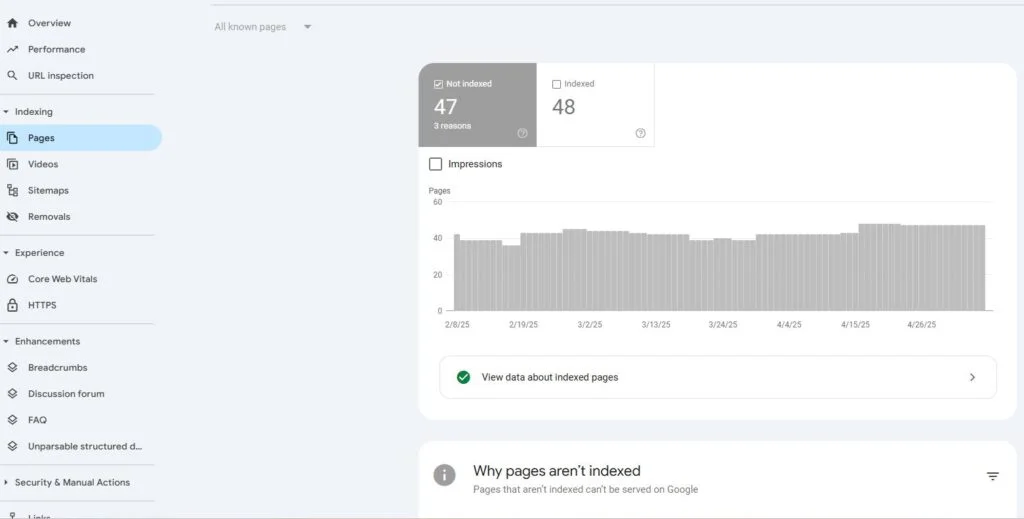
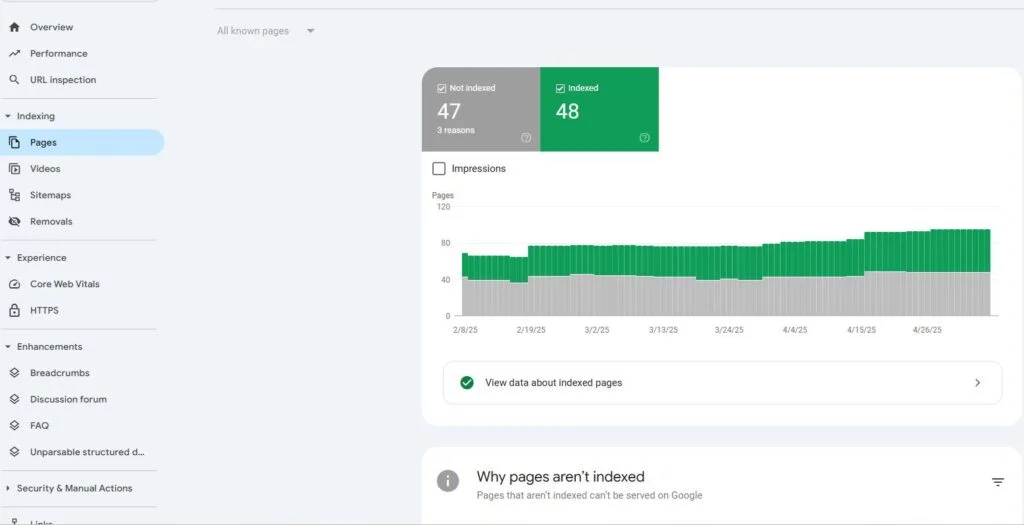
First things first, you’ll want to check that the right pages are being indexed. Check that you’re not indexing any unnecessary items like tags.

Check if there’s a high volume of Excluded URLs

Most commonly URLs that should be indexed will sit in discovered and crawled, not indexed. You’ll want to find ways to get those pages indexed (I’ll cover this in a few slides)

Is Google Respecting Your Canonicals?

Duplicate, Google chose different canonical” means Google chose another URL as the canonical and not your user-selected canonical.

You’ll also want to make sure you have a canonical tag set, otherwise, Google will choose one for you or let it sit in excluded.

Do You Have “Noindex Tags” Added to the Wrong Pages?

While rare, you’ll want to check that none of your priority URLs have a noindex tag applied to them… it happens more often than you’d think.

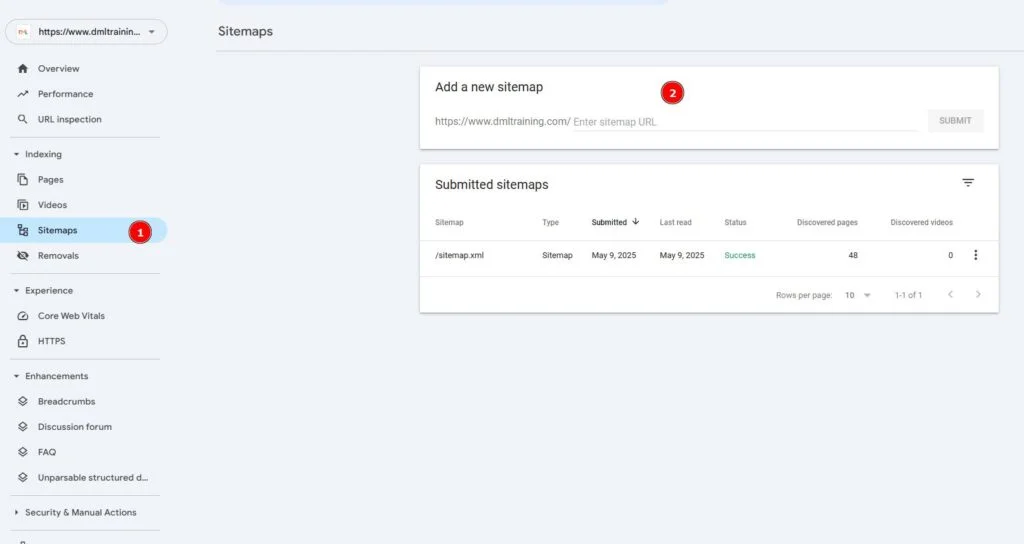
Can Google Successfully Access and Read Your Sitemap?

Add your sitemap here if nothing has been submitted yet.

Do You Have Pages Sitting in Discovered or Crawled, Not Indexed?

This is basically Google’s version of purgatory. As always, it depends, but I’ve found improving content quality and internal linking helps with these pages.

You’ll also want to request these URLs to be recrawled after you update them.

Is Google Excluding the Right URLs from your Robots.txt

This likely won’t be an issue if you set your robots.txt up right, but still worth a quick look.

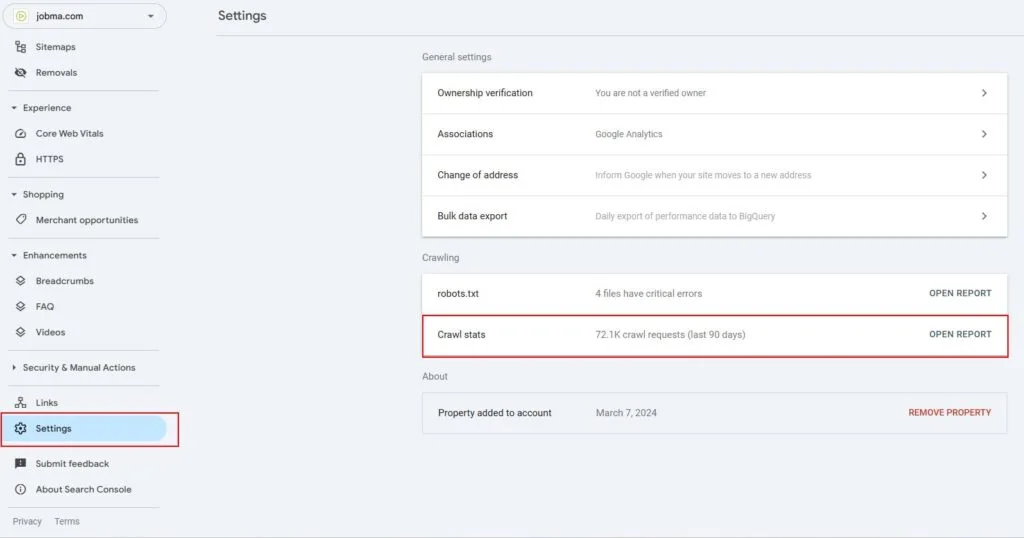
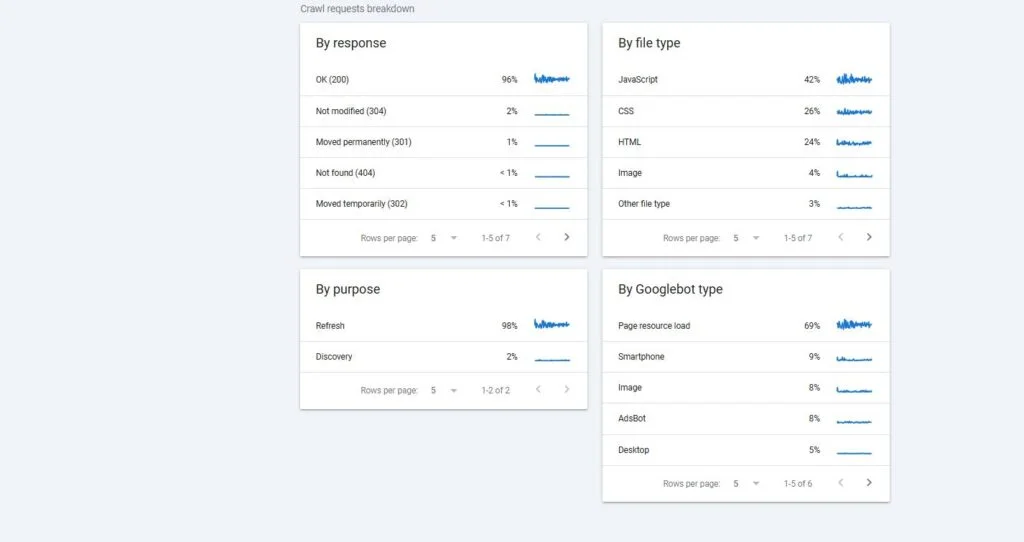
Crawl Stats

Here you can access different stats on how Google interacts with your website

It’s Settings > Crawl Stats > Open Report

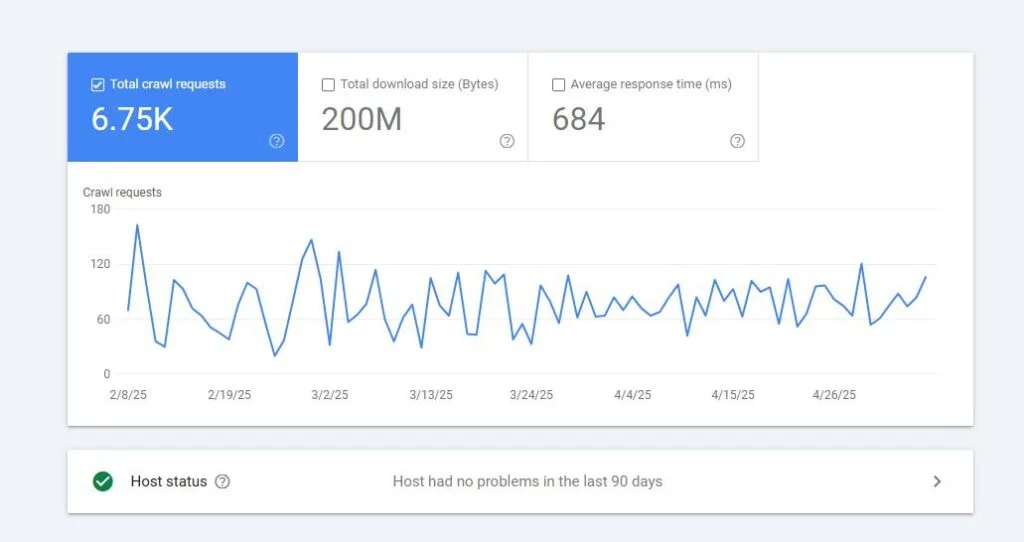
Any Spikes or Drops in Crawl Trends?

This crawl trend is worth keeping an eye out for any crawling or server-related issues

By Response

Is Google coming across a high volume of 3xx or 4xx responses?

You’ll also want to check that you’re not internally linking to any of these

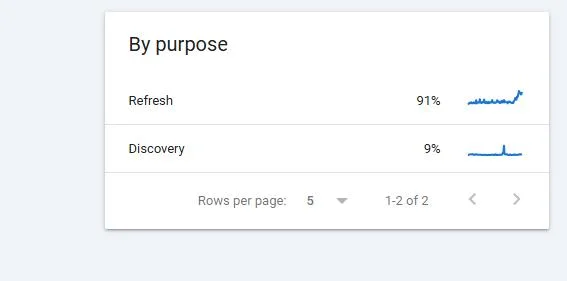
Are New Pages on Your Website Being Discovered?

Here you can check whether Google is having any issues discovering and crawling new pages

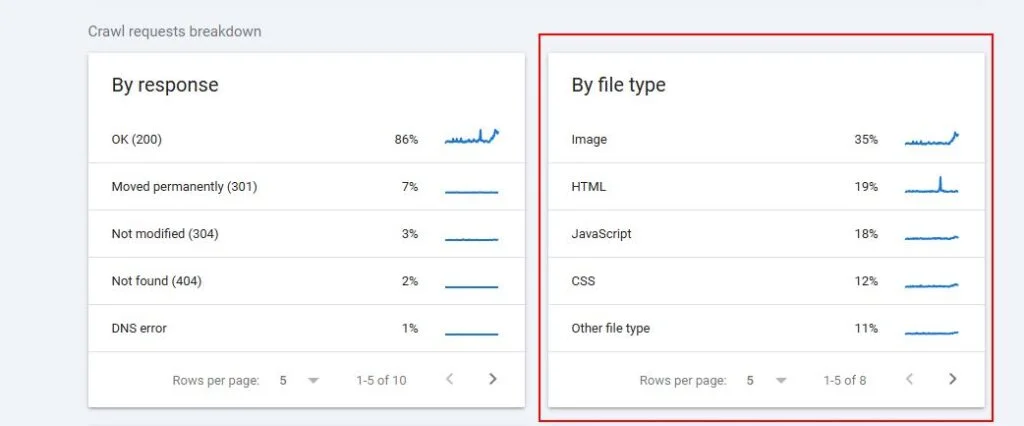
By File Type

Here you can see which resources Google is crawling the most and if it’s causing any crawling issues like a slower response time.

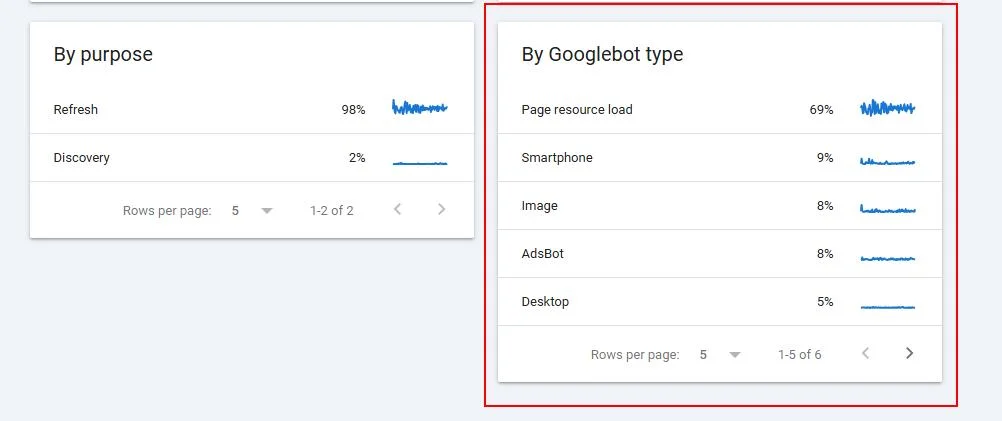
By Googlebot Type

Here you can see which Googlebots are crawling your site

Look for any fluctuations, specifically with page resource load as it may indicate a rendering issue

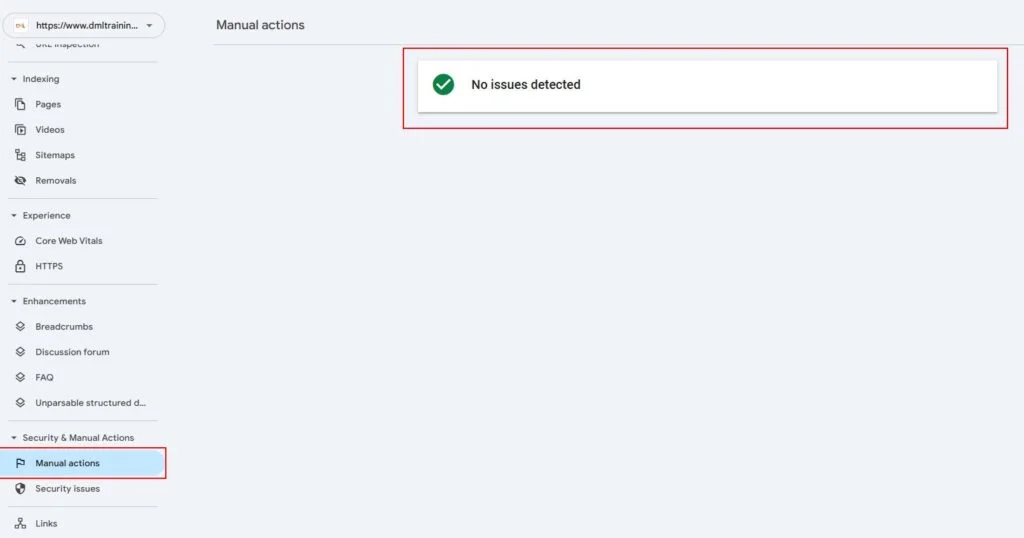
Has the Website Been Hit With a Manual Penalty?

As always, you should check if your website has ever been hit with a manual penalty.

These are still pretty rare, but it will absolutely debilitate your SEO efforts if it’s still there.

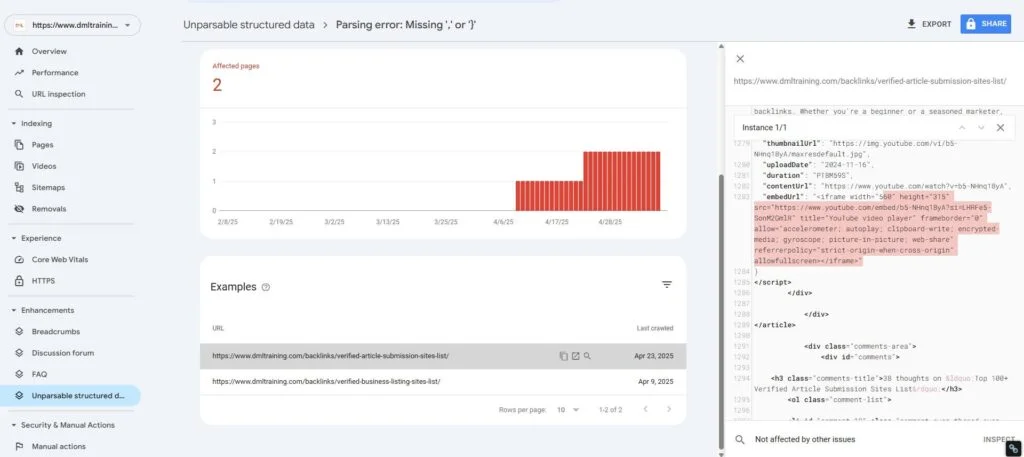
Is Your Schema Being Read Properly?

Depending on the type of schema you use, you’ll want to check the “enhancements” tab to see if it’s being read properly.

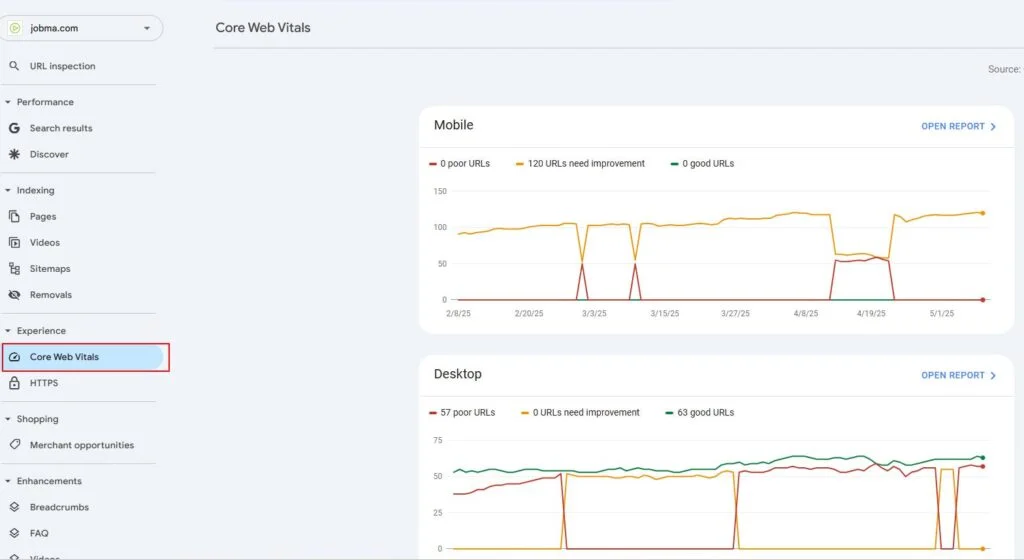
Core Web Vitals

While the page experience and mobile usability tabs are leaving GSC, Core Web Vitals will still be around.

Remember, don’t use SEO as an excuse to update page experience and CWV, you should optimize for it regardless for your users.

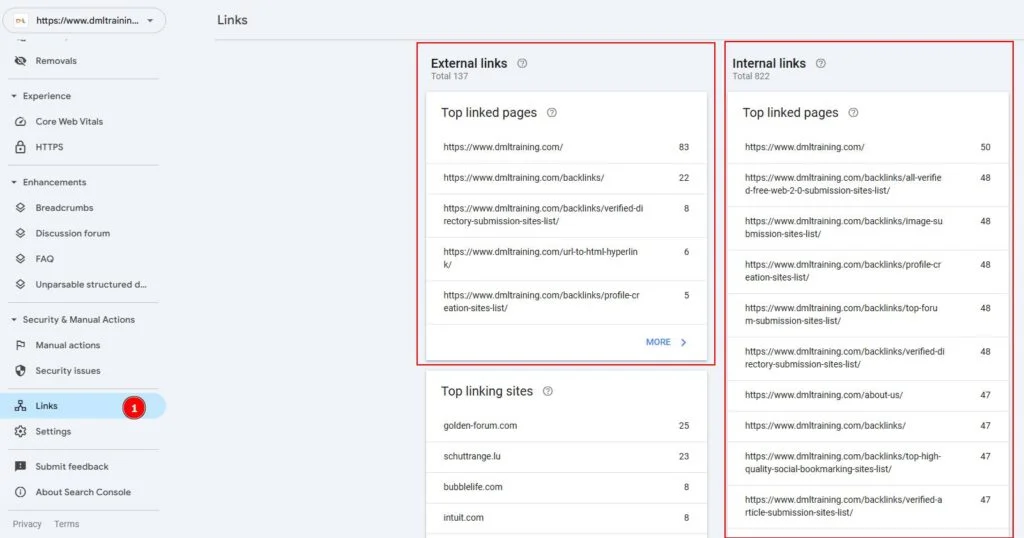
Internal and External Links

Use the links tab to find pages with high volumes of external and internal links pointing toward them.

You can use these URLs as a base when looking for internal link opportunities.

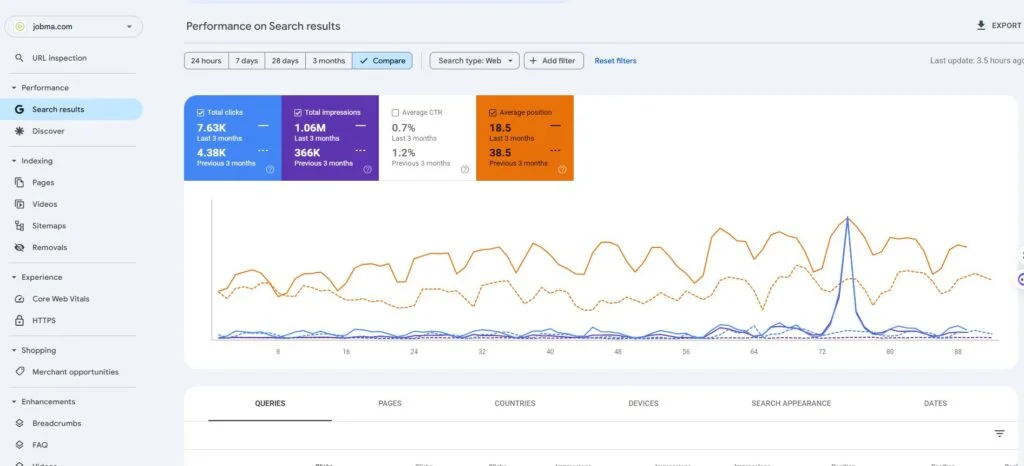
Traffic Drop Analysis

Has your website seen a drop in either positioning, impression, or clicks?

You’ll want to use this report to find and fix that.

Just use the date filter to compare different ranges of time.

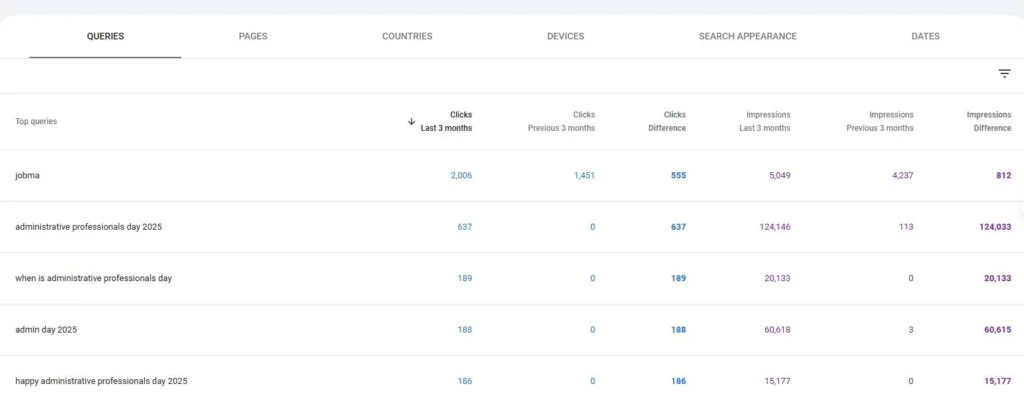
Low-Hanging Fruit Pages

You see this one get posted all the time on LinkedIn

These are queries on your website that rank between 4-20

These are essentially quick wins you can go after with a little bit of work

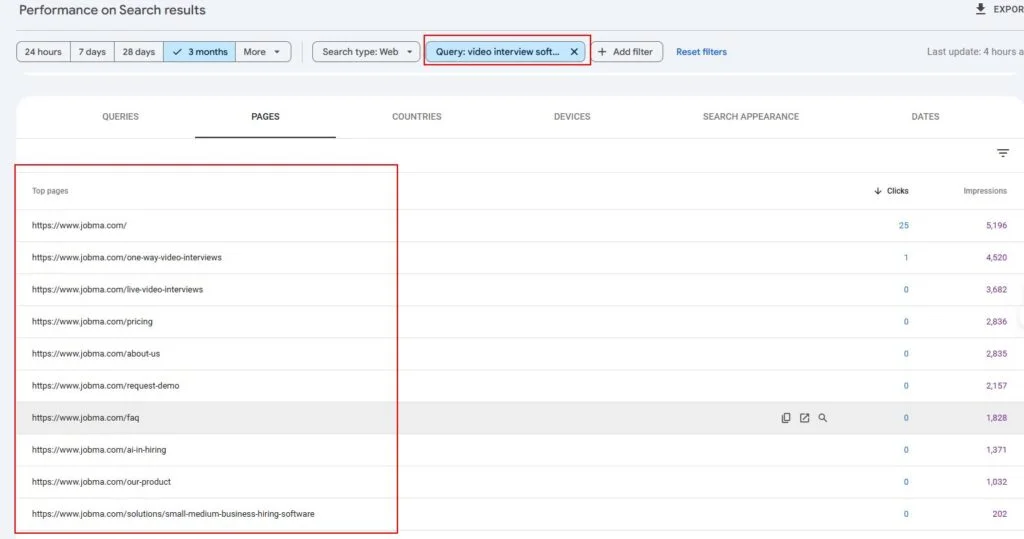
Cannibalizing Pages

To check keyword cannibalization, all you need to do is enter your exact query and check the page tab to see if multiple URLs are appearing

From there, you’ll want to take these URLs to the SERPs to see if their results are the same

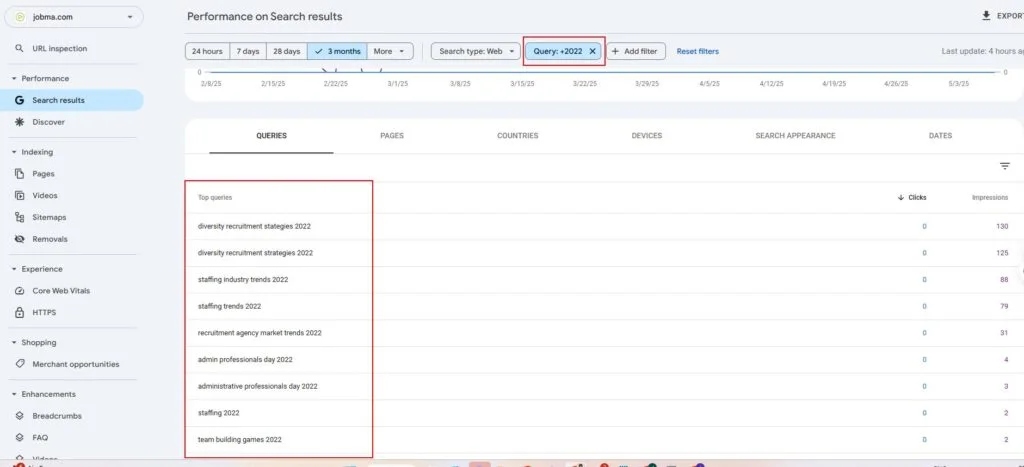
Do you have any outdated content on your website?

Set a date filter for the last 28 days and enter a query filter for a year (2020, 2021, 2022)

You’ll find a list of queries on your site that are still ranking for previous years.

Content with Potential

Similar to the LHF pages, these are queries on your website that have potential (high impressions) but will need a full makeover to see movement.

These will likely be ranking in positions 40–60… always remember to check the intent of those pages.

High Impressions and Positioning, Low CTR

These pages are pages that very likely could drive traffic but aren’t for some reason. This could be due to boring titles and meta descriptions, but luckily this is a quick fix.

Content Audits

If you have been consistently creating content, you likely have a few duds in there.

Why not turn garbage into gold with a quick content audit

You’ll basically want to look for content with 0 clicks and low impressions over the last 16 months that you can delete or merge into relevant pages.

That’s It! Just to Recap

Just to recap, GSC is one of the best (FREE) SEO tools you have access too.

When it comes to anything discovery, crawling, indexing, rendering, and content performance, GSC will be your best friend.

  •  

How to Perform an SEO Audit in 18 Steps

Introduction

IIf your website isn’t ranking the way it should, it’s probably time for an SEO audit. Think of it like a health check-up for your site—it helps you uncover what’s working, what’s broken, and what’s holding you back in the search results. Whether you’re trying to boost organic traffic, fix indexing issues, or just get a clearer picture of your site’s performance, a thorough SEO audit can uncover powerful opportunities for growth. In this guide, I’ll walk you through 18 essential steps to perform a complete SEO audit—tools included—so you can take action right away.

The tool you need

  • Audit tool like Semrush Site Audit
  • Google Analytics
  • Google Search Console
  • Google PageSpeed Insights
  • Google Schema Markup Testing Tool

Basics — The Things You 100% Must Check

  • Benchmark your rankings and understand your competitors
  • Check for duplicate versions of your site in Google’s Index
  • Check your site’s indexed URLs
  • Check for manual actions
  • Analyze your site’s speed
  • Confirm that your site uses HTTPS
  • Check for mobile-friendliness issues
  • Analyze and resolve further indexation issues
  • Understand your site’s page experience
  • Audit your on-page SEO

SEO Audit Quick Wins

  • Fix broken internal links
  • Clean up your sitemap
  • Check your redirects

Auditing Content

  • Find and fix duplicate content issues
  • Identify thin content pages
  • Fix issues with orphan pages
  • Compare your content to top ranking pages & analyze searcher intent
  • Run a Backlink Audit

Conclusion

Doing an SEO audit doesn’t have to feel overwhelming. Once you break it into steps—like we’ve done here—it’s really just about getting a clear picture of how your site’s performing and spotting areas where you can improve. Some fixes might be quick wins, others might take more time, but all of them move you in the right direction.

The key is consistency. Don’t just audit once and forget about it—make it part of your regular website maintenance. Over time, you’ll catch issues early, stay ahead of algorithm changes, and keep your content in line with what your audience (and Google) actually wants.

If you’ve got any questions or tips from your own audits, feel free to share—always happy to swap notes.

  •  

The Roadmap to SEO Success: An In-Depth SEO Audit of Your Website

Crawlability & Indexability

AAchieving strong visibility in search engines starts with a technically sound, content-rich, and user-friendly website. In this comprehensive guide, we walk you through a detailed SEO audit framework that covers everything from crawlability and site structure to content optimization, mobile readiness, and international SEO. Whether you’re uncovering hidden issues in your robots.txt file or fine-tuning your hreflang implementation, this roadmap highlights the most critical technical and on-page SEO elements that can make or break your organic performance.

Robots.txt

  • ✖ Format errors in robots.txt
  • ✖ Invalid structured data items
  • ⚠ Issues with blocked internal resources in robots.txt
  • 🖼 Issues with blocked external resources in robots.txt
  • 🖼 Robots.txt not found
  • 🖼 Pages blocked by X-Robots-Tag: noindex HTTP header
  • 🖼 Pages were blocked from crawling

URL Structure

  • ✖ Malformed links
  • ⚠ Underscores in the URL
  • ⚠ Too many parameters in URLs
  • ⚠ URL is too long
  • ✅ User-friendly first, then search engine-friendly
  • ✅ Concise
  • ✅ Punctuated correctly
  • ✅ Consistent
  • ✅ Avoid repeating keywords

Links

  • ✖ Broken internal links
  • 🖼 Pages with only one incoming internal link source
  • 🖼 Pages that need more than 3 clicks to be reached

Internal Linking

  • ✅ Identify Orphan Pages
  • ✅ Fix Redirected / Broken Links
  • ✅ Relevance
  • ✅ Anchor Text
  • ✅ Remove Internal Links to Unimportant Pages
  • ✅ Internal Link Position

Redirects

  • ✖ Pages returning 4XX status code
  • ✖ Pages returning 5XX status code
  • ✖ WWW domain configured incorrectly
  • ✖ Redirect chains and loops
  • ✖ Pages with a meta refresh redirect tag
  • ✖ Broken canonical link
  • ✖ Multiple canonical URLs
  • ⚠ Pages with temporary redirects
  • ⚠ Internal links with nofollow attributes
  • ⚠ Too many on-page links
  • ⚠ Broken external links
  • 🖼 External links with nofollow attributes
  • 🖼 URLs with a permanent redirect

Sitemap

  • ✖ Format errors in sitemap.xml
  • ✖ Wrong pages found in sitemap.xml
  • ✖ Sitemap.xml files are too large
  • ⚠ Sitemap.xml not found
  • ⚠ Sitemap.xml not indicated in robots.txt
  • 🖼 Orphaned pages in sitemap
  • 🖼 Orphaned pages from Google Analytics

On-Page SEO

Page Title Optimization

  • ✅ Compelling and engaging
  • ✅ Short, sweet, and descriptive
  • ✅ Unique
  • ✅ Not too long
  • ✅ Optimized for your primary keyword
  • ✅ Add your primary keyword towards the front

Content

  • ✖ Missing or empty title tags
  • ✖ Issues with duplicate title tags
  • ⚠ Duplicate H1 and title tags
  • ⚠ Title tag is too long
  • ⚠ Title tag is too short
  • ✅ Write As You Talk
  • ✅ Target Your Audience Pain Point
  • ✅ Analyze the Heading
  • ✅ Use Sub Headings and Bullet Points
  • ✅ Use Table of Content
  • ✅ Avoid Plagiarism
  • ✅ Write for Content Salesy
  • ✅ Avoid Keyword Stuffing
  • ✅ Add Relevant CTA
  • ✅ Keep the Vocabulary Simple
  • ✅ Remove Duplicate Content

Heading Optimization

H1 Heading

  • ⚠ Missing H1 heading
  • ⚠ Duplicate H1 and title tags
  • ✅ You only have one H1 tag
  • ✅ Your heading describes what your page is about
  • ✅ They aren’t too long
  • ✅ They aren’t too short either
  • ✅ They grab the user’s attention
  • ✅ Try to include the primary keyword you want to target

H2-H6 Heading

  • ✅ Are meaningful
  • ✅ Include long-tail keywords
  • ✅ Answer subtopics required to answer the main search query
  • ✅ Accurately summarizes your content
  • ✅ Are optimized with your primary keyword
  • ✅ Are engaging
  • ✅ Aren’t too long

Meta Description

  • ✖ Duplicate meta descriptions
  • ⚠ Missing meta descriptions

Image

  • ✖ Broken internal images
  • ✖ Broken external images
  • ⚠ Images missing alt attribute
  • 🖼 Resources formatted as page link
  • ✅ Descriptive
  • ✅ Not too long
  • ✅ Optimized for your keywords

Technical SEO

Page Speed

  • ✖ Large HTML size
  • ✖ Slow page load speed
  • ⚠ Uncompressed pages
  • ⚠ Issues with uncompressed JavaScript and CSS files
  • ⚠ Pages have a JavaScript and CSS total size that is too large
  • ⚠ Pages use too many JavaScript and CSS files
  • ⚠ Issues with unminified JavaScript and CSS files
  • ⚠ Issues with uncached JavaScript and CSS files
  • 🖼 Issues with broken external JavaScript and CSS files

Core Web Vitals

  • 🖼 Pages that take more than 1 second to become interactive

Old Technology

  • ⚠ Frames used
  • ⚠ Doctype not declared
  • ⚠ Incompatible plugin content

Mobile

  • ✖ Missing viewport tag
  • ✖ Missing the viewport width value
  • ✖ AMP pages with HTML issues
  • ✖ AMP pages with style and layout issues
  • ✖ AMP pages with templating issues
  • ✖ AMP pages have no canonical tag
  • ✖ Issues with broken internal JavaScript and CSS files

HTTP Implementation

  • ✖ Mixed content
  • ✖ Non-secure pages
  • ✖ No redirects or canonicals to HTTPS URLs from HTTP version
  • ✖ SSL certificate registered to an incorrect domain name
  • ✖ Old security protocol version
  • ✖ Expiring or expired SSL certificate
  • ✖ Subdomains don’t support secure encryption algorithms
  • ⚠ HTTPS pages lead to HTTP page
  • ⚠ Homepage doesn’t use HTTPS encryption
  • ⚠ HTTP URLs in sitemap.xml for HTTPS site
  • ⚠ Subdomains don’t support SNI
  • 🖼 Subdomains don’t support HSTS

International SEO

  • ✖ Hreflang implementation issue
  • ✖ Hreflang conflicts within page source code
  • ✖ Incorrect hreflang links
  • ⚠ Pages with no hreflang and lang attributes
  • ⚠ Pages without character encoding declared
  • 🖼 Hreflang language mismatch issues

A successful SEO strategy starts with a solid foundation. By regularly auditing key areas like crawlability, content, page speed, and mobile performance, you’ll stay ahead of issues that could hurt your rankings. Use this roadmap as your guide, fix what matters most, and keep your site search-engine friendly and user-focused.

  •