LLaunching a new website is exciting, but it’s also when SEO plays a crucial role in ensuring long-term success.
New website coming SOON
Here’s a step-by-step breakdown of how I approach SEO for new websites:
Understand the Purpose and Audience
Before diving into technical SEO, I focus on understanding the website’s purpose and target audience.
Define objectives: Is the website meant to generate leads, sell products, or provide information?
Identify the audience: Who will visit the website? Their preferences, problems, and search behaviour guide my strategy.
Keyword Research
Effective keyword research is the backbone of SEO. For a new website.
Use tools like SEMRush, Ahrefs, or Google Keyword Planner.
Target low-competition, long-tail keywords to quickly gain traction.
Analyze competitor keywords and gaps.
Create a seed list of primary, secondary, and LSI (Latent Semantic Indexing) keywords.
Structure the Website
Site structure impacts SEO and user experience.
My process includes:
Flat structure: Ensures every page is accessible within 3 clicks.
Logical hierarchy: Groups pages into categories for clarity.
SEO-friendly URLs: Keep them short, descriptive, and keyword-optimized.
Internal linking: Helps Google understand relationships between pages.
Technical SEO Setup
The technical foundation is essential for search engines to crawl and index the site. I focus on:
Installing Google Analytics and Google Search Console.
Submitting an XML Sitemap to Search Console.
Setting up a robots.txt file to control crawling.
Ensuring the website is mobile-friendly with responsive design.
Improving Core Web Vitals: Optimize load time, interactivity, and visual stability.
Enabling HTTPS for a secure browsing experience.
Content Creation
Content drives organic traffic, so I prioritise:
Writing SEO-optimized blog posts targeting keywords.
Creating cornerstone content that answers key user queries.
Ensuring content is informative, actionable, and engaging.
Using multimedia (images, videos, infographics) to boost user interaction.
On-Page SEO Optimization
Every page is optimized to rank effectively. My on-page checklist includes:
Crafting compelling title tags and meta descriptions.
Using header tags (H1, H2, H3) for better readability and keyword placement.
Optimizing images with alt tags and compressed file sizes.
Adding internal and external links to boost authority.
Building Backlinks
Backlinks signal authority to search engines. For a new website
Build citations and directory links for local businesses.
Leverage guest blogging on niche-relevant sites.
Conduct outreach campaigns for high-quality backlinks.
Avoid spammy or black-hat link-building practices.
Regular Monitoring and Optimization
SEO is a continuous process. Post-launch
Track performance: Use tools like Google Analytics and Ahrefs to measure organic traffic and keyword rankings.
Analyze user behavior to identify bounce rates, exit pages, and session durations.
Update content regularly to stay relevant.
Fix crawl errors, broken links, or duplicate content to maintain site health.
Local SEO (If Applicable)
For businesses targeting specific locations
Set up Google My Business and optimise the profile.
Add NAP (Name, Address, Phone Number) consistency across citations.
Encourage customer reviews for credibility.
Remember
SEO for a new website requires a strong foundation, strategic planning, and consistent effort.
From technical optimizations to creating valuable content and building backlinks, I ensure every step aligns with the website’s goals and audience needs.
DeepSeek is a China-based AI research lab and startup founded in 2023 by Liang Wenfeng (Hangzhou, Zhejiang). It’s officially registered as Hangzhou Deeply Seeking AI Technology Research Co., Ltd. and is widely known for building high-performance open-source AI models with an unusually strong focus on cost efficiency and engineering optimization.
Why it started: DeepSeek’s goal is to push frontier AI capability while keeping models accessible and open (weights + papers), proving top-tier results don’t require massive budgets. It’s also shaped by Liang’s background in AI and quantitative finance, where efficient modeling and real-world decision systems matter.
Funding & management: DeepSeek is largely self-funded, backed by Liang and his hedge-fund ecosystem (often linked to High-Flyer). It’s notable for having no major VC/Big Tech investors, giving it freedom to prioritize research and open releases. Liang is the key decision-maker/leader.
Focused on domain-specific expertise and precision.
Designed for industry-specific applications like healthcare, finance, or legal.
Excels in deep analysis and tailored solutions for niche use cases.
Ideal for professionals looking for specialized insights and actionable intelligence.
What it does best: DeepSeek is especially strong in:
Reasoning and math (multi-step problem solving), via models like DeepSeek-R1 and RL-heavy training approaches.
Coding (generation, debugging, multilingual coding), via DeepSeek-Coder and DeepSeek-Coder-V2, including long-context use cases.
Efficiency at scale, using Mixture-of-Experts (MoE) designs so only part of the model “activates” per request, cutting inference cost while keeping high capability.
Model lineup (high level):
DeepSeek LLM / V-series (V2/V3): general-purpose LLMs, with MoE scaling for strong performance at lower cost.
DeepSeek-R1: reasoning-focused model competing with top proprietary “reasoning” systems on several benchmarks.
DeepSeek-Coder / Coder-V2: specialized coding models with large context windows.
DeepSeek-VL / VL2: multimodal (image + text) models tuned for practical visual tasks like OCR/docs/screenshots.
DeepSeek-Math / Prover: math reasoning and formal theorem proving (Lean).
ChatGPT
ChatGPT is a conversational AI product developed by OpenAI, designed to understand and generate human-like text (and now images, audio, and code). It officially launched to the public in November 2022, quickly becoming one of the fastest-growing consumer applications in history.
Origin & Purpose
OpenAI was founded in 2015 by Sam Altman, Elon Musk, Greg Brockman, Ilya Sutskever, and others, with the mission to ensure artificial general intelligence (AGI) benefits humanity. ChatGPT was created to make OpenAI’s advanced language models usable through a simple chat interface for everyday tasks, businesses, and developers.
Leadership & Organization
CEO: Sam Altman
CTO: Mira Murati (until 2024; leadership evolving)
Structure: “Capped-profit” company
Funding: Major backing from Microsoft (over $10B), plus venture capital and cloud partnerships
Underlying Models
ChatGPT is powered by OpenAI’s GPT (Generative Pre-trained Transformer) models:
GPT-3.5: Free-tier model (basic reasoning, writing, Q&A)
GPT-4 / GPT-4 Turbo: Advanced reasoning, coding, and creativity
Multimodal GPT-4: Handles text, images, voice, and documents
Models are trained on a mix of licensed data, human-created data, and publicly available information, then refined using RLHF (Reinforcement Learning from Human Feedback) for alignment and safety.
It performs especially well in general-purpose reasoning and conversational fluency, often setting the benchmark for consumer AI assistants.
Product & Access
Free: GPT-3.5
ChatGPT Plus: GPT-4 access, tools, multimodal features
Team / Enterprise: Security, admin controls, private data handling
API: Pay-per-token pricing for developers
Safety & Limitations
ChatGPT uses strict safety guardrails, content moderation, and refusal mechanisms. However, it can be conservative, restricted, or slower in reasoning compared to newer “reasoning-first” models like DeepSeek-R1.
Competitive Position
ChatGPT leads in usability, ecosystem, and polish, while competitors like Claude focus on safety, Gemini on Google integration, and DeepSeek on efficiency and open-source performance.
Bottom line: ChatGPT is the most widely adopted, general-purpose AI assistant today, strong in quality and experience, but premium-priced and closed compared to newer open challengers.
A general-purpose AI built for broad conversational capabilities.
Great for creative content generation, brainstorming, and casual interactions.
Widely used for customer support, content creation, and everyday problem-solving.
Known for its user-friendly interface and versatility.
Key Difference:
While ChatGPT is your go-to for general-purpose tasks, DeepSeek shines when you need deep, industry-specific expertise.
Think of ChatGPT as the Swiss Army knife of AI, and DeepSeek as the specialized tool for precision work.
SSEO strategies sound great on paper. In reality, growth comes from fixing boring problems, making small improvements consistently, and learning from real data.
This 90-day SEO plan is built around what actually works in 2026, with examples and insights you’ll recognize if you’ve ever worked on a real website.
Days 0 – 30: Fix What’s Broken Before Trying to Grow
Most SEO failures happen because teams skip the basics and jump straight to content production.
Every SEO win I’ve seen started with fixing technical issues no one wanted to look at.” SEO Consultant, B2B SaaS
Run a Full SEO Audit
A proper audit often reveals surprising problems.
Real example: A SaaS website publishing weekly blogs saw no traffic growth. The audit revealed 40% of its pages weren’t indexed due to incorrect canonical tags. Fixing that alone led to a 22% increase in organic traffic within a month.
Fix Crawl Errors and Broken Links
Broken links don’t just hurt SEO, they frustrate users.
Real example: An education platform fixed over 300 broken internal links after a site migration. Within weeks, crawl stats improved and several previously “lost” pages started ranking again.
If Google struggles to move through your site, users probably do too.
Set Up Search Console and Analytics
Without clean data, SEO decisions become guesswork.
Real example: After properly setting up GA4 events, a hiring tech company realized its highest-traffic page had the lowest conversion rate, leading to a content rewrite that doubled demo sign-ups.
Do Keyword Research Based on Intent
High-volume keywords often bring the wrong audience.
Real example: A recruitment SaaS stopped targeting “video interview software” alone and created content around long-tail queries like “one-way video interview for universities”. Result: fewer visits, but higher-quality leads.
Intent beats volume every single time.
Days 31 – 60: Improve Content and Build Trust
Once the foundation is solid, content starts doing the heavy lifting.
Update Old Content Before Writing New Posts
Refreshing content is faster, and often more effective.
Real example: A healthcare blog updated 15 older posts with new data, FAQs, and better formatting. No new content was published for a month, yet organic traffic grew 18%.
SEO isn’t always about creating more—it’s about improving what already exists.
Write Long-Tail, Problem-Focused Content
Long-tail keywords attract users who are closer to action.
Real example: Instead of generic blogs, a B2B brand published content answering very specific questions like “How to reduce interview drop-offs in campus hiring.” These pages didn’t go viral, but they converted.
Start Backlink Outreach the Right Way
Link building works best when it feels natural.
Real example: A SaaS company earned backlinks by contributing expert quotes to industry articles instead of cold pitching guest posts. Fewer emails, better links.
One contextual link from the right site is worth more than ten generic guest posts.
Optimize for Featured Snippets and Rich Results
Clear answers help both users and search engines.
Real example: Adding short Q&A sections helped multiple blog posts earn featured snippets, increasing click-through rates without ranking #1.
Days 61- 90: Scale, Optimize, and Convert
At this stage, SEO shifts from traffic to business impact.
Scale What’s Already Working
Not all content deserves scaling, only what performs.
Real example: After noticing high engagement on “how-to” guides, a SaaS brand doubled down on that format. Those guides became their top organic lead drivers.
SEO growth accelerates when you stop experimenting and start repeating success.
Improve Landing Pages and Conversions
SEO traffic only matters if it converts.
Real example: Changing a CTA from “Book a Demo” to “See How It Works for Your Hiring Team” increased conversions by 27%, with no traffic increase.
Review Results and Plan the Next Cycle
SEO is iterative.
Real example: One team found that pages ranking in positions 5–10 were the fastest wins. They focused solely on improving those pages during the next 90 days—and saw quicker results than chasing new keywords.
The second 90-day SEO plan always performs better than the first—because now you have real data
Final Thoughts
SEO in 2026 isn’t about hacks or shortcuts. It’s about:
Fixing real problems
Writing content for real users
Measuring real outcomes
A 90-day SEO plan gives you direction—but the results come from execution, iteration, and patience.
IIf you’re just getting into SEO, it can be confusing to know where to start or which tools are actually useful. I’ve put together this list of 16 tools because they’re easy to understand, beginner-friendly, and genuinely helpful for improving your website. Whether you want to find the right keywords, check your site’s health, spy on competitors, or make your content better, these tools will make the whole process a lot easier. Think of this as a quick guide to the essentials you should know before diving deeper into SEO.
1. Google Analytics
TRAFFIC ANALYSIS: Track the number of visitors, their source, and their behavior on your site.
USER INSIGHTS: Measure your website’s conversion rates and identify areas for improvement.
CONVERSIONS TRACKING: Understand user demographics, interests, and engagement to refine your strategy.
2. Google Search Console
PERFORMANCE MONITORING: Track your site’s search performance and discover which queries bring the most traffic.
INDEXING STATUS: Ensure your website’s pages are properly indexed by Google.
ERROR DETECTION: Identify and fix crawling, indexing, and mobile usability issues quickly.
3. Ahrefs
BACKLINK ANALYSIS: Explore your site’s backlink profile and identify high-quality link opportunities.
COMPETITOR RESEARCH: Analyze competitor content and keywords for a competitive edge.
KEYWORD RESEARCH: Discover keyword search volume and traffic potential.
4. SEMrush
COMPREHENSIVE KEYWORD RESEARCH: Access detailed keyword data, including trends and competition levels.
SITE AUDIT: Identify technical SEO issues and optimize your site for better performance.
COMPETITOR ANALYSIS: Monitor your competitors’ rankings and content strategies to stay ahead.
5. Yoast SEO
ON-PAGE OPTIMIZATION: Get real-time suggestions for optimizing content, titles, and meta descriptions.
READABILITY CHECK: Improve readability with easy-to-follow recommendations.
XML SITEMAPS: Automatically generate sitemaps to help search engines index your site efficiently.
6. Mozbar
QUICK SEO METRICS: Instantly view key SEO metrics like domain authority for any website.
ON-PAGE ANALYSIS: Evaluate the SEO elements of any webpage, including titles, meta tags, and headings.
SERP OVERLAY: See how your website ranks on search engine results pages (SERPs) with ease.
7. Screaming Frog
KEYWORD SUGGESTIONS: Discover volume new keywords with search, competition, and cost-per-click data.
CONTENT IDEAS: Generate ideas for content based on top-performing pages and search trends.
SEO AUDITS: See how your website ranks on search engine results pages (SERPs) with ease.
8. Ubersuggest
SITE CRAWLING: Identify broken links, redirects, and other issues by crawling your entire site.
TECHNICAL SEO INSIGHTS: Analyze key SEO elements like meta tags, headers, and content structure.
DUPLICATE CONTENT DETECTION: Find and fix duplicate content issues that can harm your rankings.
9. Google Keyword Planner
KEYWORD DISCOVERY: Find new keywords related to your business with search volume and competition metrics.
AD CAMPAIGN PLANNING: Optimize your PPC campaign with precise keyword targeting.
BUDGET-FRIENDLY: A free tool from Google, making it accessible for all beginners.
10. Keywords Everywhere
KEYWORD METRICS: Access search volume, CPC, and competition data directly in your browser.
TREND ANALYSIS: Identify trending keywords and topics to capitalize on new opportunities.
COST-EFFECTIVE: Affordable keyword research tool with a pay-as-you-go model.
11. Rankmath (WordPress)
ADVANCED SEO FEATURES: Access features like rich snippets, 404 monitoring, and redirections in one plugin.
EASY-TO-USE INTERFACE: Intuitive setup and configuration process with detailed SEO analysis.
INTEGRATION: Seamlessly integrates with Google Search Console and other tools for enhanced tracking.
12. Answer the Public
CONTENT INSPIRATION: Find new keywords related to your business with search volume and competition metrics.
KEYWORD INSIGHTS: Discover related keywords and phrases for better content targeting.
VISUAL DATA: Easy-to-interpret visualizations help you quickly grasp audience interests.
13. GT Metrix
SPEED ANALYSIS: Test your site’s loading speed and receive actionable insights for improvement.
PERFORMANCE SCORE: Get detailed performance scores and recommendations to optimize your site.
HISTORICAL TRACKING: Monitor changes in your site’s performance over time with historical data.
14. SEO Quake
SEO OVERVIEW: A quick overview of any webpage’s SEO elements including meta tags and keywords.
SERP ANALYSIS: Compare multiple websites directly in the Search Engine Results Pages (SERPs).
FREE TOOL: A cost-effective option for beginners to get started with SEO analysis.
15. Majestic SEO
LINK ANALYSIS: Dive deep into your website’s backlink profile with trust flow and citation flow metrics.
SITE EXPLORER: Explore any domain in detail, uncovering top pages, referring domains, and backlinks.
LINK CONTEXT: Understand the context of your backlinks, including the surrounding content and anchor.
16. Copyscape
PLAGIARISM DETECTION: Ensure your content is original and avoid duplicate content penalties.
CONTENT PROTECTION: Protect your website from unauthorized content copying.
EASE OF USE: Simple interface that provides quick and accurate results.
Conclusion
SEO gets much easier once you know which tools to rely on. You don’t need to use everything at once—just start with a few and slowly build your workflow as you get comfortable. The tools in this list cover all the basics you need as a beginner, from researching keywords to checking site performance and improving your content. With a bit of practice, you’ll start seeing what works, what doesn’t, and how to make steady progress.
OOver the years, we have had countless conversations with store owners, developers, and agencies-all of whom shared one frustration in common: the more their business grew, the more disconnected their digital tools became. Product details living in one system, stock levels managed in another, orders exported manually just to keep accounting software up to date-it was clear that even the best e-commerce setup can become overwhelming when every task requires a separate login or spreadsheet. Modern online stores struggle not because they are lacking in features, but because their systems don’t speak the same language. When the information stops flowing smoothly, the business slows down with it.
That recurring challenge became the spark for creating a solution that removes friction instead of adding more steps. We wanted Joomla stores to operate like well-coordinated teams, where every tool knows exactly what the others are doing. That vision crystallized into the development of the DJ-Catalog2 Sync API, a way to automate data exchange and help businesses work smarter, not harder. It’s a natural evolution of how e-commerce should function: connected, accurate, and effortlessly efficient.
Below, we’ll examine what the Sync API does, why it matters, and how it will transform the way you manage your Joomla store.
What Problem Does the DJ-Catalog2 Sync API Really Solve?
The DJ-Catalog2 Sync API gets rid of disconnected workflows by enabling instant, automated data exchange between your Joomla store and external systems. It replaces manual updates with smooth, two-way communication.
In other words, it stops your e-commerce from functioning like an island.
If you have ever had mismatched stock numbers, a CRM that’s missing new customers, or an accountant chasing you for updated order data, then you already know the pain this plugin solves. The Sync API becomes the quiet assistant that handles all the background work that you once did manually.
How Does the API Turn Your Joomla Store into a Connected Ecosystem?
The Sync API acts as a secure RESTful communication layer, enabling your store to “talk” to any external system capable of API-based communication. It reads, writes, updates, and deletes data automatically.
This includes:
products
categories
orders
customers
pricing
stock levels
Think of your business as a city. Once, each department was separated by miles of distance. Through the Sync API, highways connect them, moving information instantaneously and with intelligence.
Common System Integrations
ERP systems: SAP, Odoo, Dynamics
CRM systems: HubSpot, Zoho, Pipedrive
Accounting tools: Xero, QuickBooks
Warehouse & logistics systems, Marketing automation platforms, Custom-made internal systems
Why Is Automation Essential in Modern Joomla E-commerce?
Automation ensures accuracy, efficiency, and scalability-features that all online businesses need to be competitive. By automating repetitive tasks, your team can pay more attention to strategy and growth instead of data entry.
Think of this chain reaction happening in a split second:
A customer places an order
→ Your warehouse updates stock → Your accounting application generates an invoice → Your CRM tags the customer → Your marketing tool has scheduled a follow-up email. Nobody presses a button. That’s the level of automation modern e-commerce expects.
Key Automation Advantages
Consistency: Data is the same in all systems.
Speed: Changes take place in seconds, not hours.
Reliability: Machines don’t make typos or forget steps. Scalability: Handle growth without adding chaos.
Who Benefits Most from the DJ-Catalog2 Sync API?
The plugin brings considerable benefit to its developers, agencies, and business owners alike.
Who It’s For?
User Type
Benefit
Developers
Build integrations without reinventing the wheel
Agencies
Deliver enterprise-level solutions faster
Business Owners
Reduce manual tasks, errors, and operational costs.
Whether you run a boutique store or a large multi-department operation, the Sync API adapts to your workflow.
How Does Sync API Enhance DJ-Catalog2’s Already Powerful Features?
DJ-Catalog2 already offers one of the most flexible and robust e-commerce and catalog experiences available for Joomla; the Sync API raises the stakes by allowing effortless integrations with external applications.
DJ-Catalog2 Highlights
unlimited products & categories
variants & product combinations
advanced search & filtering
multilingual & multi-currency support
responsive layouts
fast cart & checkout
automatic invoicing
guest checkout
wishlists, quick view, product questions
custom fields, product comparison, and geolocation
extensive payment & shipment integration
Adding in the Sync API makes these features part of a much larger, fully connected business ecosystem.
Summary
The DJ-Catalog2 Sync API brings modern automation to Joomla e-commerce, turning a powerful standalone extension, DJ-Catalog2, into a fully integrated part of your business ecosystem. It removes the inefficiencies brought about by manual data handling and disconnected workflows by allowing seamless communication between your store and external systems like ERPs, CRMs, accounting tools, or warehouse platforms. This means that businesses can operate faster, reduce errors, and provide customers with a smoother experience-all through real-time synchronization, consistent information, and automated processes. This level of integration is not only going to save one’s time and operational costs but also sets up a foundation for long-term scalability. In a digital landscape where accuracy and speed too often decide who will stay competitive, the Sync API becomes much more of a strategic advantage than just another plugin. It represents a natural step forward for any Joomla store ready to work smarter and grow without unnecessary friction.
WWhy do people buy what they buy online? Ever thought about that? It’s weird. Sometimes it’s about the price. Sometimes it’s about emotion. And sometimes no reason at all. Just an impulse.
Digital marketing tries to answer that mystery. It peels back the layers. The habits. The feelings. The choices people make with just one click.
Because behind the every scroll and every add-to-cart moment there’s a reason. So understanding that reason? That is the real super power for any eCommerce brand today. Let’s talk about that world. The strange, emotional, data-driven world of online buyers.
Hidden Psychology of Online Shopping
People think they buy things logically. Compare. Decide. Purchase. Simple. Not really. Most of it’s emotional. That red “Limited Time Offer” tag? It’s not random. It’s urgency, wrapped in color. That countdown timer? It’s pressure disguised as opportunity. Digital marketers understand this dance. They use emotion, fear of missing out, joy, and curiosity to spark reactions. A late-night shopper scrolling through a feed doesn’t always need that jacket. But it feels good. Feels rewarding. Feels like a win. So, they click. That’s not manipulation. It’s understanding how humans behave when emotion leads and logic follows.
Data: The Secret Mirror
Data is the quiet observer. It watches everything but says nothing until someone listens. Every click, every scroll, every abandoned cart tells a story. A pattern. A small clue about behavior.
Marketers use that. They study heat maps, bounce rates, and browsing paths. They see where people hesitate, where they lose interest, and where they come back. Someone left their cart at checkout? Data reveals why. Shipping costs. Payment failure. Maybe they just got distracted by a cat video.
And what happens next? A gentle nudge. A reminder emails. A discount. Retargeting ads following them across websites. Not a coincidence. Pure strategy. Data is the language of digital behavior. Smart marketers read it fluently.
Personalization: The New Normal
Ever notice how your homepage looks different from someone else’s? That’s personalization. The invisible hand of digital marketing. It remembers what you liked.
What you hovered over. What you almost bought. Then, it shows you similar stuff. Just for you. Feels like magic. But it’s not. It’s algorithms, cookies, and careful observation. And it works because everyone wants to feel seen. Understood. Special.
Brands that get this right build loyalty. Not because they have the best product. But because they get you. That’s personalization, the most human part of eCommerce technology.
Storytelling: The Emotional Hook
People forget ads. But they remember stories. Always. A good brand does not just sell. It narrates. A journey. A reason. A feeling. Nike doesn’t sell shoes. It sells drive. Apple doesn’t sell phones. It sells creativity. Starbucks doesn’t sell coffee. It sells belonging.
Stories humanize brands. They make the product feel alive. Real. Like something with purpose, not just price. Digital marketing is a master of this sleight of hand. The image is a master of this sleight of hand. The images, the vibe, the feelings they all foster in connection. For in the end, people buy stories, not things.
Power of Social Influence
Social media changed how people decide. A single post can move markets. A single review can kill a product. Influencers talk. People listen. Trends spread like wildfire.
An Instagram reel can sell out a new brand overnight. A bad tweet can ruin years of reputation. That’s how powerful social proof has become.
Digital marketers study that ecosystem closely. They analyze hashtags, engagement, and sentiment. They join conversations instead of shouting over them.
Social media isn’t just a platform. It’s where consumer behavior lives. Breathing, talking it and reacting in to the real time.
Twisted Path to Purchase
Noone buys instantly. The journey’s messy.
First, awareness. “Hey, that looks interesting.”
Then interest. “Hmm, maybe I’ll check it out.”
Then the comparison. “Let’s see if it’s cheaper elsewhere.”
Then hesitation. “Do I really need it?”
And finally, decision.
Digital marketing guides people through that maze. Content builds awareness. Reviews build trust. Discounts trigger action. Retargeting brings them back. Every step has a strategy. Every stage has a voice.
Emotional Engine
Let’s be honest, shopping is emotional. Always was. Always will be. Excitement. Relief. Guilt. Pride. Every purchase carries one of these.
That’s why emotional marketing works so well. Limited-time offers. Feel-good campaigns. “Join our family” messages. They all target emotions first.
But emotion is fragile. Fake it, and you lose trust. Be real, and you win hearts. Consumers can smell insincerity. They crave honesty. So, digital marketing isn’t about selling dreams. It’s about the truth of the sale is wrapped in feeling.
Behavioral Retargeting: The Friendly Stalker
You check a product once. And suddenly, it’s everywhere. Instagram. YouTube. News sites. Even your email. Creepy? Maybe. Effective? Definitely.
That’s behavioral retargeting. It tracks user actions and gently reminds them of what they left behind. Sometimes with a discount. Sometimes with an emotional push.
It does because it hits curiosity and closure. Humans hate unfinished business. So, they go back. Complete the purchase. It’s not manipulation. It’s memory is digitally engineered.
Culture and Demographics: The Human Filters
Different audiences. Different habits. Culture defines what people buy and why. In some places, red means luck. Elsewhere, it screams danger. A phrase that sells in one country might offend another.
Marketers adapt. They localize the tone and visuals and some times even humor. Because one-size-fits-all? Doesn’t work anymore.
Then comes age and identity. Gen Z wants realness. No filters, no fakes. Millennials wish for ethics, convenience, and sustainability. Boomers? They value trust and clarity.
Mobile Behavior: Shopping on the Go
Phones changed the things, People do not go online anymore, but they live online. Shopping happens between bus stops. Lunch breaks. Midnight scrolls.
Those quick searches “best deals,” “next-day delivery,” “buy now”—are micro-moments. Small but mighty. Brands need to be ready for them. Fast-loading sites. Mobile-friendly designs. Voice search.
A second delay can kill a sale. Attention spans are short. Impatience rules. If your website lags, your customers’ gone. No second chances.
Reviews and Word-of-Mouth
Trust. That’s the currency of eCommerce. No matter how flashy your ads are, if people don’t trust you, you’re done. That’s why reviews matter. Honest ones. Real ones. They build credibility faster than any campaign ever could.
Five stars make buyers confident. One bad review makes them hesitate. Brands can’t fake authenticity. They can only earn it. To By being open. To By owning mistakes. By fixing what’s broken.
Online trust spreads like wildfire. And so, does doubt. Handle both carefully.
WooCommerce Variable Pricing: The Psychology of Price
Pricing isn’t math. It’s psychology. People rarely buy the cheapest item. They buy what feels worth it. What matches their sense of value.
That’s where WooCommerce Variable Pricing shines. It lets businesses test how pricing affects behavior, offering flexible prices for different users, regions, or loyalty levels.
A returning buyer might see a better offer. A new visitor might get a first-time discount. A big spender might get a personalized deal. It’s smart pricing. Adaptive. Emotional
Rise of AI in Understanding Behavior
Artificial Intelligence changed everything. It tracks the browsing history, predicts preferences, and segments customers instantly. It can guess when someone is about to buy or when they are about to leave it forever.
AI reads data faster than humans ever could. But interpretation? That’s still human work. Machines analyze. Humans empathize.
Together they make marketing that looks and feels much smart and human and this is the future.
Thin Line
There’s a dark side to all this. Data privacy. Tracking. Manipulation. Ethical marketing isn’t optional anymore. It’s survival. Respect data. Be transparent. Ask permission. Build trust. Because once people feel violated, they never come back. Empathy over exploitation. Always.
Real Story. Real Lesson.
Let’s talk about one small skincare brand. New. Unknown. Great products, but low sales. They had traffic. But conversions? Terrible.
After digging through data, they found the problem. Customers dropped off during checkout, and shipping fees were too high.
So, they changed it. Offered free shipping above a certain limit. Sent reminders for abandoned carts. Personalized offers based on browsing habits.
In three months, conversions jumped 27%. They didn’t change the product. They changed how they understood their customers. That’s what digital marketing really is: listening with data.
Conclusion
So, what really drives a customer to buy online? It’s not one reason. It’s hundreds of small ones. Emotion. Trust. Timing. Convenience. And connection.
With tools like AI, analytics, and smart strategies like WooCommerce Variable Pricing, eCommerce brands can adapt faster. Smarter. More human.
But never forget the data points are people. The clicks are conversations. And behind every “Buy Now” button there’s a story waiting to be understood.
SEO (Search Engine Optimisation) is the process of optimising your website so that it appears higher in search engine results pages (SERPs).
It helps to:
Increase website traffic
Generate more leads
Improve brand awareness
Boost your online sales
Concepts We’ll Cover
SEO Basics
Types of SEO
Keyword Research
Search Engine Mechanics
SEO Tools
Advanced Tactics
Do You Want to Learn SEO Practically?
What You Will Learn in This Article?
How Search Engines work (SEO Basics)
How to do in-depth SEO Audit
How To Do Keyword Research
SEO Strategies used by Agencies
How to Rank on the 1st page of Google for Target Keywords
Master Technical SEO to beat your competitors
How to create high-quality backlinks
How to use AI to scale your SEO Efforts
What is SEO?
SEO stands for Search Engine Optimization, which is a process to help search engines understand your website content and help users find your site.
Key Goals:
Boost Website Traffic
Enhance Visibility
Drive Conversions
SEO’s Impact on Business Growth:
Businesses prioritising SEO grow faster, showing a 14.6% conversion rate from SEO-driven leads. So, What Kinds of SEO You Need.
Types of SEO
It’s important to understand and implement all types of SEO. Together they play an important role in improving your site’s ranking and visibility.
3 Types of SEO
Off-Page SEO
On-Page SEO
Technical SEO
On-Page SEO
Focuses on keyword optimization and high-quality content
Improves user experience through meta tags and headers
Off-Page SEO
Builds authority with backlinks
Enhances reputation through external site interactions
Technical SEO
Optimizes site speed and mobile-friendliness
Fixes crawlability and indexing issues
We have just scratched the surface. It’s time to take a deep dive into the world of SEO. Ready to lock the secrets of SEO and boost your online visibility?
How Search Engines Work
Crawling: Search engines scan the web to discover new and updated content.
Indexing: The collected content is stored and organized in the search engine’s database.
Retrieval: The search engine retrieves and ranks the most relevant content from its index for a user query.
Ranking: Based on algorithms, search engines rank indexed content to show the most relevant results for a query.
Importance of Algorithms
Algorithms determine which content ranks first in search results. Google uses 200+ factors, including:
Keyword Relevance
Mobile-Friendliness
Backlink Quality
Ensures the most accurate and relevant results for users.
Organic vs. Paid Search Results
Paid
Organic
Paid ads (PPC) for quick visibility
Free, earned through SEO
Appear at the top of search results
Ranked by relevance and content quality
Short-Term
Long-Term
You’ve put in a lot of effort in learning key SEO basics. Give yourself a break!
In the meantime, here are some fun SEO marketing facts:
The top 5 search results get over 75% of all clicks.
Over 3.5 billion searches are conducted on Google every day!
Content including visual elements like images or videos can drive up to 94% more views
What is Keyword Research?
Keyword research finds and analyses the search terms people use on search engines. It ranks your content higher, attracting relevant traffic.
Identifies popular search terms and phrases
Helps understand user intent and behaviour
Guides content creation for better SEO
Improves visibility by targeting relevant keywords
Crucial for both organic and paid search strategies
3 Tools for Keyword Research
Google Keyword Planner
Ahrefs
SEMRush
Types of Keywords
Informational: Keywords used to find information or answers (e.g., “how to bake a cake”)
Navigational: Keywords used to find a specific website or page (e.g., “Facebook login”)
Commercial: Keywords showing interest in a product or service (e.g., “best DSLR cameras”)
Search Volume: Choose keywords with significant search traffic potential.
Competition: Target keywords with low competition for easier ranking.
Relevance: Ensure the keyword aligns with your content and business goals.
User Intent: Focus on keywords that match what your audience is looking for.
Conversion Potential: Prioritize keywords likely to drive conversions or sales.
Types of Search Intent
Informational
Navigational
Transactional
Commercial
How to Align Content with Search Intent
Informational: Offer in-depth, helpful content like blogs, guides, or FAQs.
Navigational: Create clear, accessible content that leads users to your site.
Transactional: Optimize product pages, pricing info, and calls-to-action to encourage purchases.
Commercial: Use comparison pages, reviews, and guides to aid purchase decisions.
Take a Quick Break!
You’ve been learning a lot about SEO – great job so far! Take a moment to relax, stretch, or grab some coffee. When you’re ready, we’ll dive into some core concepts. Get set for practical, actionable insights you can implement immediately!
All About On-Page SEO
The SEO best practices of optimizing web page content for search engines and users is on-page SEO.
Directly impacts search rankings by optimizing individual pages
Enhances user experience and improves content visibility
Ensures your site is relevant and accessible for both users and search engines
Key Elements of On-Page SEO
Meta Tags (Title, Description): Optimise titles and descriptions for keyword relevance and clarity.
Content Quality: Focus on creating valuable, relevant, and keyword-rich content.
Image SEO: Use descriptive alt text, optimize file size for faster loading.
On-Page Optimization Techniques
Internal Linking: Create a clear, logical internal link structure to guide users and bots.
URL Structure: Keep URLs short, descriptive, and keyword-rich.
Mobile-Friendliness: Ensure your site is responsive on all devices.
Page Load Speed: Optimize for faster load times to improve rankings and user experience.
Off-Page SEO Basics
Off-Page SEO focuses on actions taken outside your website to improve rankings. It helps build your site’s authority and credibility through external factors.
Builds trust and credibility with search engines and users
Increases site authority through quality backlinks and external references
Improves rankings by signaling relevance and reliability to search engines
Link Building Strategies
Link building involves acquiring high-quality external links to boost your site’s authority and rankings.
Key Strategies
Influencer Outreach: Collaborating with influencers to promote content and gain links
Guest Blogging: Publish on reputable sites to gain backlinks and reach new audiences
Social Sharing: Social media increases visibility, attracting more visitors and enhancing backlink opportunities
Technical SEO Basics
Importance of Technical SEO
Technical SEO helps to improve a website’s technical aspects to help search engines crawl and index it more effectively.
Benefits:
Higher search engine rankings
Increased traffic
More conversions
Elements of Technical SEO
Site Architecture and XML Sitemaps: Structured site with sitemaps for better indexing
Robots.txt and Crawlability: Control which pages search engines can crawl for indexing
HTTPS vs. HTTP: Best for enhanced security and improved trustworthiness
Structured Data (Schema Markup): Add schema markup to help search engines understand and display your content.
Fixing Broken Links (404s): Address broken links to improve user experience and maintain SEO health.
Time to Chill!
Congratulations! You’ve mastered all the types of SEO. Good work! Now it’s time to take some rest. Next, we’ll explore the strategies and tools that’ll help you put it all into practice! Relax for a moment, and learn the essential gear for your SEO journey!
Introducing SEO Tools
5 Important SEO Tools
Unlock SEO power with essential tools for analyzing performance, tracking rankings, and optimizing your website.
Tools
Google Search Console: Monitors website performance and provides insights on search queries and indexing.
Google Analytics: Analyzes website traffic and user behavior for data-driven decisions.
ahrefs: Performs backlink analysis, keyword research, and competitive analysis
SEMRUSH: Tracks keywords, conducts site audits, and analyzes content strategy
MOZ: Offers link building tools, keyword exploration, and site audits
SEO Strategies: A Short Overview
Importance of an SEO Strategy
Why SEO Strategy Matters
Drives organic traffic and improves rankings
Aligns SEO efforts with business goals
Key Benefits of SEO Strategy
Increases visibility, brand recognition, and ROI
Builds long-term trust and authority
Key Components
Keyword research, on-page and technical SEO
1. Content Marketing and SEO
SEO and Content Synergy:
Quality content targets keywords and boosts rankings
Optimization Tips:
Naturally integrate keywords
Solve user queries via blogs, guides, and articles
Content Types:
Use blogs, videos, infographics, and podcasts
2. Local SEO Strategies
Importance of Local SEO:
Crucial for businesses with physical locations
Optimizing your website for localized terms to targeted traffic and better leads
Key Tactics:
Optimize Google My Business
Include local keywords, build citations, and manage reviews
Mobile Optimisation:
Ensure the site is mobile-user friendly
3. Voice Search Optimization
Why Voice Search Matters:
27% of users use voice search; optimize for conversational queries
Optimization Tips:
Use natural language and long-tail keywords
Prioritize mobile, site speed, and featured snippets
Long-term SEO vs. Short-term Tactics
Aspects
Long-Term SEO
Focus
Sustainable growth
Quick, temporary gains
Approach
Quality content, authority
Paid ads, keyword stuffing
Timeframe
Slow, steady results
Immediate but short-lived
Risk
Low, compliant strategies
High, risk of penalties
9 Social Media Influencers to Follow for SEO
Brian Dean: Founder and CEO of Backlinko
Neil Patel: Co-Founder Of Neil Patel Digital
Barry Schwartz: SEO and Content Marketing Columnist of Search Engine Land President of Pilot Holding
Danny Sullivan: Google Search Liaison
Rand Fishkin: SEO Visionary & Former CEO of Moz.com
WWhen I run an SEO audit, I don’t rely on guesswork — I rely on tools that actually show me what’s happening behind the scenes. Over time, I’ve tested dozens of platforms, and honestly, only a few of them are worth sticking with.
Some tools help me find technical issues, some give me keyword and competitor insights, and others keep an eye on my site in real time. Together, they make the whole audit process faster, cleaner, and way more accurate.
In this blog, I’m sharing the 8 SEO tools I personally use and why they’ve stayed in my toolkit. If you’re trying to improve your site’s performance, rankings, or overall SEO workflow, these are the tools that actually make a difference.
8 Best SEO Tools
1. Ahrefs
This SEO tool provides in-depth site audits, backlink analysis, and keyword research to enhance your website’s performance.
2. Screaming Frog
Essential for crawling websites to find broken links, analyze page titles, and discover duplicate content.
3. SEMrush
An all-in-one marketing platform that offers site auditing features, competitive analysis, and on-page SEO recommendations.
4. Netpeak
Efficient for technical audits, identifying issues like broken links, duplicate content, and site structure problems.
5. SE Ranking
This SEO platform offers keyword tracking, site audits, and competitor analysis for effective optimization.
6. Sitebulb
This auditing tool generates visual reports on technical SEO issues, making complex data easy to understand.
7. Siteguru
Online SEO audit tool that analyzes your website’s health and provides actionable recommendations for improvement.
8. ContentKing
Real-time SEO auditing and monitoring. It helps you stay on top of your site’s performance and changes.
Conclusion
At the end of the day, you don’t need every SEO tool out there; you just need the ones that genuinely help you understand your site better. The tools I mentioned are the ones I use regularly because they make audits easier, help me catch issues early, and give me clearer insights to work with.
Try a few of them, see what fits your style, and build your own go-to stack. Once you get comfortable with the right tools, running SEO audits becomes a lot less overwhelming and a lot more effective.
LLaunching a website is cool, but honestly, just putting a site live doesn’t do anything.
If you want traffic, rankings, or even basic visibility, you need some SEO setup from day one.
Here’s the simple version of what actually matters.
1. Pre-Launch SEO Setup
Before you make the site public, get these basics done:
Domain Name: Keep it short and easy. If it fits your niche, even better.
Hosting: Don’t cheap out here. Pick something stable so the site doesn’t lag.
SSL Certificate: Make sure the site is HTTPS. Google doesn’t like non-secure sites.
A few more things before launch:
Mobile-Friendly: Your site should work properly on phone, tablet, laptop – everything.
Robots.txt: Tell search engines what they can and can’t crawl.
XML Sitemap: Upload it in Search Console so Google understands your site layout.
2. Keyword Research: Build the Base
This part decides what you’ll rank for.
Primary Keywords: Use tools like Keyword Planner to find keywords with good volume.
Long-Tail Keywords: These get fewer searches but convert way better.
Competitor Research: Look at what your top competitors rank for and figure out the gaps.
3. On-Page SEO: Basic Page Optimization
Title Tags: Keep them short and use the main keyword.
Meta Descriptions: Write simple, clear descriptions so people know what the page is about.
Heading Structure: Use H1 for the main topic, H2/H3 for sections. Keep it clean.
More on-page stuff:
URLs: Short, clean URLs. No weird numbers or random strings.
Images: Compress them and add alt text.
Internal Links: Link related pages so users and Google can navigate your site better.
4. Technical SEO: Fix the Backend Stuff
Speed: Use PageSpeed Insights and fix whatever slows your site.
Mobile-First: Google checks mobile performance first, so don’t ignore it.
Schema: Add structured data so your content is easier for Google to understand.
Canonical Tags: Avoid duplicate content issues with proper canonicals.
5. Content Strategy: Don’t Just Publish for the Sake of It
Quality Content: Write something useful. Not fluff. Not filler. Something that actually helps.
E-A-T: Show expertise. Link credible sources. Prove you know your stuff.
Blog/Resources: Publish content regularly – consistency is what works.
Content tips:
Longer content (1000+ words) usually performs better because it covers topics in detail.
User Intent: Understand what people actually want when they search – then write for that.
6. Off-Page SEO: Build Authority Slowly
Backlinks: Earn good links through outreach, guest posts, PR, etc.
Social Presence: Share your content so at least someone sees it at the start.
Brand Mentions: Track unlinked mentions and turn them into backlinks when you can.
7. Local SEO (If your business serves a local area)
Google Business Profile: Keep your info updated and consistent.
Local Citations: Same NAP (name, address, phone) everywhere.
Reviews: Get real customer reviews – they help with rankings and trust.
8. Analytics & Tracking
Google Analytics: Check traffic and user behavior.
Search Console: Look at indexing, search queries, and any errors.
Monthly Audits: Clean up issues regularly so they don’t pile up.
9. Post-Launch SEO
Indexing: Make sure Google actually indexes your pages.
Broken Links: Fix them using tools like Screaming Frog.
Content Refresh: Keep updating old content – it matters more than people think.
10. Stay Updated
Follow new Google updates – things change often.
Stay connected with SEO communities.
Don’t stick to old strategies; update your approach when needed.
Final Thoughts
If you follow this checklist properly, your website won’t just “exist”, it’ll actually start performing. SEO isn’t a one-time thing. You build it slowly, you fix things regularly, and over time, the site grows.
So the real question is: Are you planning for a launch or planning for long-term growth?
IIf you’re trying to find a remote job that pays in USD, it can feel a little overwhelming at first. There are tons of websites out there, but only a few are actually useful. To save you time, here are some reliable platforms where companies regularly post genuine remote opportunities.
1. No Desk
What it is
NoDesk is a platform that helps companies build remote‐first teams and aids job‐seekers in finding remote work. It offers a job board of remote roles, a directory of remote‐friendly companies, and resources about remote work.
Key offerings
Remote job listings across roles, contract types, and geographic regions.
Company profiles for remote‐first employers to showcase culture and attract talent.
Articles, blogs, books and a newsletter aimed at remote workers and distributed teams.
2. Remote OK
What it is
Remote OK is a global remote-jobs marketplace where companies post fully remote roles and candidates can apply from anywhere in the world.
Key offerings
Daily updated listings for tech, design, marketing, support, and more.
Filters for time zone, salary, job type, and region.
Employer tools to post remote roles and reach worldwide talent
3. FlexJobs
What it is
FlexJobs is a job-site founded in 2007 that specialises in listing vetted remote, work-from-home, hybrid and flexible-schedule roles.
Key offerings
Hand-screened, high-quality job listings across 50+ career categories, free from scams, ads or junk.
Advanced search tools for remote, part-time, freelance or hybrid jobs, and resources like webinars, downloadable guides and career advice.
Support for both job-seekers and employers: for employers it offers remote/flexible recruiting, branding and candidate sourcing.
4. We Work Remotely
What it is
We Work Remotely is one of the largest dedicated job boards for 100% remote work, serving companies and job-seekers worldwide.
Key offerings
A wide range of remote job listings across tech, design, marketing, customer support, and more.
Global reach: roles available “Anywhere in the World” and not strictly tied to one country.
For employers: a channel to access a large remote-work-oriented audience (the site claims millions of monthly visitors).
5. Working Nomads
What it is
Working Nomads is a remote-job board launched in 2014 that curates fully remote opportunities worldwide across many categories.
Key offerings
Listings of 100% remote jobs (full-time, part-time, contract) across development, design, marketing, sales, education, and more.
Region-based filters (Anywhere, North America, Europe, LatAm, etc.) so candidates can target roles by geography.
Employer service to post remote job openings and reach a global talent pool.
6. Just Remote
What it is
JustRemote is a job-board platform focused on fully and partially remote roles, helping workers from anywhere connect with companies hiring remotely.
Key offerings
A curated listing of remote jobs across various fields: development, design, marketing, sales, HR, content, etc.
Advanced filters and search tools to help apply from anywhere in the world and match the right roles to your location or timezone needs.
For employers: job-posting capability geared toward remote hires with emphasis on visibility and engagement for remote-friendly roles.
7. JS Remotely
What it is
Javascript.Jobs is a job board exclusively focused on roles involving JavaScript – covering frameworks and environments like React, Angular, Node.js, TypeScript and more.
Key offerings
Listings of JavaScript-centric jobs across frontend, backend, full-stack, remote and onsite.
A strong remote component, with a dedicated “Remote JavaScript Jobs” section.
Employer job-posting capability, with traffic stats (e.g., “20,000+ monthly visitors”) and large number of listings/companies.
Final Thoughts
Remote job boards aren’t created equal. Some excel at high-quality curation, others at global reach, and a few niche platforms dominate specific skill categories. The smartest approach – for candidates and employers – is to use a mix of these sites instead of relying on just one. Whether you’re hiring or job-hunting, the real advantage comes from knowing where each platform delivers its strongest value and leveraging that intentionally. In a crowded remote-work landscape, strategy beats volume every time.
TThe quest for top talent isn’t just about who you hire, it’s about how fast and efficiently you can get them through the process. Yet, interview scheduling continues to be one of the biggest time drains for recruiters. Between lengthy email threads, calendar sync-ups, and last-minute reschedules, what should take minutes often goes on for days.
That’s why the role of automated interview scheduling in modern hiring workflows is important. It turns a chaotic back-and-forth process into a smooth, self-service experience for both recruiters and candidates.
What Makes Automated Scheduling a Game-Changer
Automation in scheduling works in a few simple steps: you set your availability calendar and send the candidate an open link to select a slot that works for them. Next, the system sets up an interview link and sends automated reminders to both you and the candidate before the interview starts. The system automatically updates calendars, handles time zone differences, to ensure interviews happen on time. By using workflow automation, these processes become seamless, reducing manual effort and minimizing scheduling errors.
Tools like Calendly, Outlook, and Google Calendar keep recruiter calendars synced in real time. Once a slot is booked, it’s instantly reflected in candidate-facing availability, minimizing double bookings and confusion.
2. Interviewing Platforms with Built-in Scheduling
Platforms such as Jobma let recruiters set availability, share scheduling links, and automate confirmations and reminders. Candidates can book, reschedule, or cancel interviews seamlessly, without any manual coordination.
3. ATS and Job Boards
Modern ATS tools like Greenhouse, Workday, and iCIMS integrate directly with scheduling and interviewing systems to let candidates pick interview slots, cutting down days of waiting time.
How Automation Boosts Recruiter Productivity
Automation isn’t just about convenience, it’s about optimizing time. Recruiters spend nearly 35 percent of their week on manual scheduling, but AI recruitment software helps reduce that load by:
Eliminating Repetitive Emails: You send a single scheduling link that’s already synced with your hiring team’s availability. The candidate chooses a time that works, and the system books it instantly. Confirmations go out automatically, and everyone is aligned without another email being exchanged. At the same time, many companies improve efficiency by exploring Enterprise AI Development Services to streamline these processes even further.
Scaling Effortlessly: You can send bulk invitations, and candidates can self-schedule their slots within predefined recruiter availability. This scalability matters because high-volume hiring is often time-sensitive.
Reducing No-shows: One-click confirmation, calendar invites, and SMS reminders enable handling no-shows and delayed confirmations. You can also personalize reminders to keep the interview top-of-mind.
Streamlining Rescheduling: Automation makes rescheduling effortless by enabling candidates to click reschedule on their original invite and book another available slot. The system updates everyone automatically and sends new confirmations.
Enhancing Candidate Experience: Candidates can select a time that fits their personal or professional obligations. This flexibility shows respect for candidates’ time and makes them feel in control, reducing drop-offs and boosting engagement.
Imagine scheduling 50 interviews manually, it could take 10 to 15 hours. With automation, that drops to less than one.
Final Thoughts
In hiring, speed is the new competitive edge. Automating interview scheduling doesn’t just help recruiters move faster, it helps them create a candidate experience that feels effortless and human. When you remove administrative friction, you gain what really matters: time to connect, evaluate, and hire the right people before someone else does.
Summary: The article helps you get familiar with a list of the top Web3 development companies that lead innovation in 2025. These are the firms that specialize in blockchain, DeFi, smart contracts, NFTs, and decentralized apps to provide safe, scalable, and business-grade solutions. They focus on agile delivery to empower the cutting-edge digital ecosystems.
Web3 is making a significant transformation in how the Internet operates. It focuses on transparency, security, scalability, and user control. Businesses today are using Web3 to develop apps with smart contracts, blockchain, decentralized finance, and NFTs. Whether you are rolling out a crypto wallet or developing a metaverse experience, the companies mentioned below lead the web3 innovation with their proficient teams and years of experience. With the rising prevalence of Web3, it is crucial to select an appropriate development partner. The present guide highlights the top Web3 development companiesthat deliver reliable blockchain solutions across different sectors.
List of Top 10 Trusted Web3 Development Companies for 2025
Now, let’s review the details of some of the top web3 development companies popular for delivering reliable, scalable, secure, and advanced blockchain solutions across diverse sectors.
Time Zone Availability: GMT, ECT, IST, JST, MET, AET, NST, CST, PST, EST
Min Project: $5,000+
Employees: 400+
eSparkBiz is renowned as one of the prestigious web3 development companies, as it benefits enterprises with efficient, scalable, and decentralized solutions. The delivered solutions aptly match the modern business requirements and provide long-term strategic support.
Its web3 development services allow businesses to develop future-proof blockchain solutions using smart contracts, blockchain technology, and decentralized infrastructure. The company excels with its agile development processes and technical expertise that help it develop enterprise-grade Web3 solutions. You may be looking for a scalable app, dApp development, blockchain architecture, tokenization, etc. The company supports a seamless adoption of decentralized technology.
2. Jalasoft
Clutch rating: 4.9
Foundation year: 2001
Timezones: 5
Hourly rate: $25 – $49 / hr
Min project size: $100,000+
Employees: 1,000+
The key specialityspecialty of Jalasoft is nearshore software development. It provides full-cycle services in frontend, backend, DevOps, QA, and cloud. It is also well-known for its expertise in secure engineering, scalable architectures, Azure, and cutting-edge technologies (such as Azure and microservices). This level of versatility makes it competent to support decentralized or blockchain-based applications.
Their engineers enable same-time-zone collaboration and prioritize agility. You can have a direct consultation through its expert on demand model. It operates across 74 cities, suggesting its broad presence. Besides, it is ISO 27001 certified, which further contributes to its fame as one of the best web3 development companies.
3. Iron Forge Development
Clutch rating: 4.8
Foundation year: 2016
Timezones: 12
Hourly rate: $150 – $199 / hr
Min project size: $25,000+
Employees: 10-49
The aforementioned company is proficient at full-cycle software commercialization, through which organizations can boost their revenue and achieve expected growth. It also specializes in UI/UX design, 3D design, and mobile and app development.
Its expertise encompasses aspects like scalable applications, high-impact platforms (like food, fitness, and influencer marketing). To avail web3-specific solutions (such as decentralized technologies or blockchain), you need to have a direct consultation with the team. Its expert team members work with clients to ascertain that the correct architecture, APIs, frameworks, and other important components are incorporated.
4. Quest Global Technologies Limited
Clutch rating: 5.0
Foundation year: 2013
Timezones: 12
Hourly rate: <$25
Min project size: $10,000+
Employees: 50+
This innovative web3 development company provides a wide range of blockchain solutions, including crypto wallets, DApps, token creation, and decentralized exchanges. Also, its services incorporate smart contracts, crypto marketing, etc. What makes it rank as one of the top web3 development companies is that it has completed more than 500 projects and served a plethora of global clients.
It is ISO 27001 certified, and the profound technical expertise further justifies its popularity. The list of tools/platforms it works with is Angular.js, CSS3, HTML5, Bootstrap, Salesforce, etc. It operates across Canada, India, the USA, and the UAE.
5. Technorely
Clutch rating: 5.0
Foundation year: 2018
Timezones: 3
Hourly rate: $50 – $99 / hr
Min project size: $5,000+
Employees: 50+
Technorely is one of the best web3 development companies for clients in search of custom blockchain as well as web3 development. It efficiently builds scalable, secure, decentralized solutions that meet the needs of healthcare, industrial, and fintech sectors. It works on full-cycle development, from MVP to the enterprise-grade platforms.
It promises flexible collaboration across time zones because its development centers are located in the USA, Ukraine, and Canada. The dedication to transparency, lasting partnerships, and anticipated results positions this company as a reliable tech partner.
6. Webisoft
Clutch rating: 4.9
Foundation year: 2016
Timezones: 1
Hourly rate: $50 – $99 / hr
Min project size: $5,000+
Employees: 10-49
Webisoft’s engineering labs are in Miami and Montreal, from where it provides cutting-edge web3 development solutions. Primarily, it specializes in areas like blockchain infrastructure, tokenomics, and blockchain infrastructure. It also efficiently provides solutions related to smart contracts, layer1/layer2 protocols, and zero-knowledge proof systems.
Its senior engineers and product-focused approach suggest that it effectively provides secure, scalable, and user-centric decentralized applications. Note that all its development projects are managed in-house; they are not outsourced. This ensures smooth collaboration and superior quality output. Besides, Webisoft can serve its web3 solutions to both enterprises and startups. Its services encompass a broad range from meme coins to complex blockchain systems.
7. NetSet Software Solutions
Clutch rating: 5.0
Foundation year: 2011
Timezones: 7
Hourly rate: $25 – $49 / hr
Min project size: $10,000+
Employees: 400+
This company effectively provides cutting-edge web3 development services with its custom blockchain solutions. These include DeFi platforms, smart contracts, prediction markets, and digital asset systems. The company is proficient in Solana, Polygon, and Ethereum ecosystems. Primarily, it uses Rust and Solidity while working on blockchain-based solutions.
Its 99% client satisfaction ratio and the huge number of successful projects being completed suggest that the company is prestigious for its swift MVP delivery. Besides, it is CMMI and ISO certified, which further justifies its position as one of the top web3 development companies. Its agile development is found to be 30% faster than that of its competitors.
8. Ancient
Clutch rating: 4.9
Foundation year: 2014
Timezones: 3
Hourly rate: $25 – $49 / hr
Min project size: $10,000+
Employees: 400+
Ancient emphasizes insurance, fintech, and cloud-based solutions. It builds scalable, secure platforms by applying industry best practices. It excels in web3 development, and the corresponding solutions are integrated into fintech products such as digital credit systems and neobanks.
What makes it a well-known web3 service provider is its agile delivery, successful clients, and expert teams. It primarily focuses on predictive modeling, automation, and user-focused design to deliver efficient outcomes.
9. SpaceDev
Clutch rating: 5.0
Foundation year: 2017
Timezones: 6
Hourly rate: $50 – $99 / hr
Min project size: $25,000+
Employees: 400+
SpaceDev delivers its web3 development services via its global hubs existing in several countries, like Argentina, Uruguay, Colombia, and the U.S. The key areas of specialization include smart contract engineering, blockchain infrastructure, decentralized apps, and NFT marketplaces.
It supports two engagement models. One of them is MVP Builder, which is suitable for swift product launches. Another one is IT Staff Augmentation, which works well for scalable tech talent. Its profound expertise in Web2 & Web3 ecosystems, and agile delivery make it a popular web3 service provider.
10. Cheesecake Labs
Clutch rating: 4.9
Foundation year: 2013
Timezones: 4
Hourly rate: $50 – $99 / hr
Min project size: $50,000+
Employees: 400+
The nearshore teams in this company specialize in mobile, web, and blockchain technologies. The company has built more than 300 custom apps. It holds enough experience working on decentralized platforms, crypto wallets, easy-to-use front-ends (for web3 platforms), and NFT marketplaces.
Its skilled teams help plan, design, and develop Web3 products from start to end. They work in multiple time zones that match their clients, thus simplifying the communication. It is one of the best web3 development companies, renowned for working with both large-scale companies and startups.
Conclusion
With the continuous digital innovation brought by Web3, the discussed companies stand out with their technical prowess, reliable services, and commitment to developing user-first, decentralized solutions. Ranging from blockchain infrastructure to NFT platforms, these companies shape the future of the Internet. Any startup or large-scale enterprise can partner with any of these Web3 development companies to advance in their journey into the decentralized world. Choosing the right firm means you get not a developer but a reliable partner in your web3 journey.
Analyze User Behavior Across Different Devices and Platforms
Inform SEO Strategy
Improve Marketing Campaign Performance
Create Accurate Customer Personas
Analyze Ecommerce Performance
Improve User Experience
GA4 Setup Guide: How to Get Started With GA4
How to Set Up Google Analytics 4: Step-by-Step Guide
Step 1: Create an Account
Step 2: Add Account Name and Edit Settings
Step 3: Set Up Your Property
Step 4: Set Up a Data Stream
How to Add a Web Data Stream
Step 5: Add the GA4 Tracking Code to Your Website
How to Add GA4 to a Pre-generated GA4 Property
Access Setup Assistant
How to Know If GA4 Is Working
Troubleshooting Tips
Connecting GA4 With Other Google Products
Universal Analytics (UA) vs. GA4
Data Models
Metrics and Measurement
Device Tracking Capabilities
Privacy and User Data Control
Customer Journey Analysis
Conversion Tracking
Data Setup and Integration
Reporting and Customization
The GA4 Interface (+ Key Metrics)
The Main Navigation
Home
Reports
Real-time
Life Cycle
Acquisition
Overview
User Acquisition
Traffic Acquisition
Engagement
Events
Conversions
Pages & Screens
Landing Page
Monetization
The Search Console
Explore
Advertising
GA4 for SEO: Three Practical Tips
Keyword Performance Insights
Customizable Reporting
Search Function Insights
What Is Google Analytics (GA4)?
Google Analytics 4 (GA4) is a web analytics tool that helps you understand how people use your website or app. It can track every click, scroll, purchase, and other actions across various platforms and devices.
Unlike its predecessor, Universal Analytics, which was primarily session-based, GA4 introduces an event-based model.
What does this change mean for you?
You get more precise data collection capabilities and improved user privacy measures. Event-based tracking focuses on what visitors do. Not who they are. It’s less about tracking individual visitors and more about understanding user actions. Another key aspect of GA4 is its use of AI and machine learning, which makes predictions when data is limited. All good news for your data collection efforts.
What Is GA4 Used For?
You can use GA4 to get insights into user behaviors, navigational patterns, and the customer journey.
With its data, you can optimize your content, fine-tune your marketing strategies, and build more effective marketing funnels.
Whether you’re a business owner, data analyst, SEO professional, or digital marketing strategist, GA4 can help you better understand – and better serve – your visitors.
Here are some specific ways you can use GA4.
Analyze User Behavior Across Different Devices and Platforms
It’s a fact.
The customer journey is messy.
Customers weave across devices and platforms. Jumping from your website. To social. To search. And back again.
GA4 helps you get a complete understanding of this chaos.
With its cross-device and cross-platform tracking capabilities, you get an integrated view of the entire journey.
You’ll understand how your audience engages with each channel and moves between them on their way to a conversion.
With these insights, you can optimize your marketing across the whole ecosystem of touchpoints. Instead of individual channels in isolation.
Inform SEO Strategy
GA4 links up with Google Search Console, helping you with two things:
Discovering which keywords are bringing people to your site
Seeing what visitors do once they arrive
Looking at your data, you can answer questions such as:
Are visitors sticking around? Or bouncing off?
Are they clicking on affiliate links or downloading an ebook?
This information can then inform your SEO strategy.
For example, if a piece of content gets a lot of traffic and engagement, you could create more content around that keyword.
You can also track visitor journeys to understand the path from initial visit to conversion. You can then use that knowledge to optimize internal linking structures. All good news for your SEO strategy efforts.
Improve Marketing Campaign Performance
Want to know if your marketing campaigns are a success or a dud?
GA4 can answer that.
Are you trying to figure out which influencers are bringing in engaged traffic during your campaigns?
GA4 can help you track that, too.
Want to see the real impact of your ads on conversions?
Done.
With GA4’s ability to track behavior across different channels – plus the insights of its AI assistant – you get a clear picture of the entire customer journey.
This means you’re better equipped to fine-tune and optimize every step of that journey—right down to the finest details.
Create Accurate Customer Personas
GA4 helps you gauge the intent of website visitors based on behavior data.
This means you can segment your audience with precision. And create customer personas that mirror their reality.
The result?
Targeted content and marketing campaigns that make your audience feel like you’re talking directly to them.
Analyze Ecommerce Performance
GA4 provides granular ecommerce analytics – from product views to refund rates.
These insights help ecommerce teams optimize inventory, merchandising, and site experience based on how customers shop.
For example, you may discover the blue color variation of a shirt sells 3x more than other colors.
You can use this insight to decide which items to increase stock for. And which ones may need a rethink in your inventory.
Improve User Experience
GA4 revolves around a core principle: tracking customer behavior.
Are your visitors clicking? Reading? Scrolling? Watching Videos? Buying? Bouncing off as soon as they arrive?
With this fly-on-the-wall perspective, you’ll have data to guide how you can improve user experiences on your website or app.
GA4 Setup Guide: How to Get Started With GA4
Time to set up GA4.
If you’ve had a Universal Analytics account, there’s a good chance you already have a pre-generated GA4 property.
Note: When UA was phased out, Google automatically added GA4 properties to existing accounts. Most users will find an initial, incomplete GA4 setup ready for them unless they have opted out.
Haven’t used UA before? You’ll start by creating a new GA4 account.
Either way, there’s setup work to be done.
To get started, make sure you have access to:
The Google Marketing Platform website
Your website’s backend
Got those? Great! Let’s proceed.
How to Set Up Google Analytics 4: Step-by-Step Guide
Never used Google Analytics before? Here’s what you need to do.
Step 1: Create an Account
Go to the Google Marketing Platform and click “Sign in to Google Marketing Platform.”
Click the “Set up” button under Analytics.
Then, click the “Start measuring” in the window that follows.
This takes you to the “Create an account” page.
Step 2: Add Account Name and Edit Settings
Type in your name in the “Account Name” box. This is typically your business or website name.
Then, tick the data you want to share with Google.
Click “Next.”
Step 3: Set Up Your Property
In the “Property name” box, type out the name of your URL. And set the “Reporting time zone” and “Currency” to match your business preferences.
When you hit “Next,” you’ll be prompted to answer a few business-related questions.
You’ll then need to state your Google Analytics objectives. Choose one.
Lastly, accept the Google Analytics 4 terms of service.
Step 4: Set Up a Data Stream
In GA4, both web and app data are incorporated through a feature known as a data stream.
Add a separate data stream for each platform you’re using.
Here’s how.
How to Add a Web Data Stream
To add your website, click the “Web” button.
Then, add your URL. And give your site a “Stream name.”
We recommend leaving “Enhanced measurement” turned on.
Click “Create stream.”
This will allow GA4 to automatically track actions like video plays, link clicks, downloads, and more.
After clicking “Create Stream,” you’ll see your Web stream details.
Click “View tag instructions” to get the installation instructions for adding the GA4 code to your website or CMS such as WordPress or Shopify.
Step 5: Add the GA4 Tracking Code to Your Website
Next, you’ll need to link your website to GA4 by installing the tracking code to your website.
This enables GA4 to collect data from your site.
You have three options to add this code to your website:
Install manually
Install with a CMS or a website builder
Use Google Tag Manager
For this GA4 tutorial, we’ll focus on the manual installation.
After clicking “View tag instructions” in the previous step, you’ll see detailed instructions for the installation process.
These instructions are designed to help you smoothly integrate the GA4 code, whether using a standard web platform or a CMS like WordPress or Shopify.
Here’s how to proceed:
Click “Install manually” to access the JavaScript code.
Then, copy the code.
This code must be added to the <head> element of every page on your site.
The method varies based on the CMS or website platform you’re using.
For example:
In WordPress, you can add the code using a plugin like “Insert Headers and Footers” or by editing the theme’s header template.
In Shopify, you can add the code directly into the Google Analytics section within the Shopify admin dashboard.
How to Add GA4 to a Pre-generated GA4 Property
First, check if there is a pre-generated property in your account.
Click “All accounts” at the top left corner of the GA4 interface.
This will open a list showing all the properties linked to your account.
Browse through the list to find a GA4 property for the specific website or app you’re interested in setting up with GA4.
If you find one, click on it to access that property’s details.
This will open a list showing all the properties linked to your account.
Browse through the list to find a GA4 property for the specific website or app you’re interested in setting up with GA4.
If you find one, click on it to access that property’s details.
Click on the “Go to Setup Assistant” to access the GA4 setup assistant, which will guide you through the rest of the setup process.
Click on the “Go to Setup Assistant” to access the GA4 setup assistant, which will guide you through the rest of the setup process.
Click on “Go to your GA4 property” to continue the setup.
The Setup Assistant will guide you through an 8-step process, with a progress bar to track your progress.
Notice that there are three priority steps to start tracking:
Collect website and app data
Turn on Google signals
Set up conversions
Follow each step, selecting options that fit your use of Google Analytics.
How to Know If GA4 Is Working
Here’s how to confirm that Google Analytics 4 (GA4) is working correctly.
Navigate to “Reports” > “Real-time.”
Next, open your website in a separate browser window.
Then, return to the GA4 real-time report in Google Analytics.
If GA4 is correctly set up, you should see details such as your location and the page you’re currently viewing reflected in the report.
Troubleshooting Tips If data isn’t showing up as expected:
Use the Google Tag Assistant to check if the tracking code is correctly installed on your website.
Use GA4’s DebugView feature to flag any errors with event tracking.
If you’re using Google Tag Manager, verify that your GA4 configuration tag is properly set up.
Note: Data typically appears in GA4 reports outside of the Real-time section within 24 – 48 hours.
Connecting GA4 With Other Google Products
Linking GA4 to Google products, such as Google Ads and Google Search Console, can be very useful for your marketing campaigns. It sharpens your strategy by revealing exactly how users find and interact with your site.
Ready to link up? We’ll guide you through it.
For this example, you’ll connect to Google Search Console.
Note that connecting to other Google products follows the same straightforward manner.
Go to the Admin menu at the bottom left and click “Product links.”
Here, you’ll find a list of tools that can be connected to GA4.
Click “Search Console links.
Then, click “Link” in the window that follows.
Click “Choose accounts”.
A new window will appear, showing Google Search Console accounts linked to your email.
Check the box next to the Property Name you want to add and click “Confirm.”
You’ll be taken to the “Link setup” window. Click “Next”.
Click “Select” to pick the appropriate web stream.
In the “Choose a data stream” window, pick the appropriate data stream.
This will take you back to the link setup window.
Here, click “Next” to proceed.
Review the details to ensure the property and web streams are matched correctly.
To finalize the integration process, confirm your settings by clicking “Submit.”
Universal Analytics (UA) vs. GA4
The transition from Universal Analytics to GA4 has been quite a shock to the system for many.
And with good reason.
This shift isn’t as simple as clicking a button.
And the differences between the two can feel quite stark.
So first, breathe.
Now, let’s make this transition easier for you.
Let’s bridge the gap between the familiar features of UA and the new features of GA4—so you don’t feel so lost when you’re navigating the GA4 interface.
Let’s go.
Data Models
UA and GA4’s different data models mean they collect and analyze data differently.
UA tracked user sessions and pageviews.
GA4 tracks user interactions—like clicks, purchases, and form submissions.
So what does this mean?
UA could tell you that a user visited a product page.
GA4 can also tell you that. And more.
It can give you the specifics:
Which images users clicked.
Whether they added items to their shopping carts.
And how far down the page they scrolled.
This level of detail in reporting was not possible with UA.
Metrics and Measurement
In Universal Analytics, the core functionality relied on metrics such as “sessions,” “pageviews,” “bounce rate,” and “conversion rate.”
Google Analytics 4 retains these traditional metrics.
However, it places a greater emphasis on event-based metrics.
This is why the GA4 user interface looks different by default.
You’ll see less prominence given to metrics like “bounce rate.”
And more focus on metrics such as “Engagement Time,” “Scroll Depth,” and “Engagement Rate.”
Device Tracking Capabilities
The device tracking in UA had its limitations – especially when integrating user journeys across multiple devices.
GA4, on the other hand, natively supports cross-device and cross-platform tracking.
Here’s why that matters.
In UA, when a person started their customer journey on a laptop and completed the purchase on a smartphone, the person may be recorded as two separate users.
In GA4, that same person is assigned an anonymized unique User ID.
This ID links all their interactions across different devices.
This means the journey that begins on a laptop and concludes with a purchase on a smartphone is recognized as a continuous experience by a single user.
Privacy and User Data Control
UA relied on cookie-based tracking.
GA4 is designed for a cookie-less future. While it uses cookies at the moment, this is soon going to be deprecated.
Customer Journey Analysis
UA had sessions and pageviews rather than continuous user journeys.
To analyze a user’s journey through your site, you’d often find yourself stitching together separate sessions.
Now, with GA4, you can capture user journeys more comprehensively.
And have an uninterrupted view of user interactions across your website.
Conversion Tracking
In UA, you had to set up specific goals and funnels, which could be a detailed and sometimes complex process.
GA4 simplifies this by automatically capturing standard events.
This change means less manual setup and more intuitive tracking.
The benefits?
With GA4’s sophisticated ecommerce tracking, you can have a clearer understanding of user transactions, revenue, and product performance.
Data Setup and Integration
Unlike UA, which required creating separate properties for different platforms, such as web (desktop) and mobile devices, GA4 simplifies the process.
You simply set up separate data streams for each platform with a few button clicks.
After that, GA4 handles the heavy lifting by pulling all that different data together for you.
Reporting and Customization
One of the main features of GA4 is its highly customizable reports.
Yes, there are predefined reports when you first use it.
But the real power lies in your ability to tailor them to display only the data you need.
Through the “Exploration” features, you can combine, segment, and analyze data to craft custom reports.
This wasn’t available in UA.
Customization was possible—to some extent—through custom dimensions and custom metrics.
But it was relatively limited.
Sidenote:We’re not saying GA4 is perfect. Honestly, we’re still warming up to it. But it’s here to stay. As we mentioned at the start of this article, getting to grips with GA4 is a learning curve. Focusing on the positive aspects, though, will likely ease the transition.
Below is a table of the differences between UA and GA4 for easy reference.
Feature
Universal Analytics (UA)
Google Analytics 4 (GA4)
Data Model
Session-based data model with a focus on user sessions and pageviews
Event-based model treating every interaction as an event
Metrics and Measurement
Central metrics: Pageviews, Sessions, Bounce Rate
New metrics like Engagement Time, Scroll Depth, Engagement Rate
Device Tracking Capabilities
Limited, especially across multiple devices
Native support for cross-device and cross-platform tracking
Privacy and User Data Control
Cookie-based
Enhanced user data and privacy controls
Conversion Tracking
Specific actions designated as conversion goals
Any event can be a conversion
Data Setup and Integration
Separate property setups required for different platforms (web, mobile)
Unified property setup for multiple data streams (web, iOS, Android)
Reporting and Customization
Standard, predefined reports with some level of customization
Highly customizable for tailored reports
The GA4 Interface (+ Key Metrics)
Time to play around with GA4. And get familiar with its interface.
Here’s where everything is:
At the top left corner is the main menu
On the left sidebar, you’ll find the primary navigation menu,
The central area displays the reports or analyses you select from the left sidebar.
At the top middle is the search bar
On the bottom left, you have your admin button
In the top right corner, you’ll find your account information
Now, let’s look at the main navigation, where you’ll be spending a lot of your time.
The Main Navigation
The main navigation holds the different types of reports in GA4. It includes:
Home
Reports
Explore
Advertising
Admin
“Home” is your default landing page when you log in to GA4. It’s an at-a-glance view of key reports. It’s customizable, so you can change different widgets based on your preferences.
“Reports” provide data about your website’s traffic and measure activity of your users, including their actions, engagement levels, traffic sources, and conversion metrics.
“Explore” is where you create custom reports and data visualizations.
“Advertising” shows you the attribution reports. Here, you can see data on how different channels lead to conversions.
“Admin” is where you can access account settings.
Home The first on the sidebar menu is “Home.”
Here’s what the default dashboard looks like.
On the main card, you can see “Users,” “Conversions,” “Event count,” and “Sessions.”
By default, these metrics are set to show the last seven days. But you can change this window at the bottom left-hand side.
On the card to the right, you’ll see the number of users in the last 30 minutes.
Like in Universal Analytics, each bar on the chart represents each minute in the last half hour.
If you hover your mouse over one of the bars, you can see exactly how many visitors you had 12 minutes ago, for example:
Reports The Reports section is the beating heart of GA4’s analysis capabilities.
It’s where you find data about your website and/or app traffic.
You’ll find Reports under the home button.
Click “Reports.” And you’ll see the “Reports snapshot.”
This snapshot looks a lot like the home report above.
This is a condensed overview of your data. It’s designed to give you quick access to metrics and trends without having to create or explore more of your custom reports.
If you scroll down, you will also find an overview of other reports, such as your top events, top conversions, top-selling products, and more.
Real-time Under “Reports,” you’ll also find “Real-time” reports.
Clicking this will open a window showing the activities of visitors currently browsing your site.
At a glance, you can see the types of devices your active users are using – phone, tablet, or desktop.
Using the large world map, you can also review where your users are currently browsing from.
If you scroll down the page, you’ll see:
The “Users by First user source” section, which shows where users were before they arrived on your site
The “Users by audience” section, which categorizes users into segments or groups – based on criteria you’ve set
The “Views by Page title and screen name” section, which shows which pages or screens are being viewed
Life Cycle
Below “Real-time” Reports, you’ll find “Life cycle,” which has four reports on the entire lifecycle of individual user:
Acquisition
Engagement
Monetization
Retention
Overview
Click “Acquisition” > “Overview”
Here, you’ll see a general overview of your acquisition metrics.
You’ll see the same details as the ones in the “Home” reports and the “Reports snapshot.”
When you scroll down, you’ll find more data on the different channels about where your traffic is coming from.
User Acquisition “User acquisition” provides you with more data about your users.
This helps you understand which channels send the most traffic.
Organic? Social? Direct traffic?
You can find it all here.
Traffic Acquisition Traffic acquisition looks at how users arrive at your site for each user session.
It captures the sources of sessions beyond the first visit so you can see if the same sources are consistently driving repeat visits.
Engagement The engagement section has five sub-reports:
Overview
Events
Conversions
Pages & Screens
Landing page
These reports are designed to show you all the activities on your website or mobile apps.
And helps you understand how users interact with your platforms by connecting various data points of their journey.
It shows:
What pages or screens do visitors view
Custom events you have tracked as they interact with features
Conversions as a result of these interactions
Like other sections, it has an overview section that provides a top-level summary of user engagement.
Events “Events” shows you data on all the events you’re tracking.
Here, you’ll see user interactions that GA4 tracks as events by default, as well as the events you have defined yourself.
Scroll down to see a list with more data on the events you’re tracking.
Clicking any of these events will give you deeper insights about that specific interaction.
Conversions The “Conversions” section displays the total number of conversions within your selected date range.
These are based on the events that you’ve designated as conversions, which could range from form submissions and purchases to other key user actions.
Pages & Screens For insights into how users interact with individual pages on your website or screens in your app, head over to “Pages and Screens.”
The data helps you understand which content people engage with and how it contributes to the overall journey on your site or app.
Landing Page The “Landing page” section reports on the first pages visitors land on when they arrive at your website.
It shows the pages where visitors first enter your site.
This can help you understand which pages are most effective in attracting visitors.
And also helps you assess the marketing performance of your campaigns and SEO efforts.
Monetization Ecommerce websites will find themselves frequently using the monetization section.
Here, you’ll find a comprehensive view of the revenue generated by your website or app. As well as insights into shopping behavior.
Under Monetization, you’ll find details on:
Ecommerce purchases
Purchase journey
Checkout journey
In-app purchases
Publisher ads
Promotions
The Search Console You can easily connect Google Search Console to your analytics account.
To analyze search queries in GA4, you must first establish a connection with your Google Search Console account.
We cover the steps here if you haven’t set this up yet.
Explore The “Explore” section is where you create custom reports.
You have the option to start a custom report from scratch. But the template gallery also includes ready-made reports such as:
Free-form for customizable, ad-hoc analysis
Funnel exploration for visualizing journeys
Path exploration to track and display the routes users take on your site
Segment overlap to compare different segments
Advertising Link Google Ads to your GA4 and get a clear picture of the performance of your ads.
This section provides insights into the impact of all your ads (including search ads).
It shows you which campaigns drive traffic and conversions to your site, helping you pinpoint what’s working and what’s not.
GA4 for SEO: Three Practical Tips Let’s explore key GA4 reports that can help you analyze your SEO performance.
1. Keyword Performance Insights To review keyword performance on GA4, you’ll need to connect Google Search Console (GSC) to it.
IIf you work in digital marketing or content writing, you already know how important SEO is. It helps your content reach the right audience and perform better online. But with so many tools available, it can get confusing to choose the right ones.
That’s why I’ve put together this SEO tools cheatsheet – a quick list of tools that can help you with everything from keyword research to link building, content writing, and analytics. You don’t need to use them all, but it’s good to know what each one can do.
Let’s break them down by category
Link Building & Analysis
Link building helps improve your website’s authority and visibility. These tools make it easier to find link opportunities, analyze backlinks, and manage outreach.
Lemlist – Helps you send personalized outreach emails.
Respona – Great for blogger outreach and PR campaigns.
Majestic – Shows detailed backlink data with Trust Flow metrics.
MOZ Link Explorer – Lets you explore backlinks and find link gaps.
Hunter.io – Helps find verified email addresses for outreach.
Ninja Outreach – Useful for finding influencers and managing outreach.
Mailshake – Makes email campaigns simple and automated.
GMass – Gmail-based tool for sending bulk personalized emails.
Pitchbox – Helps with link prospecting and managing outreach.
SEMrush Backlink Analytics – Gives a complete view of backlinks and referring domains.
Ahrefs – One of the most popular tools for backlink and competitor analysis.
BuzzStream – Keeps your outreach and relationships organized.
Content Creation & Optimization
Good content is the foundation of SEO. These tools help you write, optimize, and improve your content quality.
Clearscope – Suggests keywords and helps optimize your articles.
Jasper.ai – AI tool that helps you write SEO-friendly content quickly.
Grammarly – Checks grammar and improves readability.
Rytr – AI content generator for blogs, captions, and short posts.
BuzzSumo – Shows trending topics and popular content ideas.
Frase – Helps research topics and optimize your content for SEO.
Surfer SEO – Gives on-page optimization tips based on competitors.
Google Trends – Tells you what people are currently searching for.
AlsoAsked – Finds related questions to include in your content.
Feedly – Keeps you updated with the latest news and trends.
WriteSonic – AI writing tool for blogs, ads, and landing pages.
Copy.ai – Helps write catchy marketing content.
MarketMuse – Suggests topics and keywords for better optimization.
Analytics & Reporting
To know if your SEO is working, you need to track results. These tools help you analyze data and create reports.
Google Data Studio / Looker Studio – Turns your data into clear reports.
Google Analytics – Tracks website traffic and user behavior.
DashThis – Makes it easy to create automated SEO reports.
Databox – Combines data from different tools into one dashboard.
Clicky – Simple tool for real-time website analytics.
Keyword Research
Keyword research helps you understand what people are searching for. These tools show keyword volume, competition, and trends.
SimilarWeb – Gives traffic and keyword insights for competitors.
Ahrefs – Finds keywords and shows their search difficulty.
SEMrush – Great for finding keyword ideas and analyzing competitors.
AnswerThePublic – Visualizes what people ask online.
MOZ Keyword Explorer – Helps find the best keywords for your content.
SE Ranking – Tracks rankings and gives keyword suggestions.
AccuRanker – Accurate rank tracking tool.
Google Keyword Planner – Free tool for keyword ideas.
KWFinder – Finds low-competition keywords easily.
Advanced Web Ranking – Helps track keyword positions across locations.
Keyword Tool.io – Generates keyword ideas from Google, YouTube, and more.
Ubersuggest – Offers keyword ideas, traffic stats, and SEO audits.
On-Page Optimization
These tools help you improve your website pages so they perform better on search engines.
All in One SEO Pack – WordPress plugin for managing on-page SEO.
SEOPress – Helps with metadata, schema, and sitemaps.
Yoast SEO – One of the most popular SEO plugins for WordPress.
RankMath – Advanced SEO plugin with keyword optimization features.
Keyword Insights – Helps group and plan content based on keyword intent.
Technical SEO
Technical SEO ensures your site loads fast, is easy to crawl, and works properly behind the scenes.
Screaming Frog – Scans your site for technical issues.
DeepCrawl – Useful for large-scale site audits.
GTmetrix – Checks your website’s speed and performance.
Sitebulb – Gives visual reports of your site’s SEO health.
Local SEO
If you want to rank locally, these tools can help manage your business listings and reviews.
Grade.us – Helps gather and manage customer reviews.
BrightLocal – Ideal for local SEO audits and reporting.
GatherUp – Makes it easy to collect feedback and reviews.
MOZ Local – Keeps your local business listings consistent.
Yext – Manages business information across directories.
Google PageSpeed Insights – Checks your site speed, which affects local ranking too.
Final Thoughts
SEO might look complicated, but with the right tools, it becomes much easier. You don’t need to use all of them – just pick the ones that fit your goals.
If you’re just starting out, begin with free tools like Google Analytics, Google Keyword Planner, and Yoast SEO. As you grow, you can explore advanced options like Ahrefs, Surfer SEO, or BrightLocal to get deeper insights.
Use this cheatsheet as your quick reference whenever you plan, create, or analyze your SEO strategy. It’ll save time, improve your results, and help you stay on top of your game!
01 Some agencies love to take weeks to define a strategy. But what if I told you that you just need ONE DAY to do that? There’s a condition, though.
02 Building an SEO strategy in a day is about being organized and focusing on the most impactful tasks. Plus, it’s all about taking action. So… let’s start NOW
03 MORNING Keyword Research & Competitor Analysis.
04 Keyword Research & Competitor Analysis: Start by identifying the keywords your target audience is searching for. Use tools like Ahrefs, SEMrush, or Google Keyword Planner to find high-traffic, low-competition keywords. Then, analyze your top competitors to understand their keyword strategy and find gaps you can exploit.
05 ACTION : Make a list of 20–30 relevant keywords to target.
07 Technical SEO Audit Use tools like Screaming Frog or Google Search Console to perform a quick audit of your website. Look for issues like broken links, slow loading times, or missing meta tags (title & description). Fix these issues to make sure that search engines can easily crawl and index your site.
08 ACTION Fix 3–5 technical SEO issues identified in the audit.
09 LUNCHTIME SEO Content Strategy
10 SEO Content Strategy Plan out your content based on the keywords you identified. Decide on the types of content you will create (blogs, videos, infographics) and map out a content calendar. Make sure your content is aligned with the needs and interests of your audience.
11 ACTION Outline 3-4 content pieces around your main keywords.
12 AFTERNOON On-Page Optimisation
13 On-Page Optimization Focus on optimizing the key elements of your web pages. Don’t spread yourself too thin. This includes title tags, meta descriptions, headers (H1, H2, etc.), images, and internal linking. Make sure each page is optimized for the specific keyword you’re targeting + use secondary keywords.
14 ACTION Optimize the top 5 most important pages on your site.
15 LATE AFTERNOON Backlink Strategy
16 Define a Backlink Strategy Identify easy backlink opportunities, such as reclaiming unlinked brand mentions or submitting your site to relevant directories. Reach out to existing partners or use press releases or HARO (Help a Reporter Out) to gain high-quality backlinks.
17 ACTION Reach out to 5 sites for backlink opportunities.
18 EARLY EVENING Local SEO and Social Media.
19 Local SEO and Social Media If you have a local business, optimize your Google My Business listing and get listed in local directories. Use social media to share your content and build a community. SEO-wise, engaging with your audience on social platforms can drive traffic and backlinks.
20 ACTION Optimize your Google My Business profile and schedule 3 social media posts.
21 EVENING Review and Set KPIs
22 Review and Set KPIsWrap up your day by reviewing the work you’ve done. Set clear KPIs to measure the success of your strategy.
23 ACTION Set 3-5 KPIs to track over the next month.
My advice? Just do your best! Define the best strategy for your website, but don’t try to tick all boxes.
TThe manufacturing world is transforming. Driven by reshoring, advanced automation, and a strong push toward sustainability, the jobs available and the skills required to fill them are evolving. Yet, while factory floors have embraced robotics and data systems, many hiring strategies are stuck in the past.
The industry is caught in a difficult hiring squeeze – persistent labor shortages amplified by a wave of retirements, a constant need for specialized technical talent, and frustratingly high turnover rates. For many companies, manual application screening, endless phone tag, and scheduling conflicts are not sustainable. If the future of manufacturing is smart and data-driven, the future of manufacturing recruitment must be too.
This is where on-demand video interviews come into play. They are a flexible, scalable tool that helps manufacturers drastically speed up their initial hiring stages, allowing them to build the strong, future-ready talent pipelines they desperately need.
What’s Slowing Down Your Recruitment Cycle?
Several interconnected challenges are jamming up the hiring process across the sector:
New Skill Requirements: With automation, robotics, AI, and IoT becoming standard, even hands-on roles now demand digital fluency. Reshoring and domestic production growth add urgency, especially for high-tech manufacturing jobs.
Persistent Labor Shortages: Many skilled workers are retiring, and there aren’t enough trained replacements. This leaves plants scrambling for talent and losing critical institutional knowledge.
High Turnover: Frequent employee exits, especially within the first 90 days, create instability and raise hiring costs.
Competition for Talent: Millennials and Gen Z care about sustainability, purpose, and flexible work options. Manufacturers now compete with tech, logistics, and clean energy industries for the same skilled professionals.
Seasonal Peaks & Specialized Roles: Some sectors experience rapid demand surges, while advanced manufacturing requires ongoing upskilling in robotics, mechatronics, and data analytics.
Accelerating the Talent Pipeline with On-Demand Interviews
Speed is critical in manufacturing. Open roles can slow production, increase overtime, and strain operations. On-demand video interviews allow candidates to record their answers to pre-set questions at their convenience, eliminating the tedious scheduling back-and-forth. Recruiters can then review dozens of candidates in the time it would take to schedule and complete just a handful of phone screens.
The benefits are immediate and impactful:
Efficiency at Scale: Whether you need to hire five maintenance technicians or five hundred production associates, on-demand video allows you to screen vast numbers of applicants far faster than manual methods.
Reduced Time-to-Hire: By fast-tracking the initial assessment, you dramatically shorten the time from application to offer, getting new hires onto the floor and up-to-speed quicker.
Consistency and Fairness: Because every candidate answers the same questions, the process becomes standardized. This objective evaluation reduces unconscious bias and helps you ensure you’re assessing all applicants on a level playing field.
Wider Talent Pool: Manufacturing plants are often remote. Removing the requirement for early-stage travel and offering a mobile-friendly, flexible process helps you reach candidates in broader regions and those who may already be working shifts.
Ultimately, integrating this modern, video-based approach creates a more robust, efficient, and equitable recruitment strategy. By leveraging the same kind of smart technology on the HR side as they do on the production side, manufacturers can better compete for the talent essential for thriving in the new industrial era.
In modern HR, strategy without data is just guesswork. Talent leaders are expected to do more than hire and support employees – they’re expected to drive business outcomes. That’s why data analytics has become such a powerful tool.
Every resume, performance review, and exit interview contributes to a growing pool of information. With the right analysis, these touchpoints reveal what’s working, what needs fixing, and where action is required. Instead of reacting after the fact, you can spot early signals and act with confidence.
Cost-per-hire tells you the cost of bringing someone new into the company by source, including spending on external agencies, hiring ads, interviewing systems, job boards, employee referrals, and internal recruiters.
How to calculate it:
Cost per Hire = (Internal + External Recruitment Costs) / Total Number of Hires
For instance, if you spent $120,000 to hire 10 people, that’s $12,000 per hire. But it’s not that simple. It helps you determine whether you are getting value for your spending. For instance, referrals might cost less but lead to stronger hires compared to external agencies. Tracking this helps you put resources into the channels that deliver quality candidates at the right cost.
2. Employee Turnover
Turnover measures the number of people leaving your company during a certain period.
How to calculate it:
Employee Turnover = (Number of terminations during period / Number of employees at start of period) x 100
If your marketing team shows a 28% turnover rate while the company average is 12%, it can be a sign of inefficiency and employee dissatisfaction. Analyzing exit interviews can help uncover patterns and guide better retention strategies.
3. Absenteeism Rate
This rate shows how often employees are missing work without planning ahead.
How to calculate it:
Absenteeism Rate = (Number of unscheduled absent days / Total working days) x 100
High absenteeism isn’t just about people not showing up, it can be a red flag for burnout or low morale. Imagine your support team’s absenteeism jumps from 2% to 7% in one quarter. After analysis, you realize that the team is struggling with adjusting to a new shift schedule. Armed with that data, you can adjust schedules or roll out wellness initiatives before the issue affects performance.
4. Revenue per Employee
This metric reveals how much revenue each employee generates, giving you a sense of overall workforce productivity.
How to calculate it:
Revenue Per Employee = Total Revenue / Total Number of Employees
If two companies both have 100 employees, but one generates twice the revenue, the number tells a story. Maybe they’ve invested more in training, or their team structure is leaner. Tracking this over time shows whether your investments in manufacturing hiring and development are paying off in real business impact.
Metrics Matter for Data-Driven HR
These metrics transform the human resource function from reactive problem-solving to proactive. Analytics bring precision into HR processes by grounding decisions in actual trends and patterns drawn from your organization’s data. Instead of waiting for turnover to hurt performance or absenteeism to disrupt teams, you can act on early warning signals. With the right data-driven HR approach, analytics doesn’t just answer “what happened”, it explains “why it’s happening” and “what to do next.”
IIf you’ve ever tried to improve your website’s visibility on Google, you already know SEO isn’t simple. Between constant algorithm updates, new competitors entering the space, and dozens of ranking factors to keep in mind, it can feel overwhelming. The good news? You don’t have to figure it all out alone.
There are plenty of tools out there designed to make SEO easier, faster, and more effective. From keyword research and backlink tracking to site audits and content optimization, the right platform can save you hours of work and point you in the right direction.
That’s why I’ve pulled together this list of the 83 best SEO websites to use in 2025. Think of it as your go-to toolbox-whether you’re a beginner trying to get your first rankings or a marketer managing multiple client sites, you’ll find something here that makes your SEO journey a lot smoother.
83 best SEO websites
semrush.com – SEO toolkit (free trial in comments)
SearchMetrics.com – SEO & content marketing platform
NetpeakSoftware.com – SEO tool suite
TheHoth.com – SEO and content marketing
ContentHarmony.com – content planning
Link-Assistant.com – link management
KeywordRevealer.com – keyword research tool
GShiftLabs.com – web presence analytics
GreenlaneSEO.com – SEO tools and services
KeywordEye.com – keyword & competitor research
SERPwoo.com – niche SEO & ORM tool
SEObility.net – SEO audit and monitoring
AuthorityLabs.com – SEO rank monitoring
MonitorBacklinks.com – backlink tracking
NinjaOutreach.com – influencer marketing + SEO tool
Databox.com – SEO performance tracking
AdvancedWebRanking.com – cloud-based SEO tool
TextTools.net – semantic SEO tool
RankWatch.com – SEO management platform
Sistrix.com – SEO analytics and visibility index
SimilarWeb.com – website traffic and analytics
STATSearchAnalytics.com – SERP analytics
URLProfiler.com – audit and content tool
Pitchbox.com – outreach and link building
Copyscape.com – plagiarism checker for SEO
LinkResearchTools.com – backlink analysis tool
Zutrix.com – keyword rank tracker
Nightwatch.io – SEO tracker and reporting tool
SEOReseller.com – white label SEO platform
NobleSamurai.com – keyword research + SEO software
WordTracker.com – keyword research tool
SEOBox.com – Spanish SEO platform
SerpYou.com – clean and simple SERP tracker
AgencyAnalytics.com – SEO reporting tool for agencies
RankActive.com – versatile SEO toolkit
SERanking.com – all-inclusive SEO software
Sightliner.com – interlinking and duplicate content tool
Lipperhey.com – SEO & website analyzer
SheerSEO.com – SEO and online marketing software
Pulno.com – website audit tool
Conclusion
At the end of the day, SEO is a long game. No single tool will magically shoot you to the top of Google, but combining the right ones can give you a serious edge. The websites in this list cover just about every area you’ll need help with-keywords, content, backlinks, technical fixes, and more.
My advice? Don’t try to use all 83 at once. Start with two or three that match your immediate needs-maybe a keyword tool, a site audit tool, and a content optimizer-and build from there. As your SEO skills grow, you’ll naturally start adding more advanced tools to your stack.
SEO in 2025 is all about working smarter, not harder. With the right tools in your corner, you can cut through the noise, stay ahead of competitors, and actually enjoy the process of growing your site.
KKGR is a modern strategy for finding low-competition keywords that can help your content rank quickly on search engines. It suggests that there is an ideal ratio of keyword usage that can maximize search visibility without triggering penalties for keyword stuffing or over-optimization.
KGR = (Number of Search Results with Keyword in Title) / (Monthly Search Volume)
Keyword Research
Start by using keyword research tools like Google Keyword Planner, SEMrush, or Ahrefs to find long-tail keywords relevant to your niche with a monthly search volume below 250.
Calculate the Keyword Golden Ratio
KGR for a keyword, do a Google search using quotation marks around the keyword. Take note of the number of search results displayed on the top right of the page. (Assume 60,000 results). Then, divide this number by the average monthly search volume (Assume 1,000) and use formula. If the calculated ratio is less than 0.25, Good to GO!
Create Targeted and High-Quality Content
After finding KGR, write high-quality and info-rich content around targeted keywords. Ensure that the keyword is included in the title tag, URL, and throughout the content in a natural way. Don’t stuff or overoptimize it!
Focus on User Intent
Search engines value content that matches the searcher’s intent and provides relevant information. By creating valuable content, you stand a better chance of increasing engagement, dwell time, and ultimately, your rankings.
Semantic Keyword Diversity
In addition to your primary target keyword, use semantically related keywords and phrases that provide context and depth to your content. This helps search engines better comprehend the topic and relevance of your content.
Monitor Analytics
Keep an eye on your content’s performance and user behavior metrics. If you’re not seeing any improvements in rankings, you might need to update and improve your content or build more backlinks to it or optimize it according to need.
Publishing and Promotion
After publishing, you can share the article on social media platforms, relevant forums, and reach out to other authoritative blogs for potential backlinks or shares. It will give a boost to your article and increase the chances to rank high.
KGR can help you find those hidden gem keywords that have been overlooked by others but are still sought after by a specific audience. This method isn’t foolproof, as search engine algorithms are constantly changing.

 Giriş yap


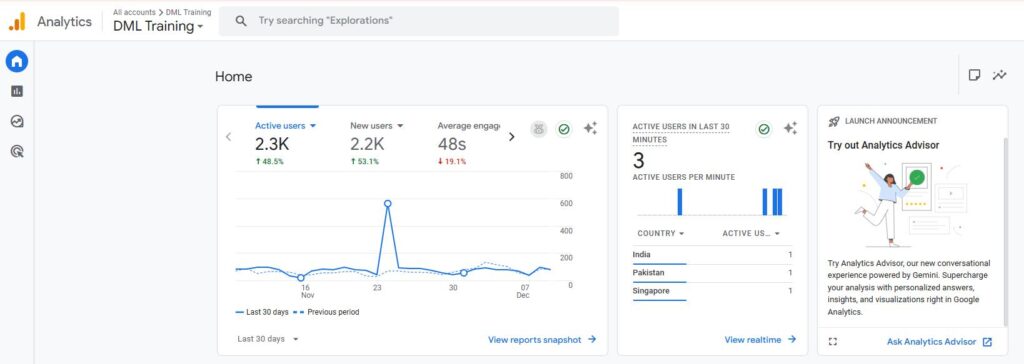
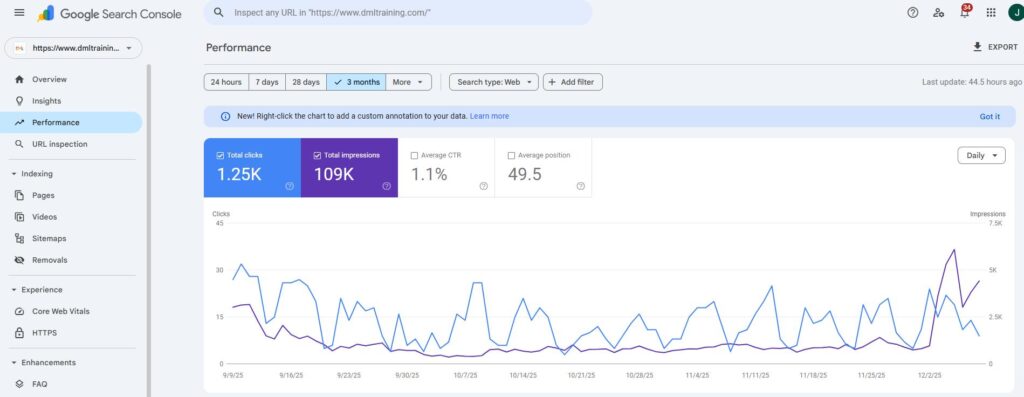
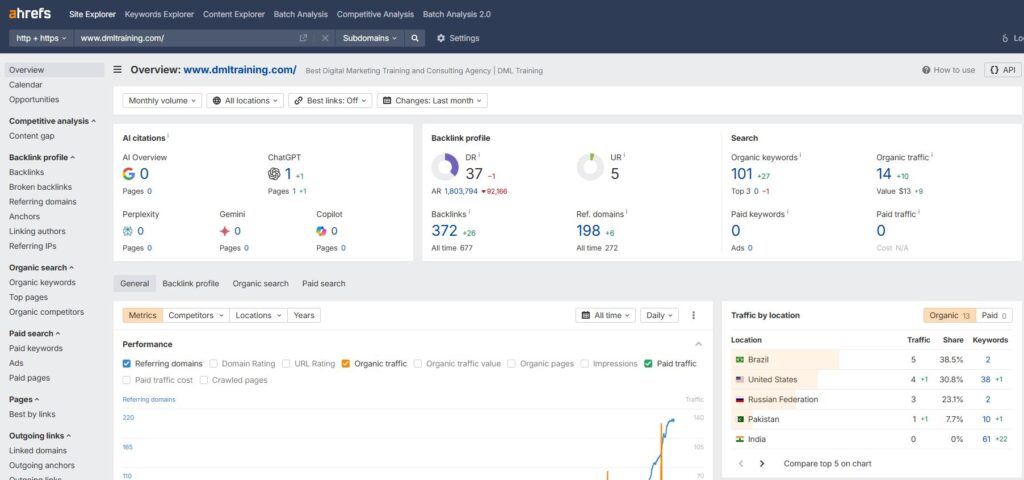
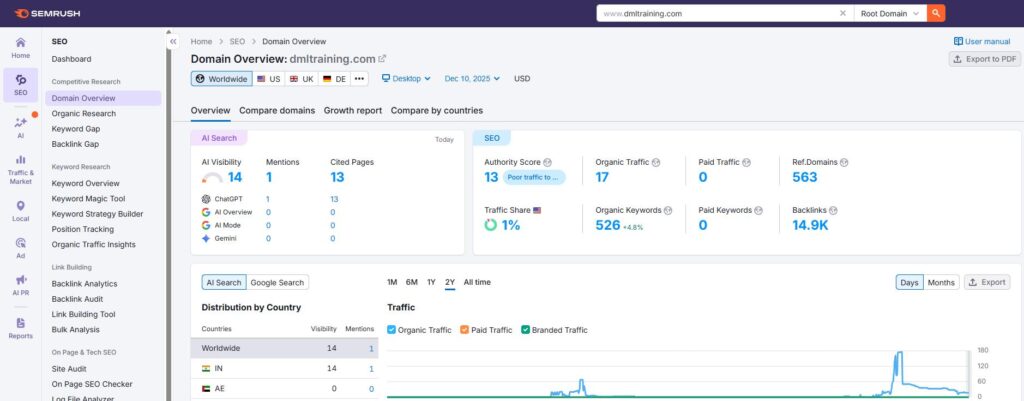
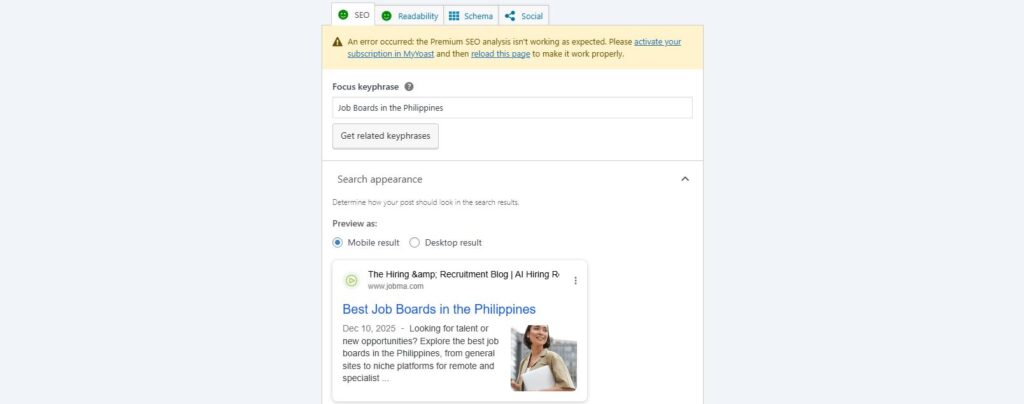
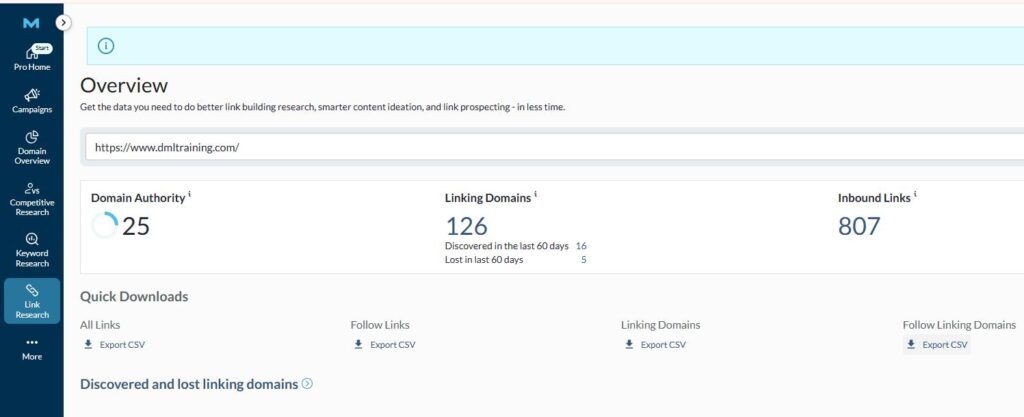
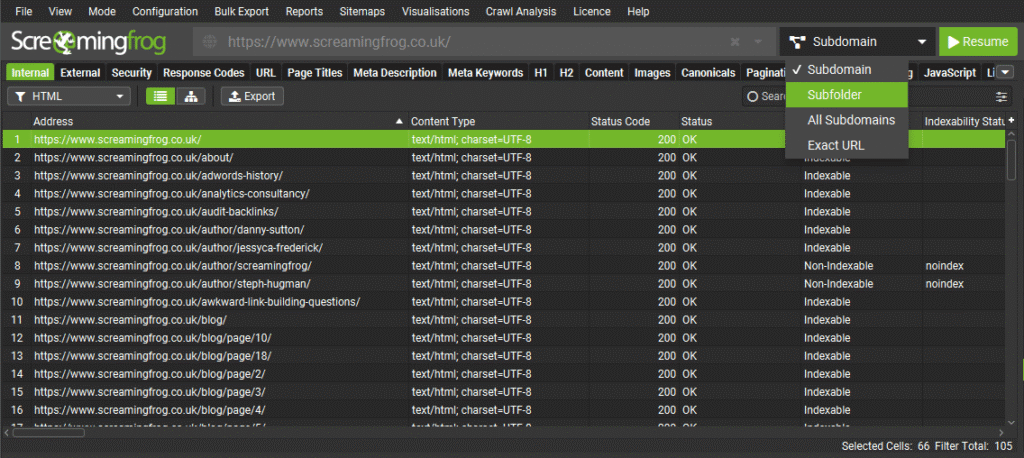
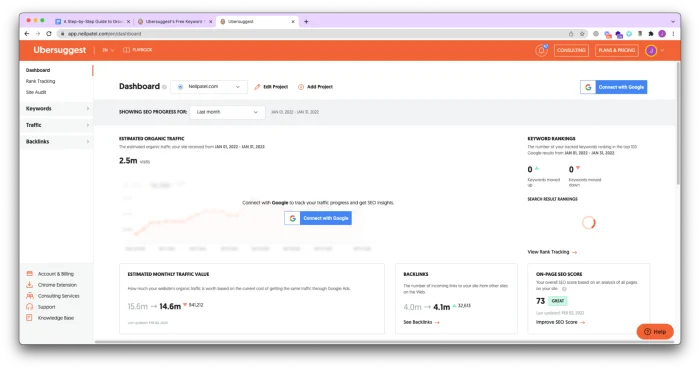
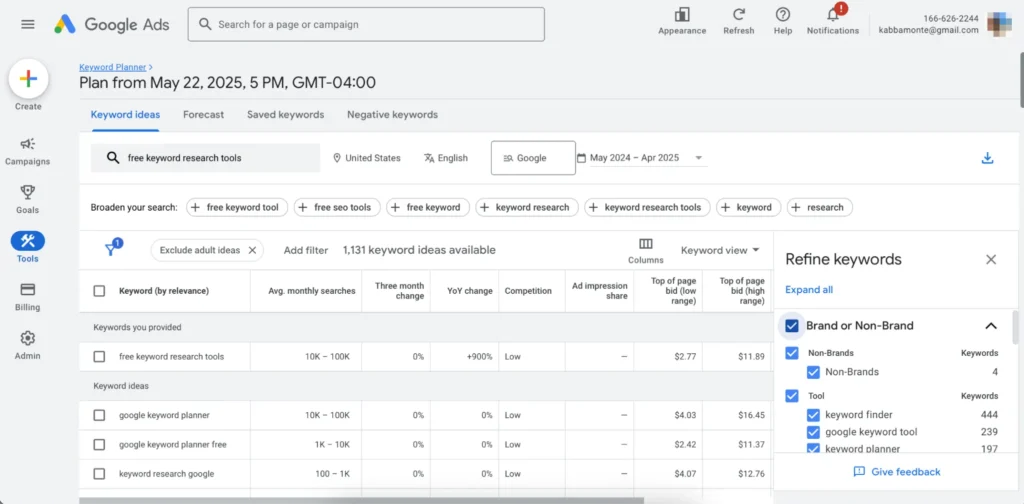
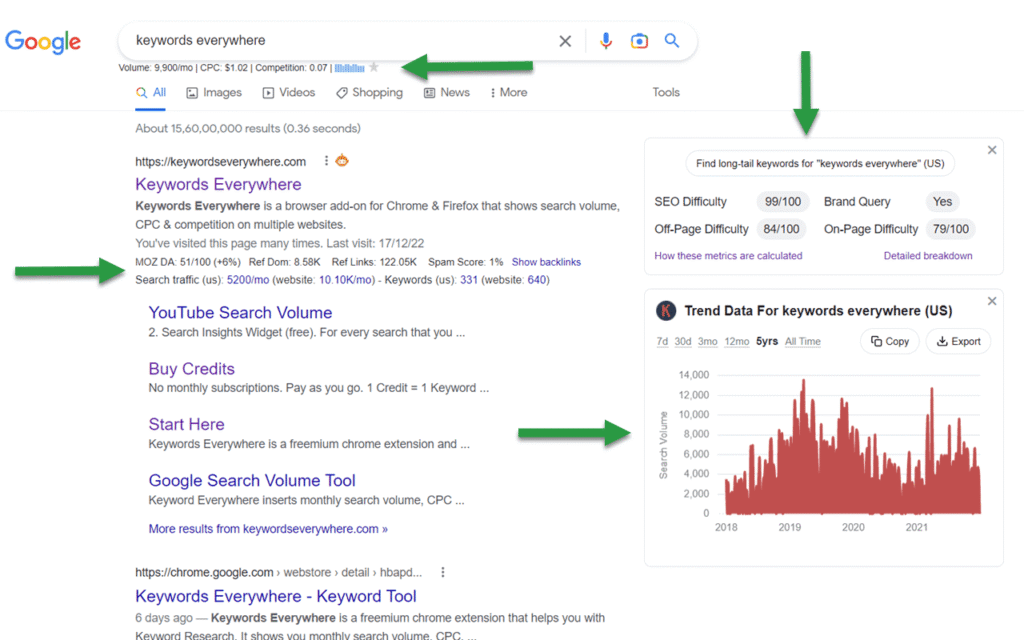
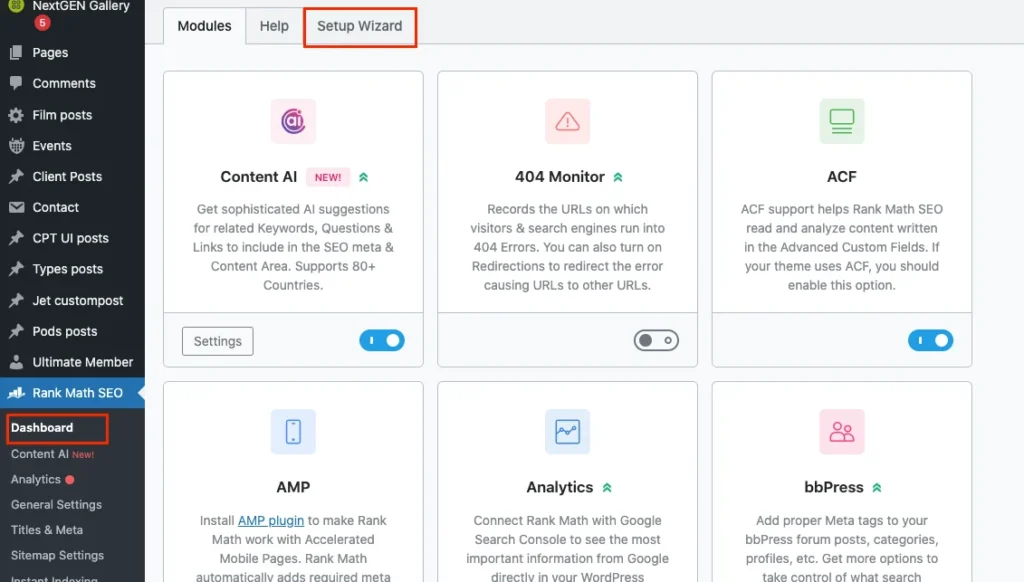
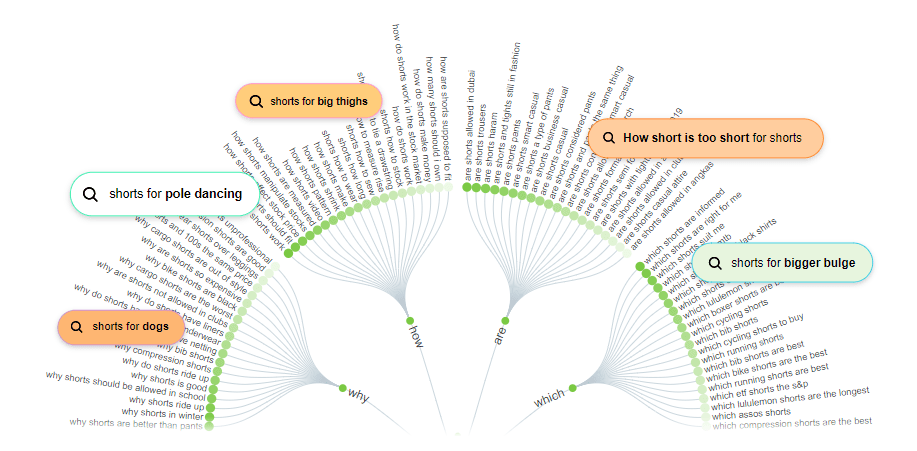
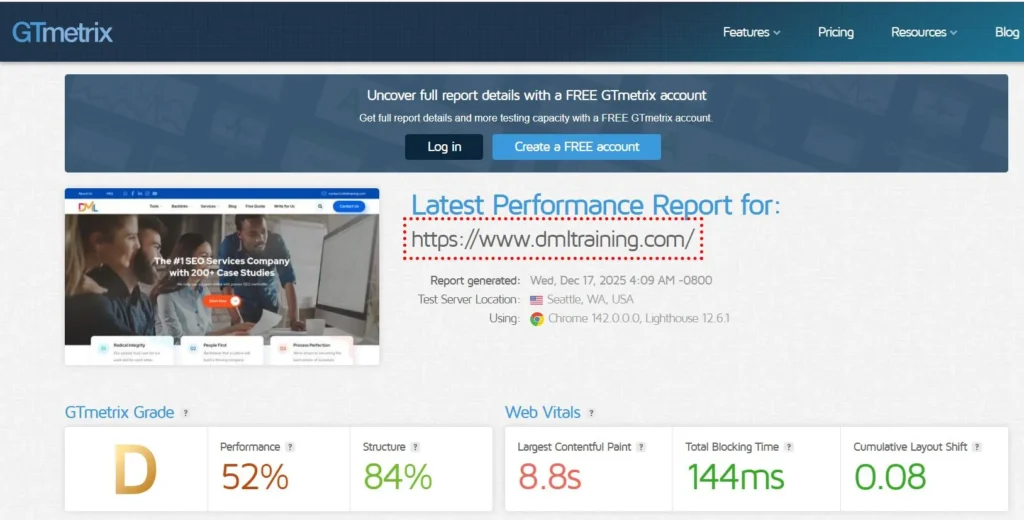
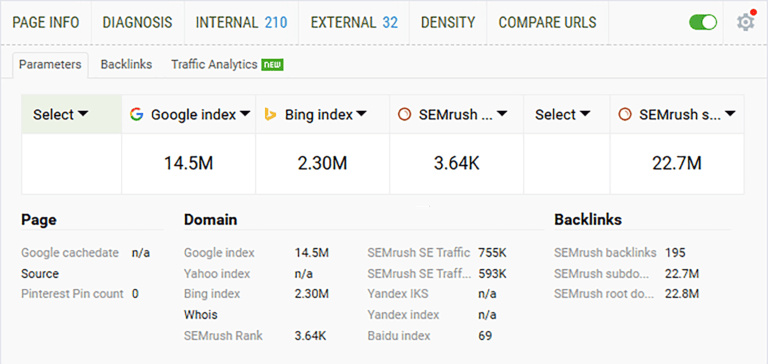
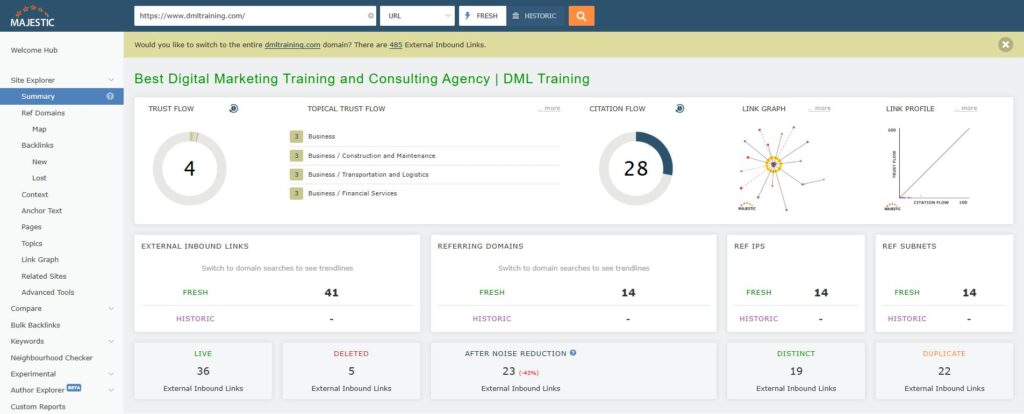
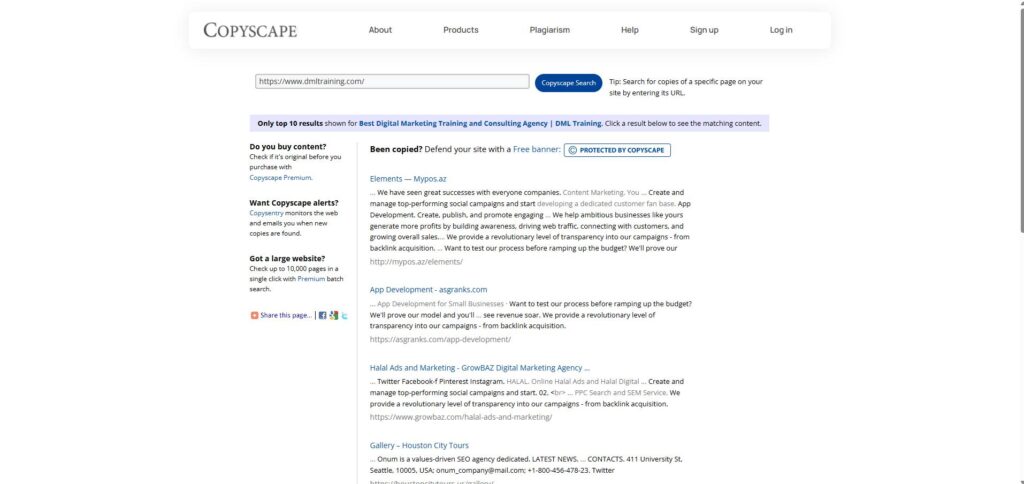
 lock the secrets of SEO and boost your online visibility?
 Take a Quick Break!









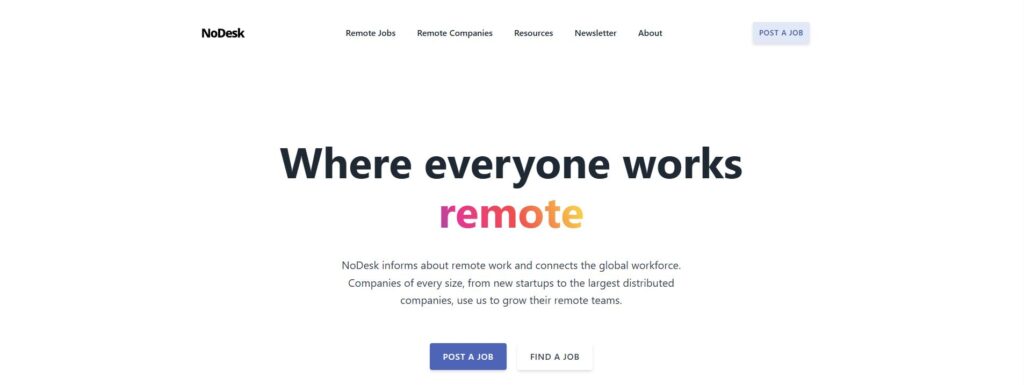
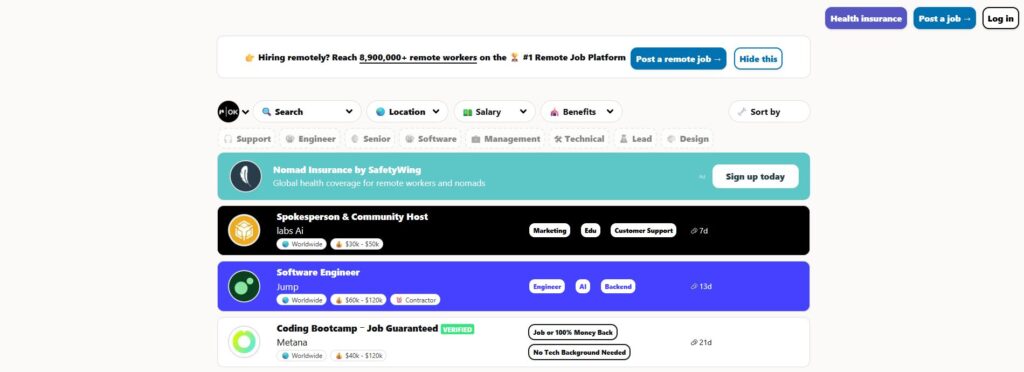

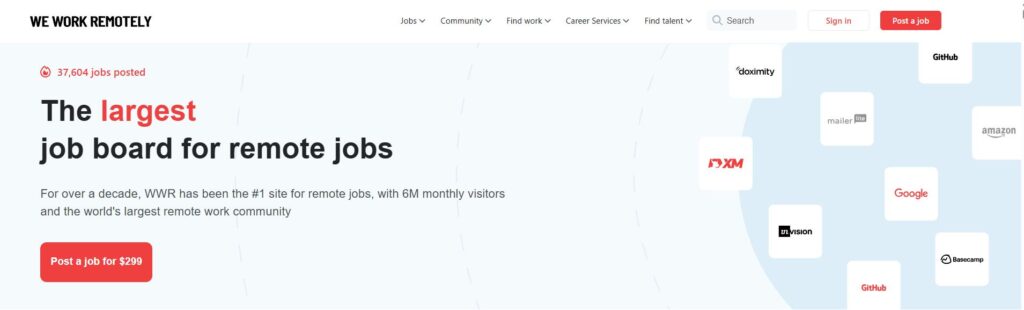


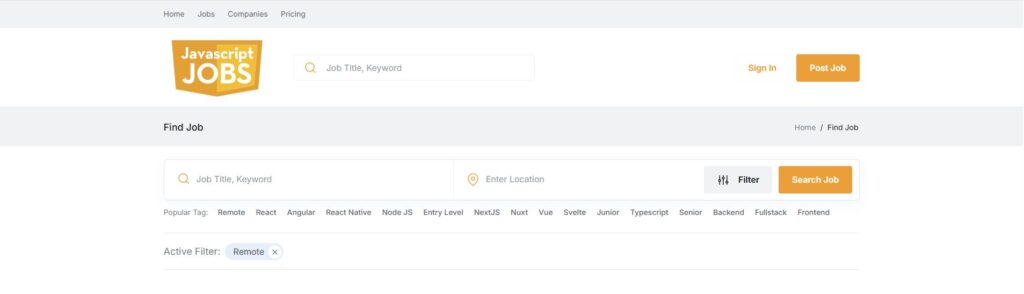
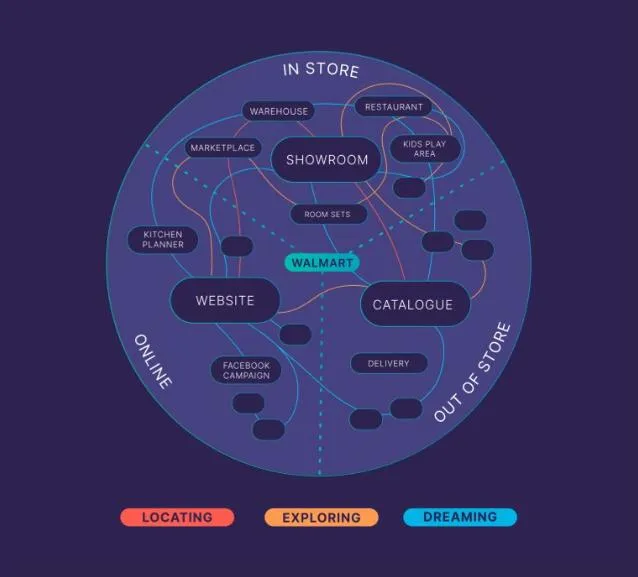
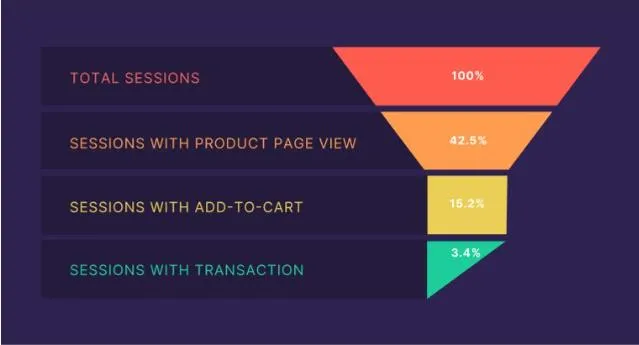
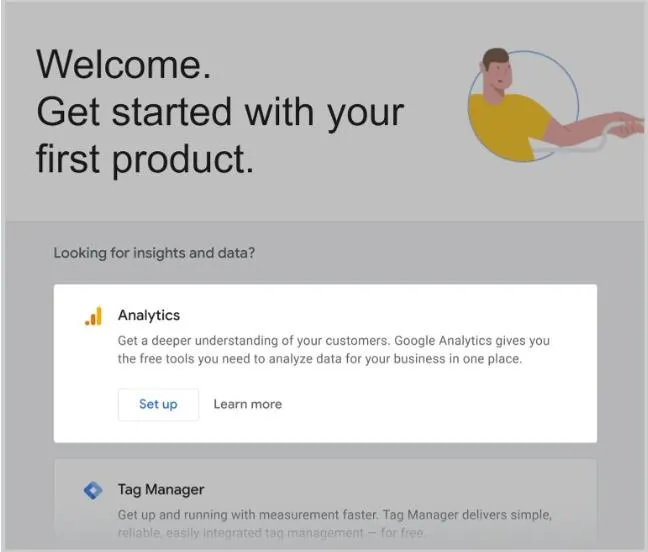
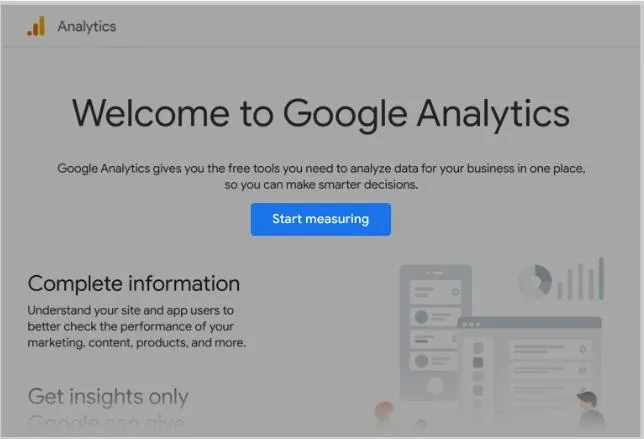
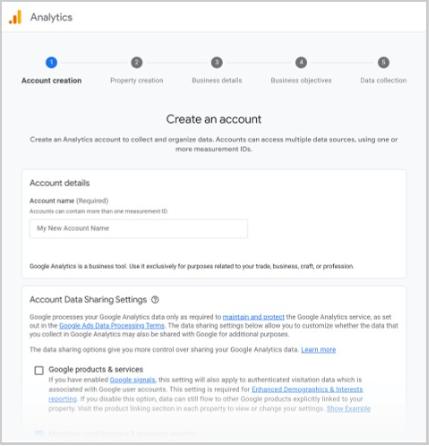
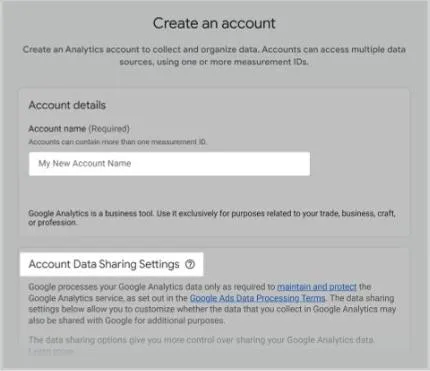
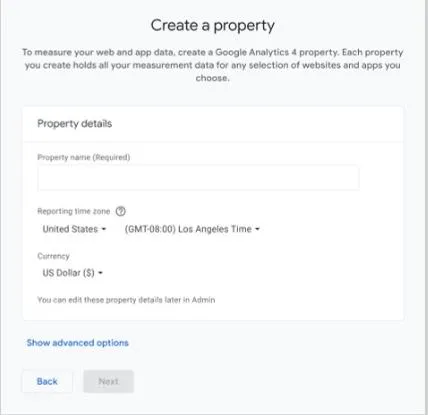
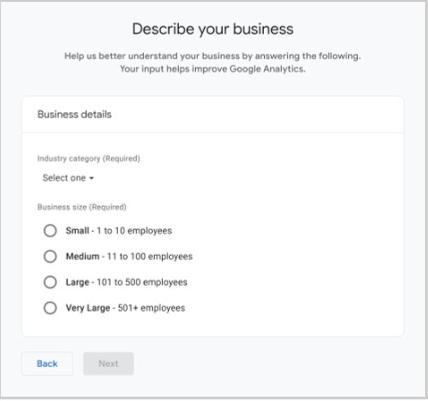
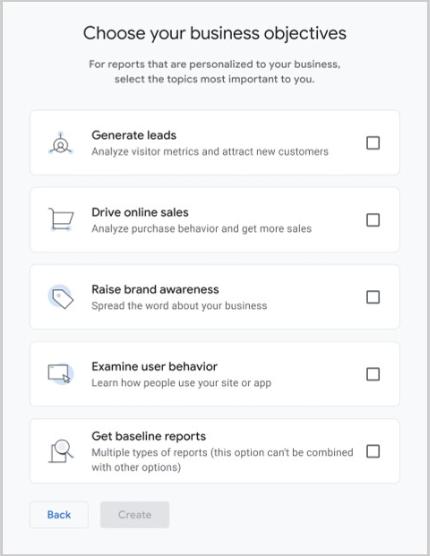
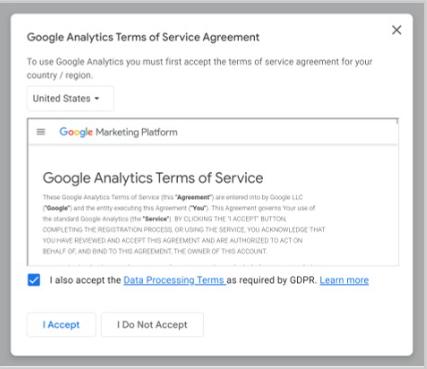
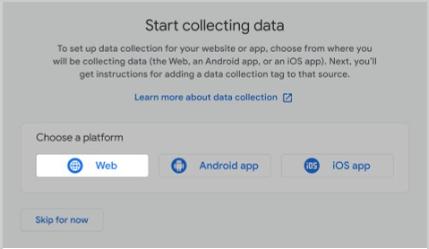
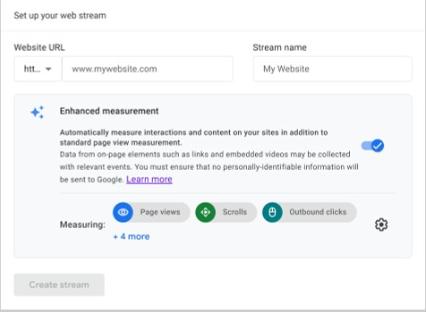
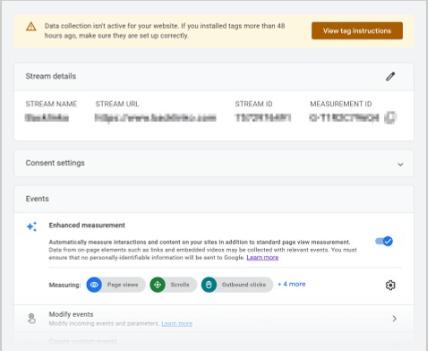
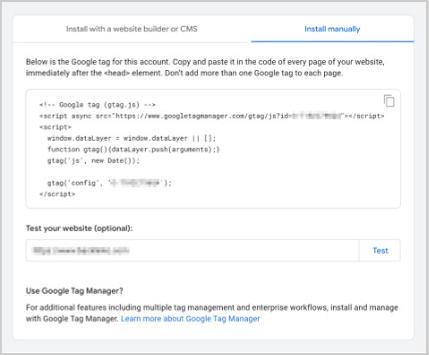
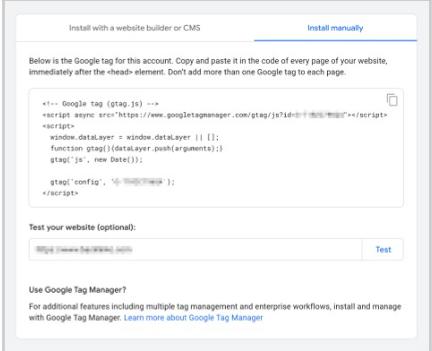


 Link Building & Analysis
 Content Creation & Optimization
 Analytics & Reporting
 Keyword Research
 On-Page Optimization
 Technical SEO
 Local SEO
 Final Thoughts
 Keyword Research & Competitor Analysis.
 : Make a list of 20–30 relevant keywords to target.
 Technical
  Use tools like Screaming Frog or Google Search Console to perform a quick audit of your website. Look for issues like broken links, slow loading times, or missing meta tags (title & description). Fix these issues to make sure that search engines can easily crawl and index your site.
 SEO Content Strategy
 On-Page Optimisation
 Focus on optimizing the key elements of your web pages. Don’t spread yourself too thin. This includes title tags, meta descriptions, headers (H1, H2, etc.), images, and internal linking. Make sure each page is optimized for the specific keyword you’re targeting + use secondary keywords.
 Backlink Strategy
 Identify easy backlink opportunities, such as reclaiming unlinked brand mentions or submitting your site to relevant directories. Reach out to existing partners or use press releases or HARO (Help a Reporter Out) to gain high-quality backlinks.
 Local SEO and Social Media.
 If you have a local business, optimize your Google My Business listing and get listed in local directories. Use social media to share your content and build a community. SEO-wise, engaging with your audience on social platforms can drive traffic and backlinks.
 Review and Set KPIs