Okuma görünümü

Google Releases Early Preview Of WebMCP
Webmcp

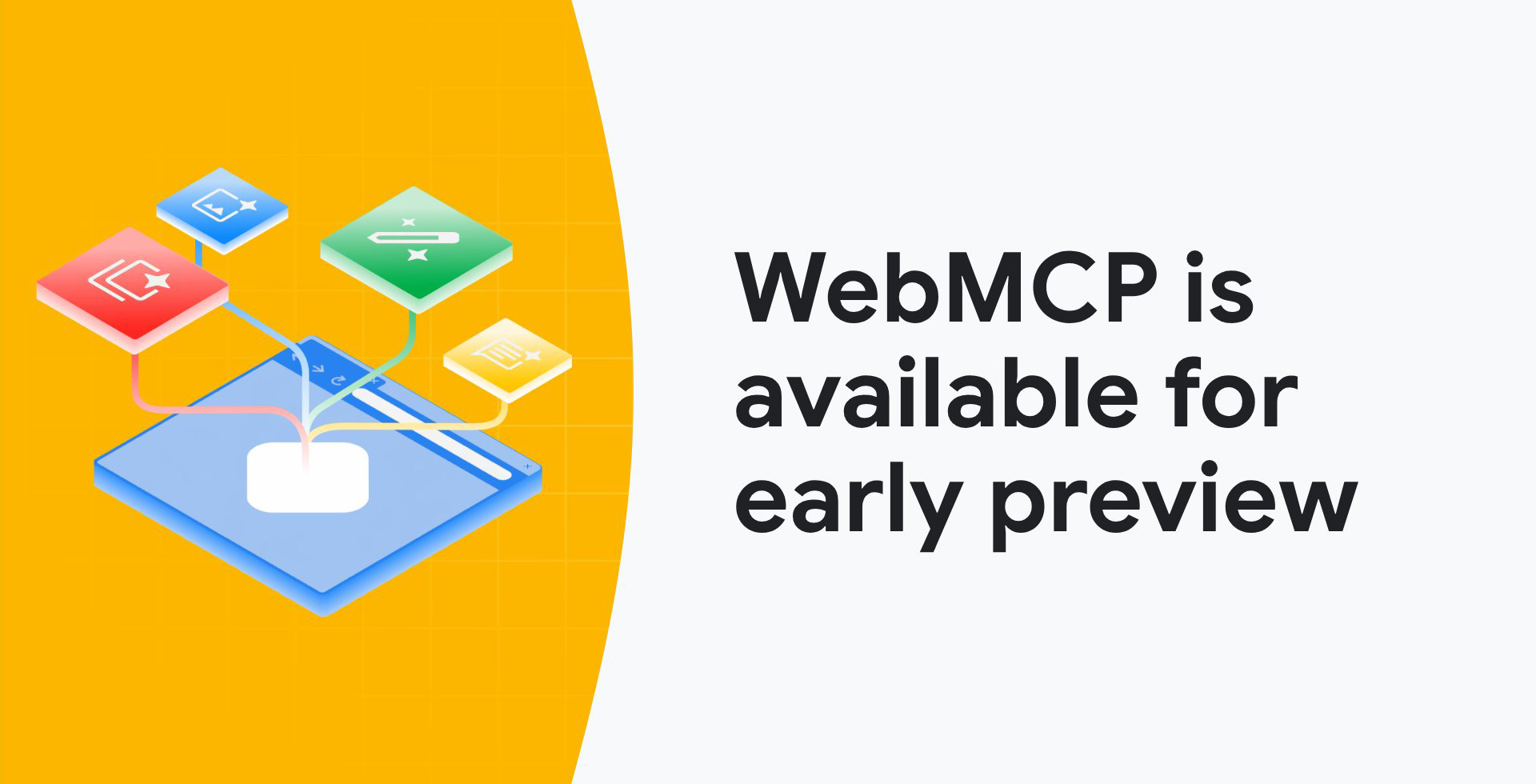
The Google Chrome team announced its early preview of WebMCP, "a standard way for exposing structured tools, ensuring AI agents can perform actions on your side with increased speed, reliability, and precision," André Cipriani Bandarra from Google wrote.

WebMCP basically gives you a way to communicate via your website to LLMs what actions certain buttons or links take on your website. WebMCP is designed to help AI agents interact with websites.

Currently, if an AI agent (like a browser assistant) wants to "book a flight" or "add an item to a cart" on a website, it often has to guess which buttons to click by looking at the pixels or HTML (screen scraping). This is error-prone.

WebMCP fixes this by allowing websites to explicitly publish a "Tool Contract." It uses a new browser API (navigator.modelContext). Instead of the AI guessing, the website provides a structured list of tools (e.g., function buyTicket(destination, date)). The AI can then "call" these functions directly.

André Cipriani Bandarra from Google explained, "By defining these tools, you tell agents how and where to interact with your site, whether it's booking a flight, filing a support ticket, or navigating complex data. This direct communication channel eliminates ambiguity and allows for faster, more robust agent workflows."

WebMCP proposes two new APIs that allow browser agents to take action on behalf of the user:

  • Declarative API: Perform standard actions that can be defined directly in HTML forms.
  • Imperative API: Perform complex, more dynamic interactions that require JavaScript execution.
  • These APIs serve as a bridge, making your website "agent-ready" and enabling more reliable and performant agent workflows compared to raw DOM actuation.

Dan Petrovic called this the biggest shift in technical SEO since structured data. Glenn Gabe called this a big deal.

SEOs should 100% read up on this...

Forum discussion at X.
  •  

Would You Give Google Your ID Numbers To Remove Results About You

Google Eraser

Google announced a number of updates to help people find and remove personal information and sensitive imagery about themselves from Google. But you would need to give Google this information first, so Google can find it and then remove it.

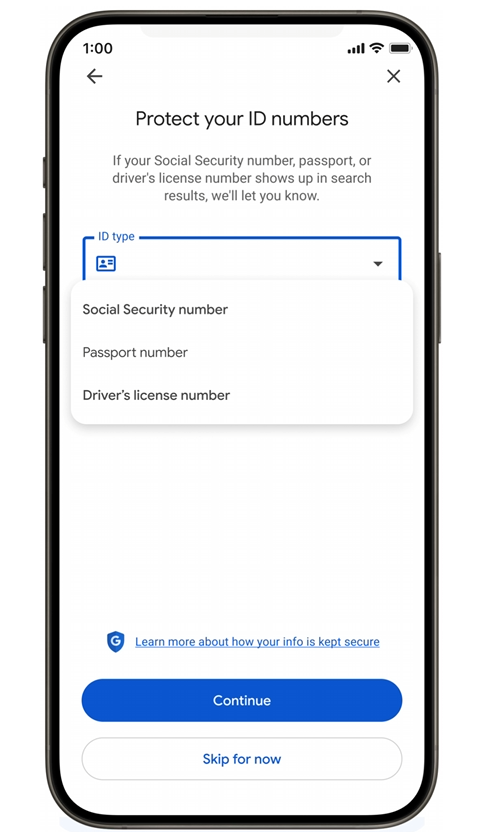
The Results about you feature asks you to add your driver's license, passport, or Social Security number. Google said, "To keep your sensitive information safe, 'Results about you' employs Google's rigorous security protocols and advanced encryption to prevent misuse and ensure your privacy."

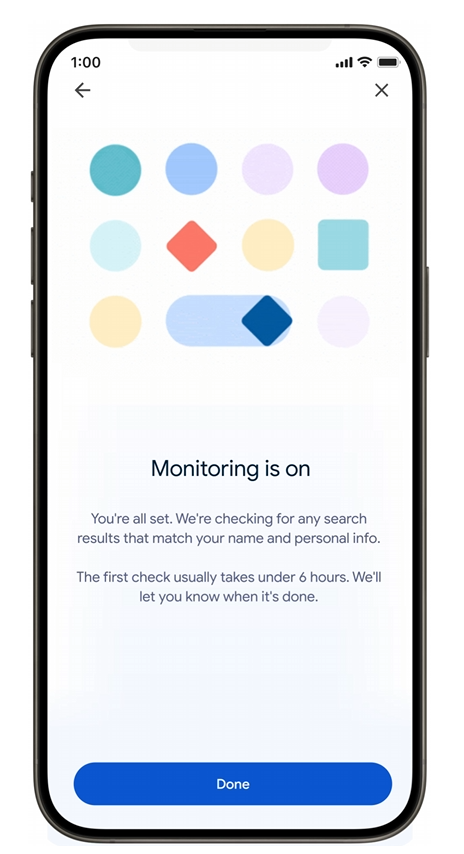
Once you have given Google your information and Google confirmed your details, Google will automatically track it for you going forward. Then if something match, Google will notify you if it finds any search results containing that information.

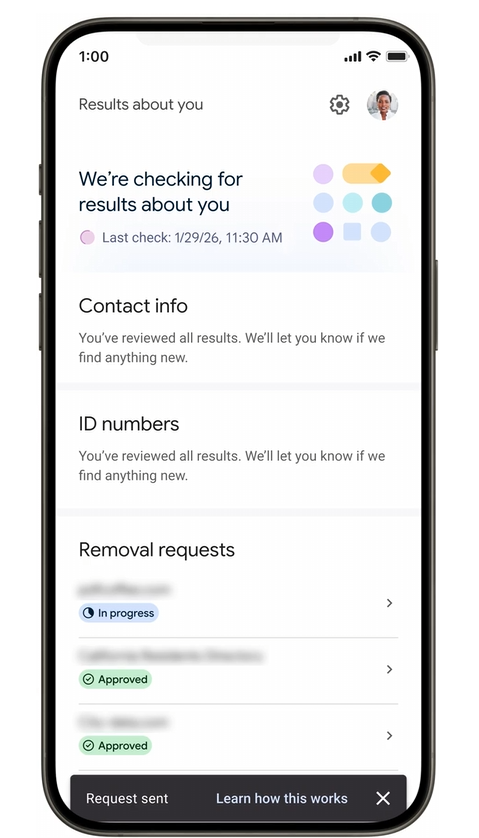
Here are some screenshots:

Google Results About You

Google Results About You2

Google Results About You3

Google did clarify that "removing this information from Google Search doesn't remove it from the web entirely, but this is an important step in helping you stay in control of your online presence and keep your private information private."

Then there is the new way to remove explicit images from the web. To access this tool, click on the three dots on an image, select 'remove result,' then select 'It shows a sexual image of me.' Plus you can now submit multiple images at once. And Google said you can opt in so that Google will proactively filter out any additional explicit results that might appear in similar searches.

But as Glenn Gabe asked, will you be willing to give Google this information in exchange for this? I suspect many will?

Google's 'Results about you' tool expands to protect your social security number, passport info and driver's license. But you have to give Google that info first. Interesting dilemma :)

"Click 'Get started' and add the personal contact information you want to monitor. You'll'... pic.twitter.com/ZXVxn23CnX

'" Glenn Gabe (@glenngabe) February 10, 2026

Robby Stein from Google:

(2/3) Over 10 million people have used 'Results about you' to stay in control of their personal information.

Here's how you can opt in:
1ï''£ On your phone, click on your Google account photo to access the 'Result about you' hub, or visit https://t.co/mS2VfNd582
2ï''£ Select 'get'...

— Robby Stein (@rmstein) February 10, 2026

Forum discussion at X.

  •  

Google Sign In To Customize Top Stories - Preferred Sources

Google Preferred Star

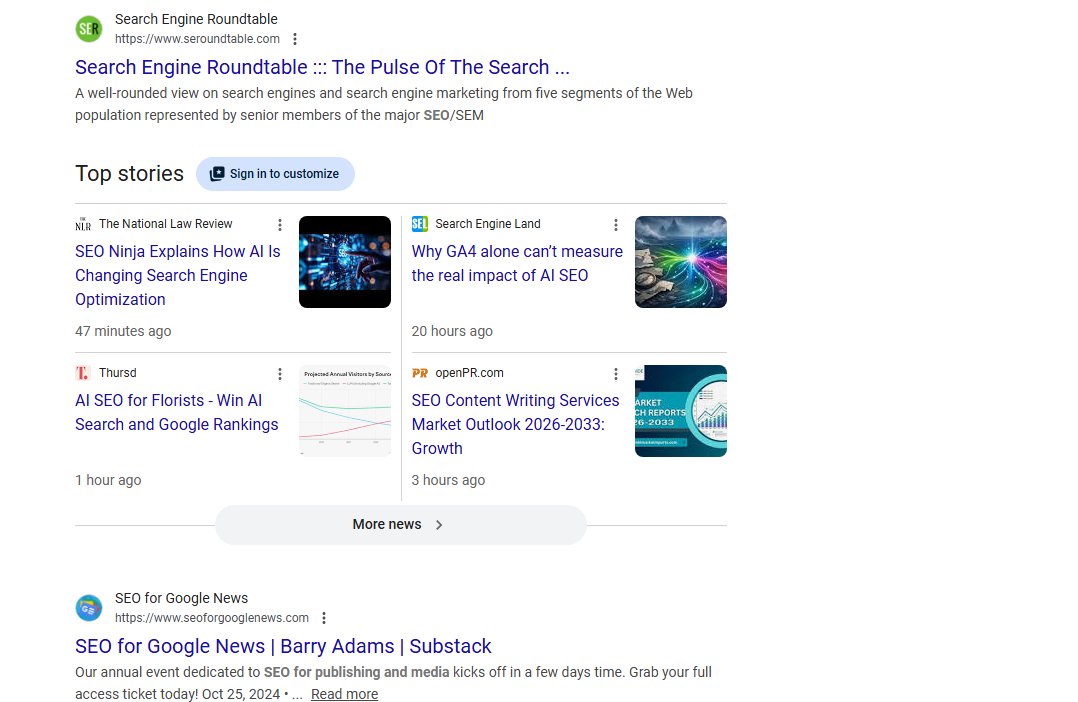
Google added a new button to the top stories section of Google Search named "Sign in to customize." This leads users who are not logged into Google to sign in, so those users can configfure there preferred sources in Google Search.

This change was spotted by Sachin Patel who posted about it yesterday on X - it seems like it is globally rolled out, so anyone should be able to see it for results that bring up the top stories section.

Here is what it looks like:

Google Sign In To Customize To Stories

This again is to get more people to set their preferred sources in Google Search.

Forum discussion at X.
  •  

Grokipedia Seeing Decline In Google Search Visibility

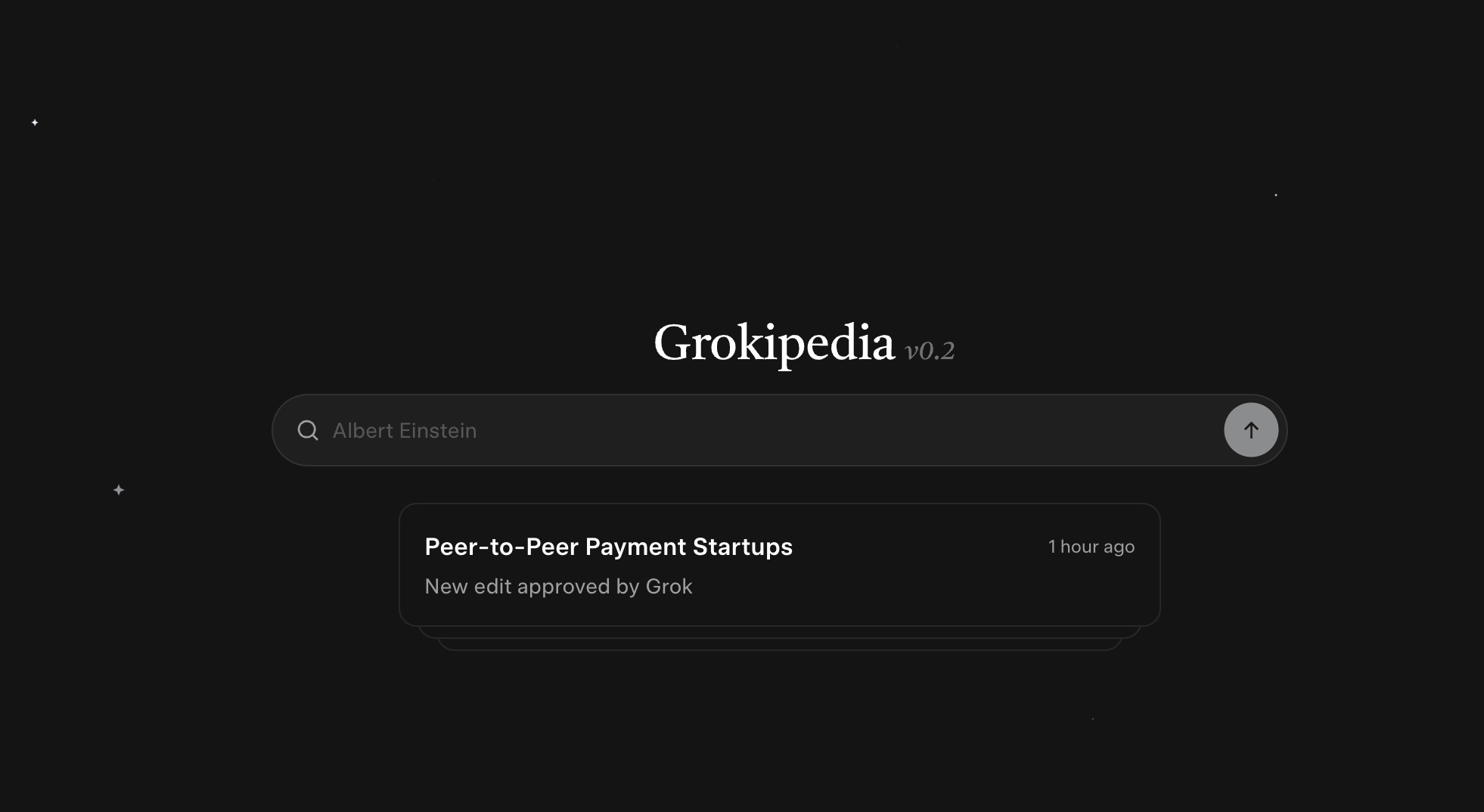
Grokipedia Home

There are some reports coming out that Grokipedia, the AI-based Wikipedia, is now showing a decline in search visibility in both Google and even ChatGPT. This comes after both an indexing and ranking surge in Google Search.

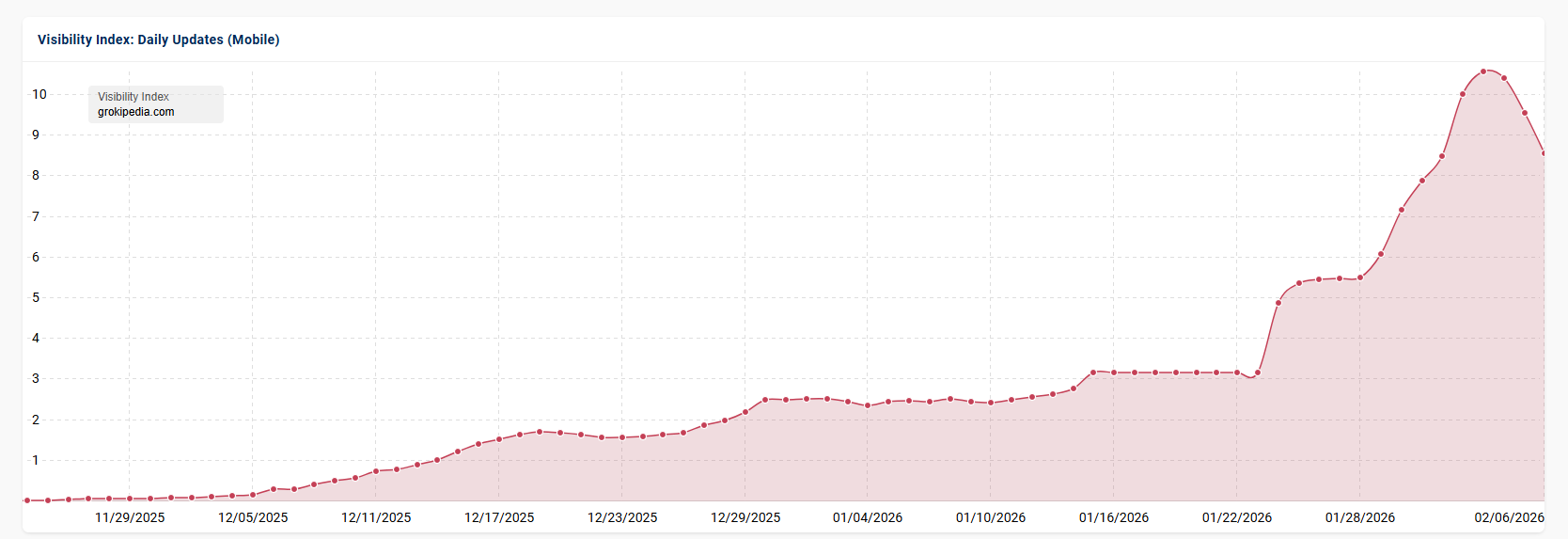
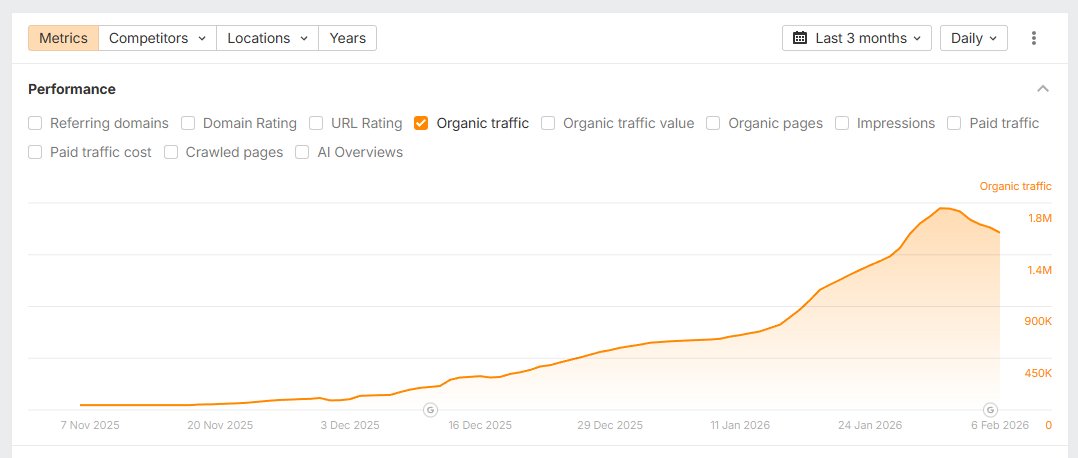
Glenn Gabe grabbed some data from both Sistrix and Semrush and it shows that while there was a huge ranking bump peaking into January, that in the past week or so, that has been dropping quickly. Glenn wrote on X, "Grokipedia has started to drop pretty heavily with the latest volatility."

Here are those charts and I am told, it is still declining even as of yesterday:

Grokipedia Sistrix

Grokipedia Semrush

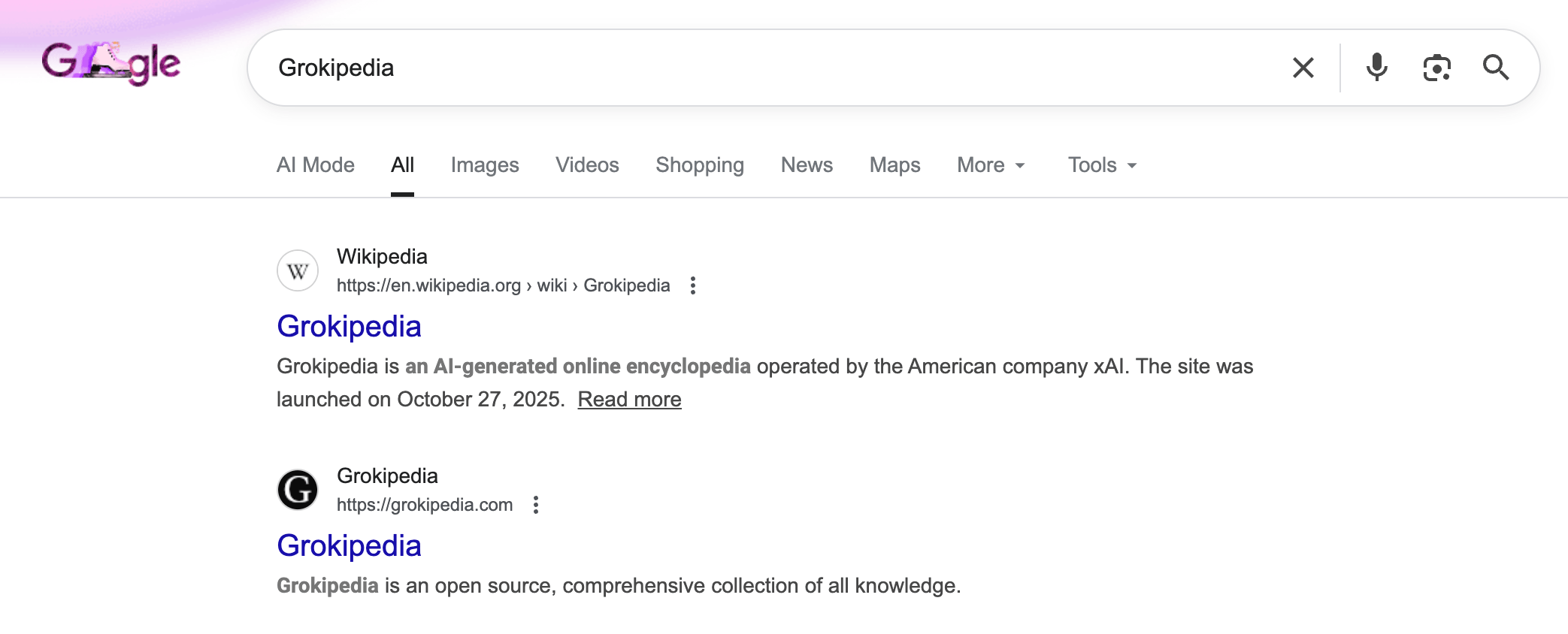
Then when I even search for [Grokipedia] signed out of my browser, I see Wikipedia ranking above Grokipedia's own web site - not sure how widespread that is:

Google Ranking Wikipedia Above Grokipedia

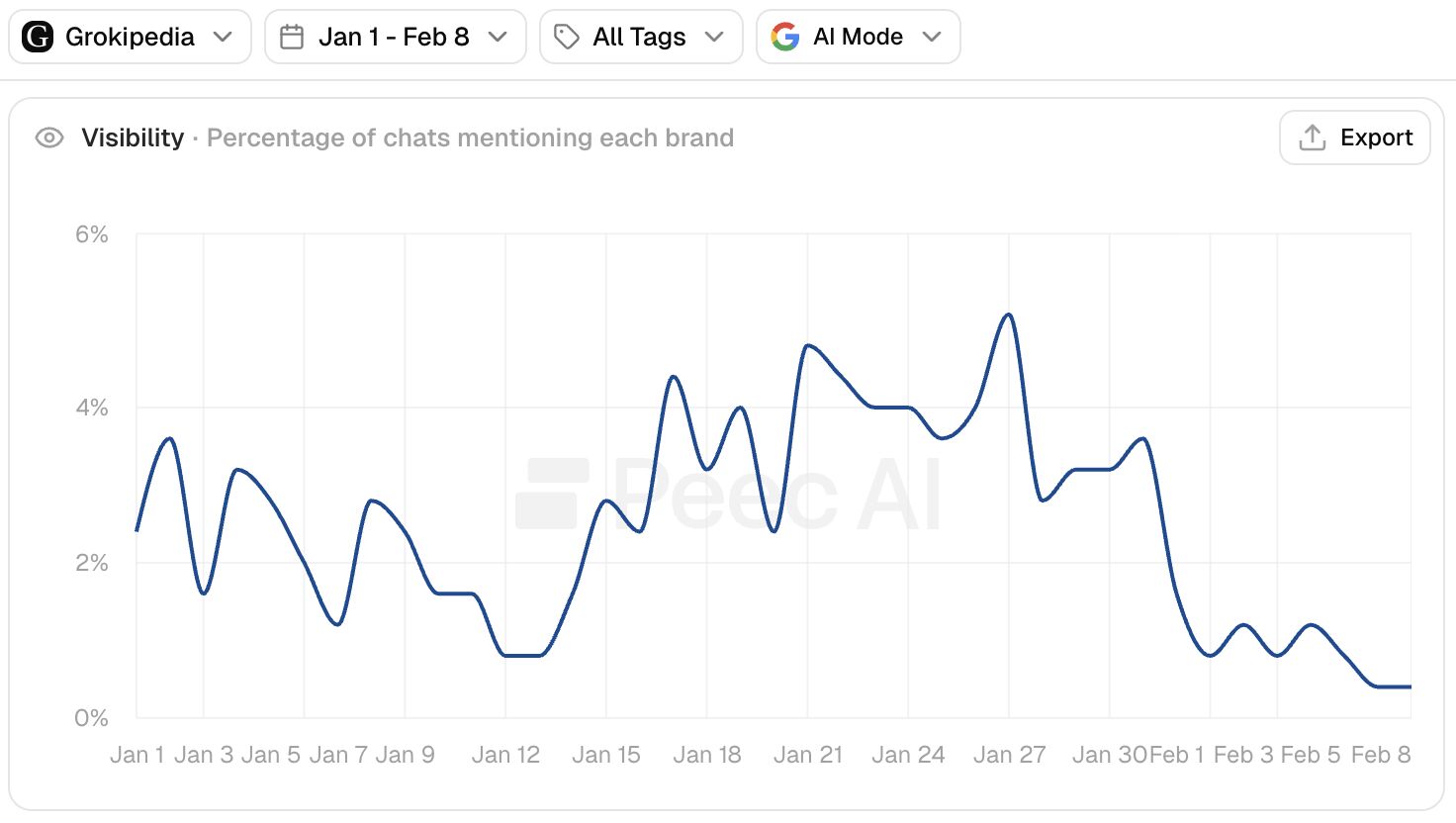
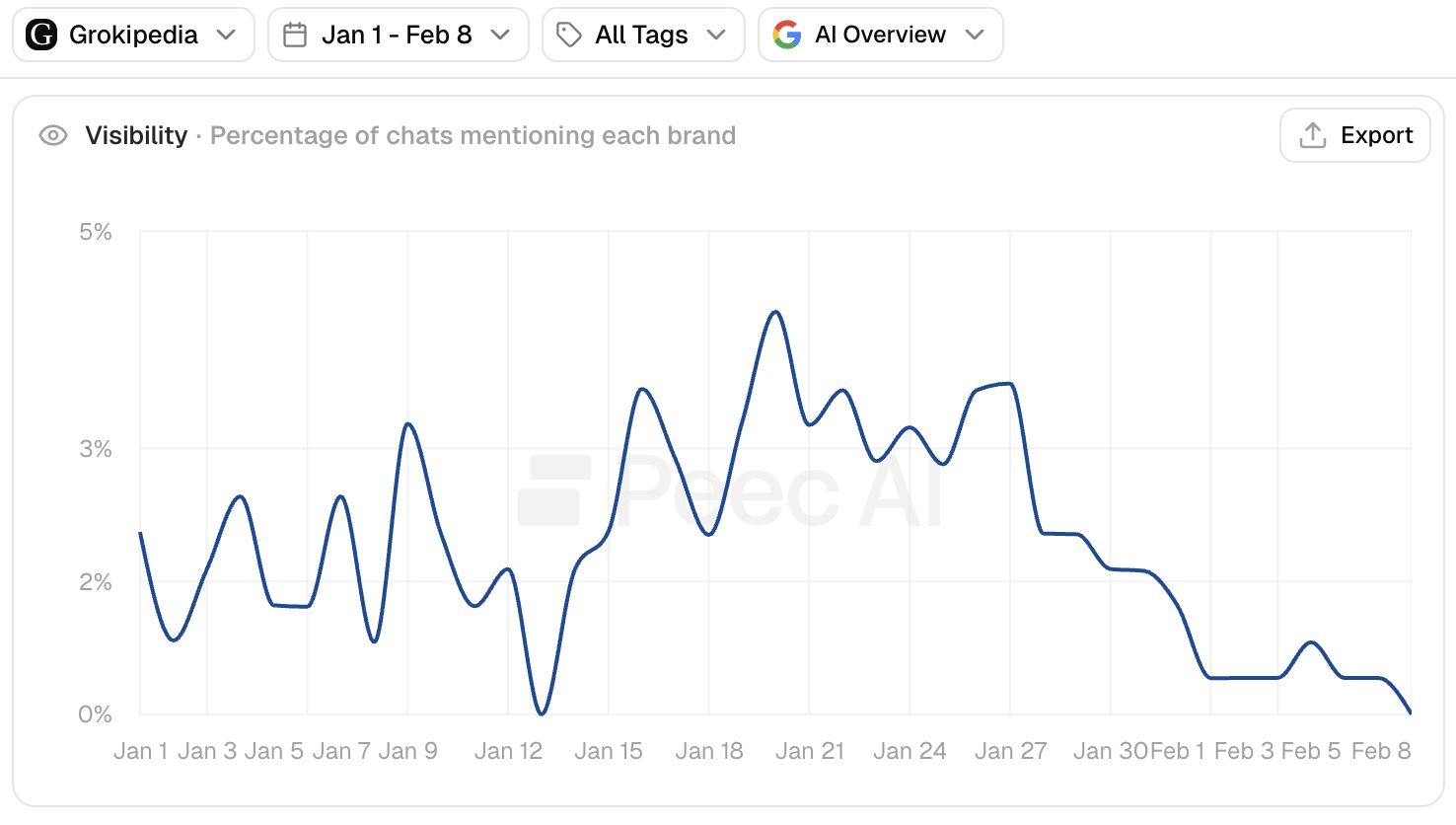
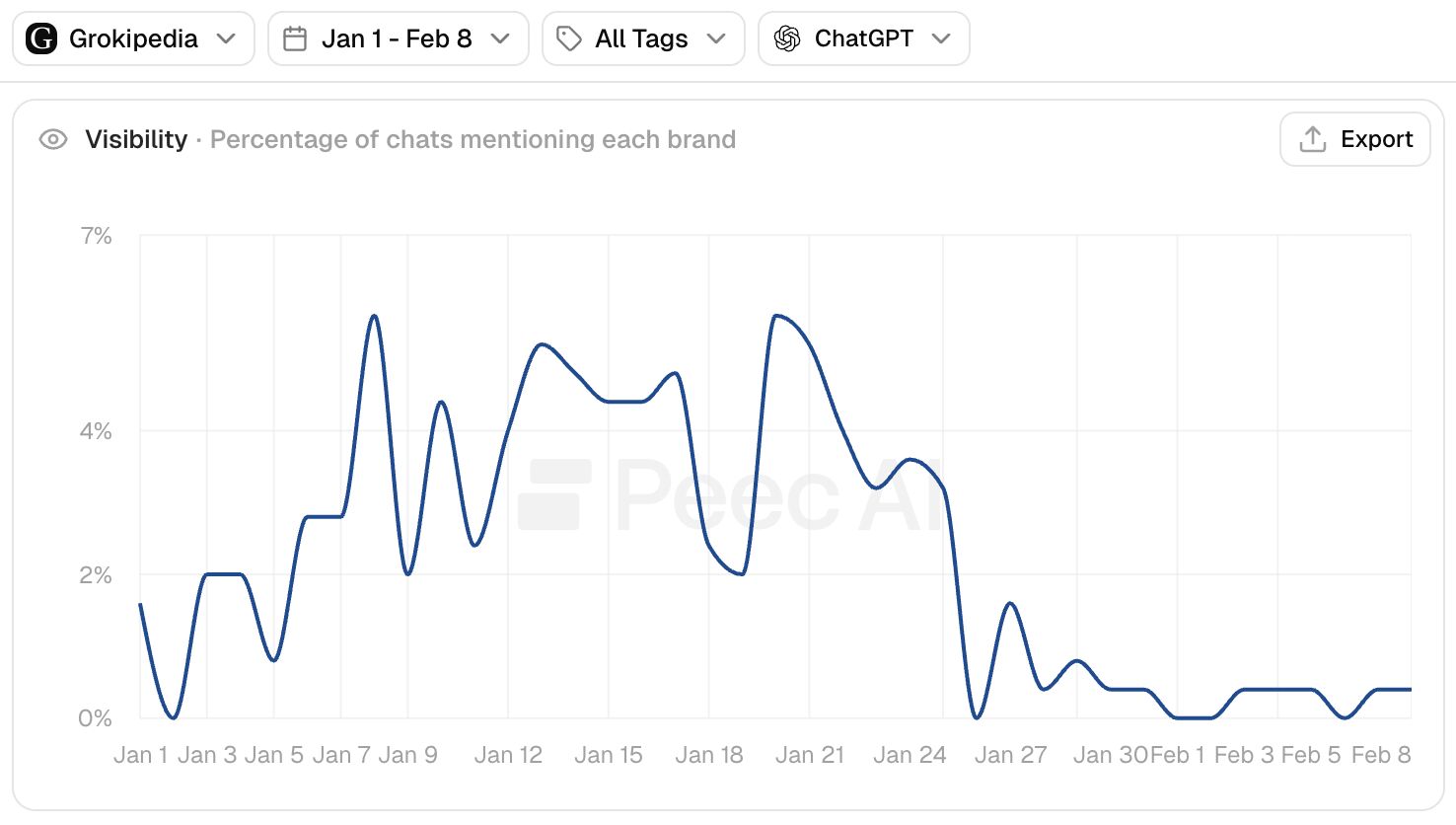
Malte Landwehr from Peec.AI also showed on LinkedIn a decline not just in core search but also across Google's AI results and even OpenAI's ChatGPT results. Malte wrote, "I can confirm the same for ChatGPT, AI Mode, and AI Overviews. All three answer engines started to recommend Grokipedia less often in late January / early February. The same time when Grokipedia lost visibility in Google!"

Here are those charts showing AI Mode, AI Overviews and ChatGPT visibility:

Grokipedia Aimode Peek

Grokipedia Aioverviews Peek

Grokipedia Chatgpt Peek

Is this a blip or part of a new Google trend?

Forum discussion at X and LinkedIn.

And the drop continues. Here's the latest Sistrix visibility trending for Grokipedia. Big big drop. https://t.co/d1tLShaCrh pic.twitter.com/hqRtOBSnJ9

— Glenn Gabe (@glenngabe) February 10, 2026
  •  

Google AI Mode Tests Citation Icons At Bottom Of Answers

Google Ai Answer Boxes

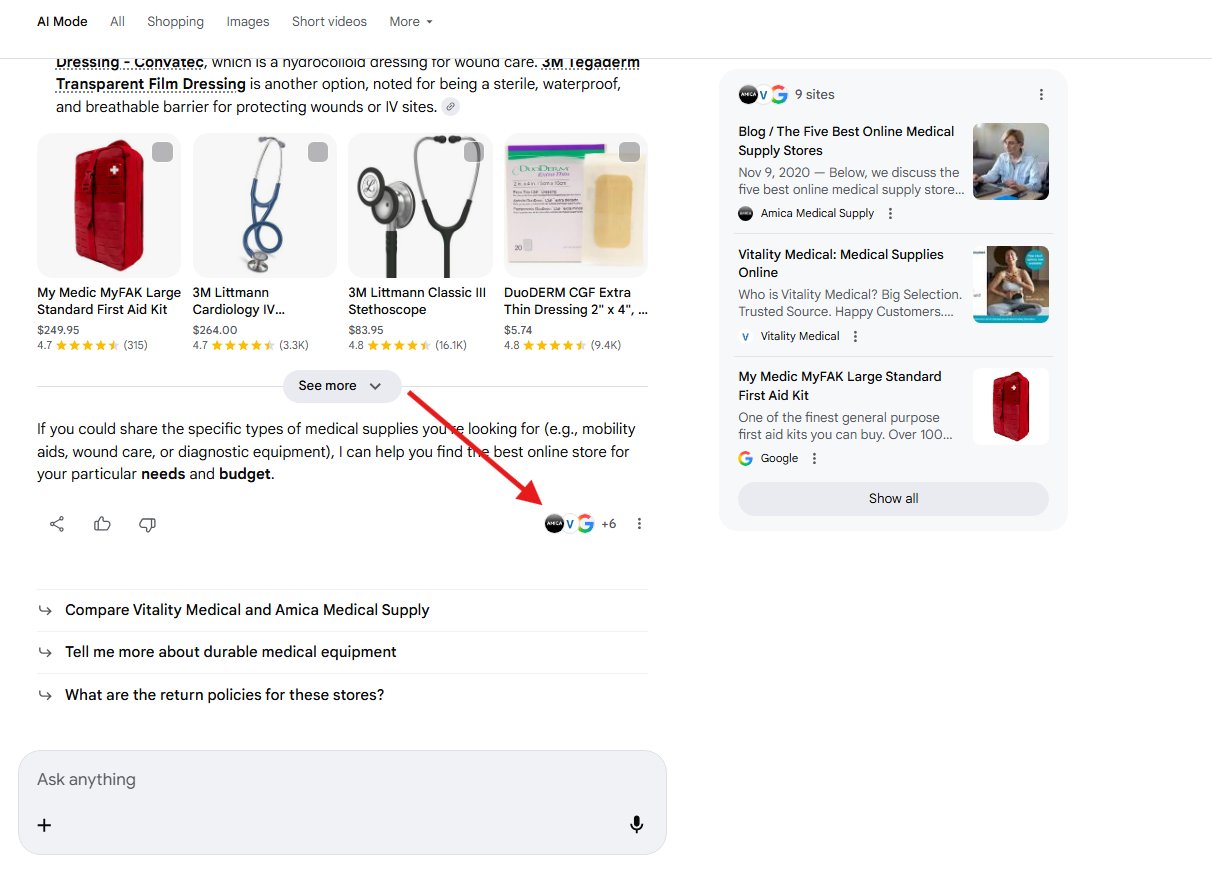
Google appears to be testing showing the citation favicon site icons at the bottom of the answer in AI Mode. This is in addition to where it normally shows those icons, at the top right of the card stack, on the side of the answer response.

This was spotted by Sachin Patel who posted on X and shared a number of screenshots. Here is one of them, and as you can see, those icon favicon links are in both spots in this test:

Google Ai Mode Favicon Links Bottom

Again, normally it just shows on the right side above the link cards and not at the bottom.

I cannot replicate this:

is that AI Mode? I am only seeing it at the top right pic.twitter.com/tvONgFTtvM

'" Barry Schwartz (@rustybrick) February 6, 2026

Forum discussion at X.
  •  

Google AI Overviews Tests Contextual Overlay Link Cards

Google Ai Overlay Cards

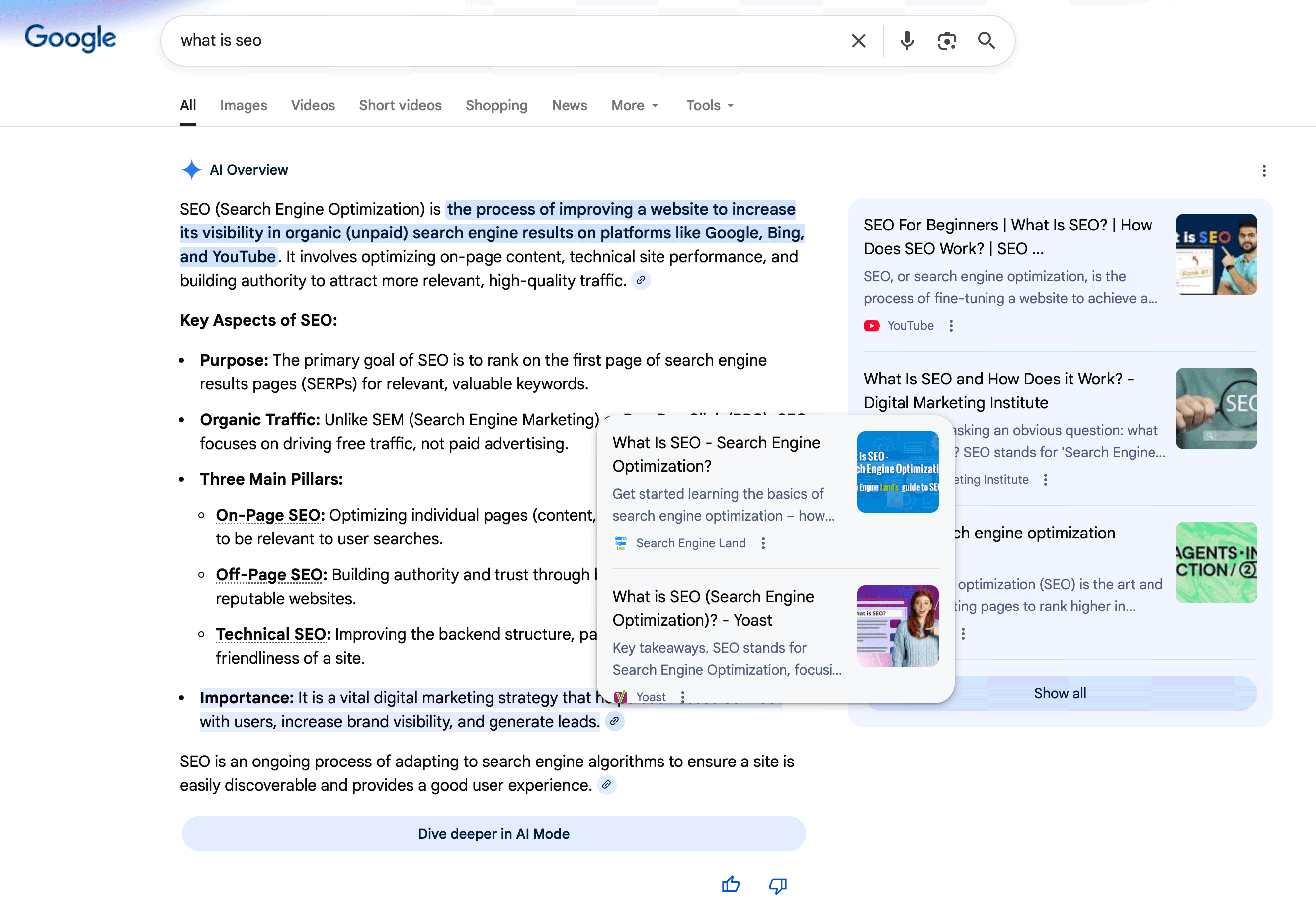
Over the past week or so, Google has been testing a new format for link cards in the AI Overviews within Google Search. When you place your mouse cursor over a link clip icon, a new overlay will show you the page/site cards that line of text is being sourced from.

Here is a screenshot that I was able to trigger on Friday late morning in New York on Apple Safari desktop:

Google Ai Overview Link Overlays

This was first spotted by Harpreet who posted this on X:

Google testing a new type of citation style in AI Overviews. Anyone seen this before? @rustybrick pic.twitter.com/ViGKwWj5Zo

'" Harpreet (@harpreetchatha_) February 3, 2026

Then both Gagan Ghotra and Sachin Patel spotted it a couple of days later:

i also see this today pic.twitter.com/SkSOOKHZv6

'" Sachin Patel (@SachuPatel53124) February 5, 2026

This might be related to the contextual links interface but I am really not sure.

Google has been experimenting with ways to make links more clickable from AI Overviews, the big question is, do any of these work?

This interface does not seem to be fully live, but does seem to be being tested heavily.

Forum discussion at X.

  •  

Google Preferred Sources Deeplink Button Is Broken

Robot Reading Ripped Newspaper Park Bench

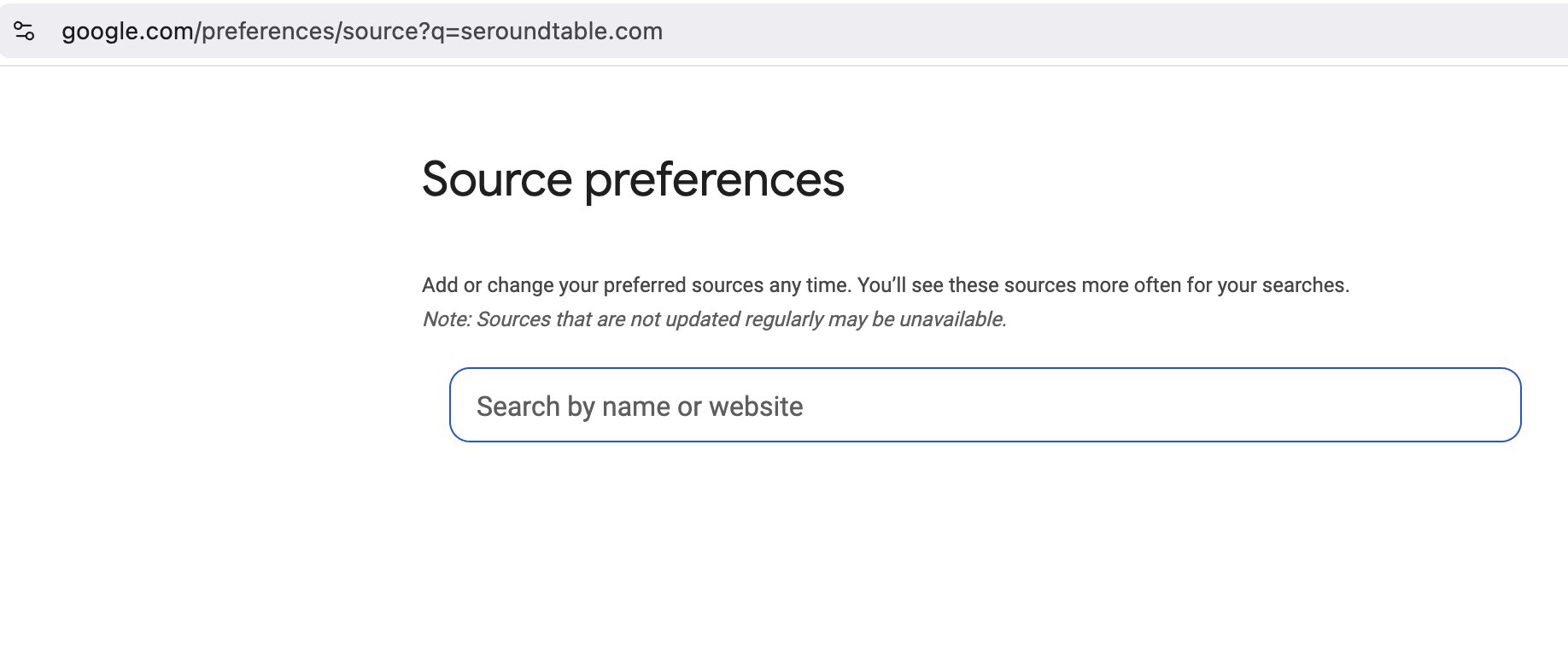
The Google preferred sources deeplink button feature is broken and has been since at least last Wednesday. When you click on a button to make a site a preferred source, such as for this site, it does not pre-fill in the site's URL in the box, as it should. You can retype it in the box but it does not pre-fill it for you.

As a reminder, in December, Google rolled out Preferred sources globally after rolling it out in the US and India in August and beta testing it in June. This past January, Google added help documentation for this feature.

In that help document it talks about deeplinks but when you try it, as LuchaBeast noted on X - it no longer pre-fills the URL. Here is a screenshot:

Google Preferred Sources Deeplink Button Broken

I have been trying it with numerous sites but it does not work.

Rajan Patel from Google said on Saturday on X, "Thanks. Taking a look now." So I am hopeful it will be fixed soon. We will see.

Let me know if it works for you, clicking on this link should make it easy to add this as a preferred source on Google : google.com/preferences/source?q=seroundtable.com.

@rustybrick Have you heard anything about "Add to Google Preferred Sources" deep links being broken? For example, @seroundtable is not autopopulating when clicking the button on the website. I've tried multiple browsers and deeplinks from multiple websites with no luck. pic.twitter.com/lhfQd0DUWC

'" LuchaBeast (@luchabeast) February 4, 2026

Forum discussion at X.
Update: This is now fixed:

This should be fixed now. Thanks for tagging me in on it.

— Rajan Patel (@rajanpatel) February 10, 2026
  •  

Google AI Mode Follow Up Search Suggestions

Google Chat Boxes

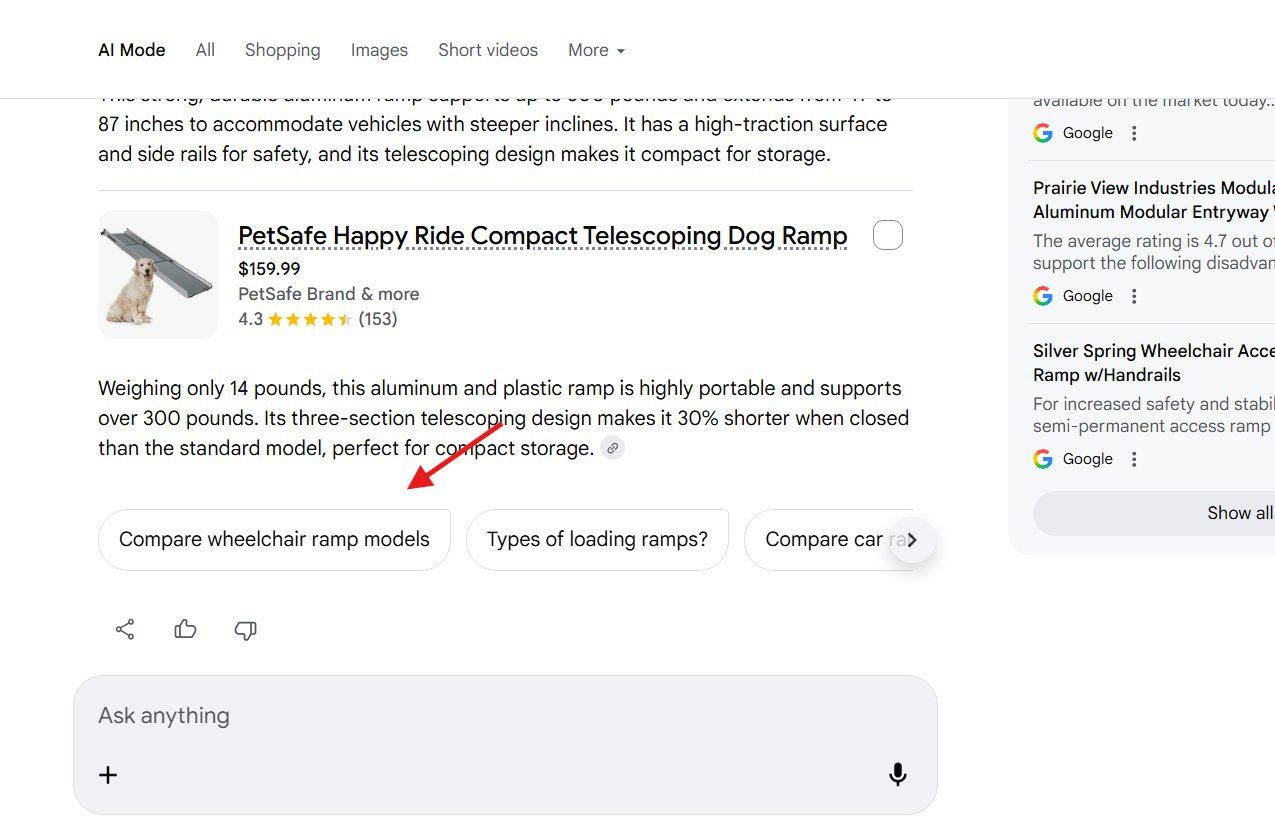
We saw Google test follow up questions below the AI Mode responses back in July. Now Google is testing follow up search suggestions, not necessarily in question format, at the bottom of some AI Mode results.

This new format was spotted by Sachin Patel who posted examples on X - here is one screenshot of this:

Google Ai Mode Follow Up Suggestions

He also posted this video:

Google is testing new query suggestions in AI Mode. We have seen similar suggestions in the SERP since last year. @rustybrick @brodieseo @gaganghotra_ pic.twitter.com/M8ZM4Bznwq

'" Sachin Patel (@SachuPatel53124) January 27, 2026

Here is the version from several months ago:

Google Ai Mode Followup Suggestions

Here are more screenshots:

Google is testing new query suggestions in AI Mode. We have seen similar suggestions in the SERP since last year. @rustybrick @brodieseo @gaganghotra_ pic.twitter.com/M8ZM4Bznwq

'" Sachin Patel (@SachuPatel53124) January 27, 2026

Google is now testing out an alternative to the follow-up prompts that appear at the bottom of the response with arrows (similar to a People Also Ask unit).

The new test features shorter prompts in white bubbles that are more similar to how the query appears. First spotted by'... pic.twitter.com/bMlddxhShN

'" SERP Alert '¡ï' (@SERPalerts) January 29, 2026

Forum discussion at X.
  •  

Google Personal Intelligence Small App Icons In Responses

Google Apps

Did you know that when Google AI Mode uses Personal Intelligence, Google will add icons of the various connected Google apps used to tailor your message. So you might see a Gmail icon, or Google Photos icon or Search or something else show up as a citation or source near the responses.

In Glenn Gabe's deep dive, he covers the icons Google shows - here is a screenshot of it in action:

Google Pi Icons

Glenn has more examples but in the one above, you see Gmail and Google Photo icons next to some of the responses.

This visually shows where and how Google is personalizing the response for you.

BTW, I also cover the new icons in AI Mode when Personal Intelligence is used. You can tap those for citations and then click through to the information/photos. pic.twitter.com/ERxszmfDHq

'" Glenn Gabe (@glenngabe) January 28, 2026

Forum discussion at X.
  •  

Google AI Overviews Bug Removes Links & Citations

Google Lines

Google confirmed there is a bug with AI Overviews not showing links for some responses. The bug was spotted by Lily Ray, who posted some examples several hours ago. Rajan Patel, Google's VP, Engineering for Search, replied saying it is a bug and Google is working on fixing it.

Here is a screenshot of the AI Overviews missing any citations or links from Lily Ray on X:

Google Ai Overviews Bug No Links

Google Ai Overviews Bug No Links2

Rajan Patel replied saying, "Thanks for flagging, this is a bug and we're working on a fix."

Here are those posts:

Thanks for flagging, this is a bug and we're working on a fix.

'" Rajan Patel (@rajanpatel) February 4, 2026

Just to be clear, this is not impacting everyone or all queries. I see links:

Google Aio Links

Forum discussion at X.

  •  

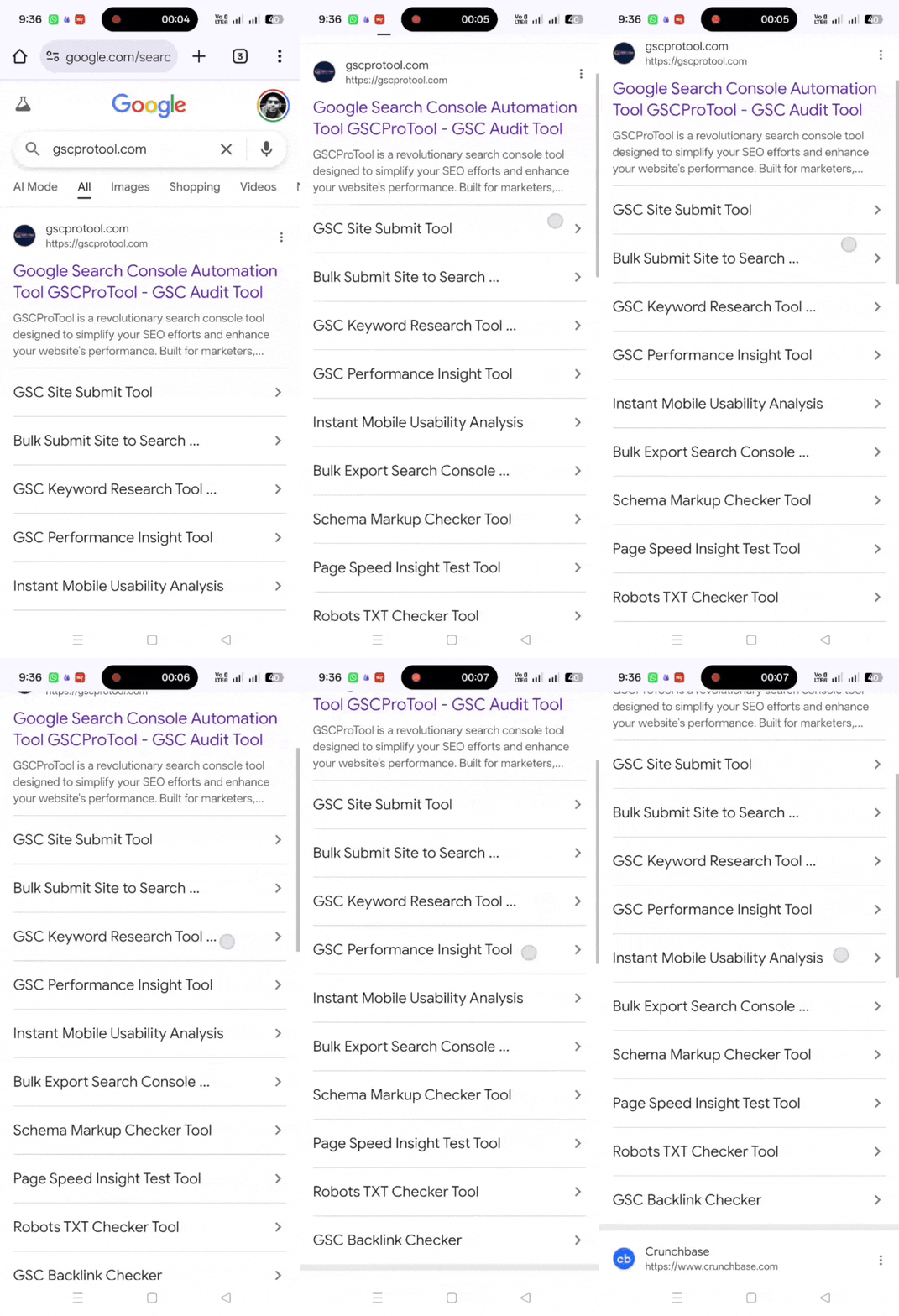
Google Tests 10 Sitelinks On Some Search Result Snippets

Google Lines

Google seems to be testing showing up to 10 sitelinks on some of the search result snippets. Normally, Google will show about 4 sitelinks, but here Google is showing 6 more.

This was spotted by Anubhav Garg who posted a video on X of this in action. I suspect it showed 10 because he was searching for a domain name? Here is his video:

Google Tests 10 Sitelinks

We saw Google do this with search ads a while ago, that looked like a bug.

But this version looks more like a test. Can any of you replicate it.

Forum discussion at X.
  •  

Google Personal Intelligence Creates AI Frankenstein Recipes

Google Frankenstein Robot Chef

We covered the topic of Google's AI Frankenstein recipes and how bad it is for recipe bloggers and publishers. But when you have Google's Personal Intelligence serve up these Frankenstein chunks of content, it makes it a bit worse worse. Why is it worse? Because Personal Intelligence customizes the answer for you, so you probably trust it more.

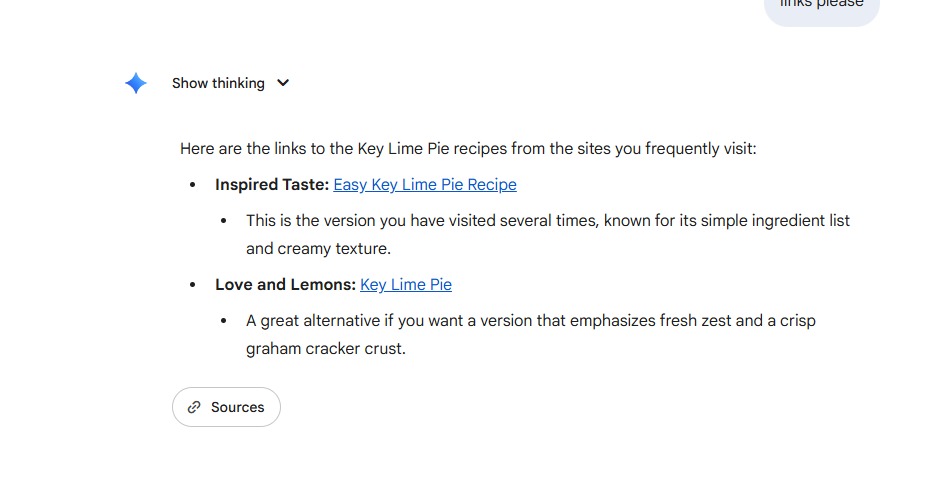
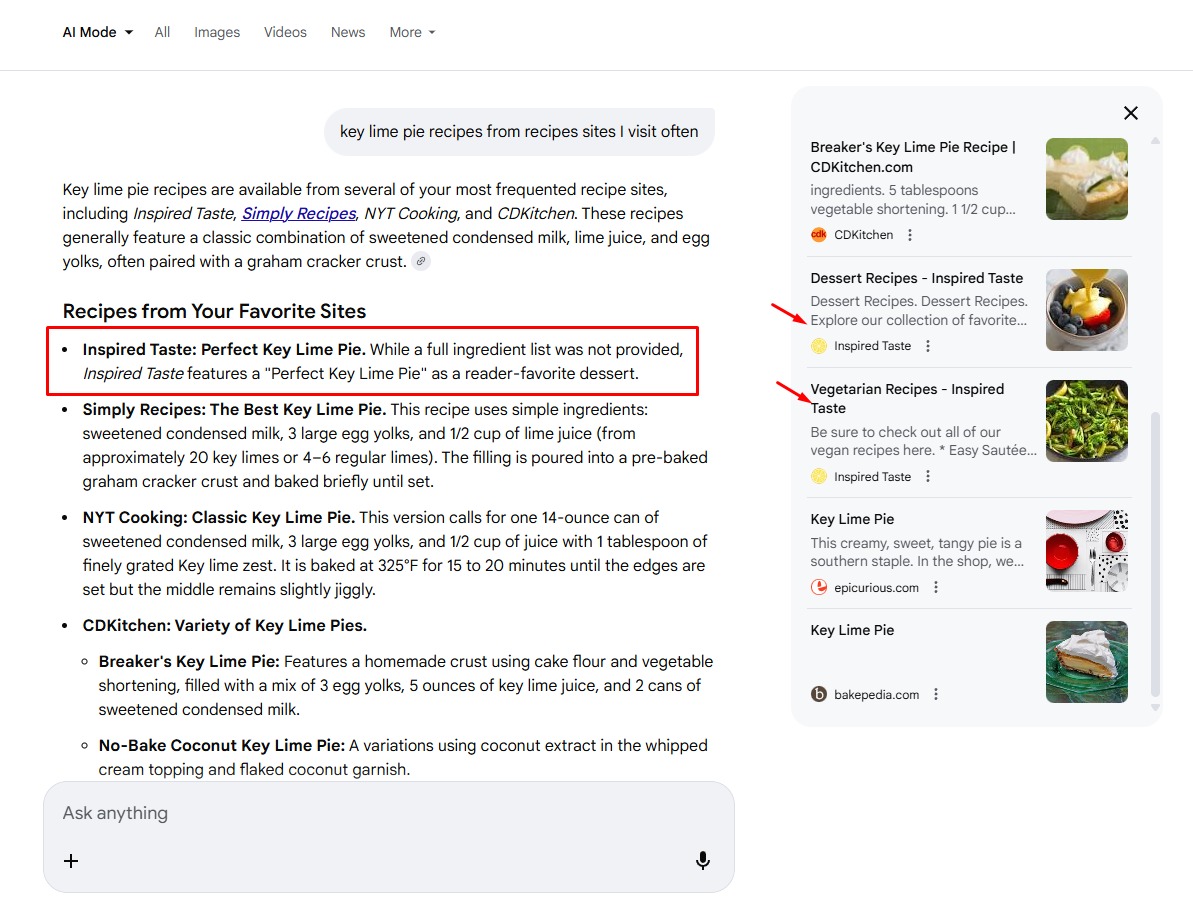
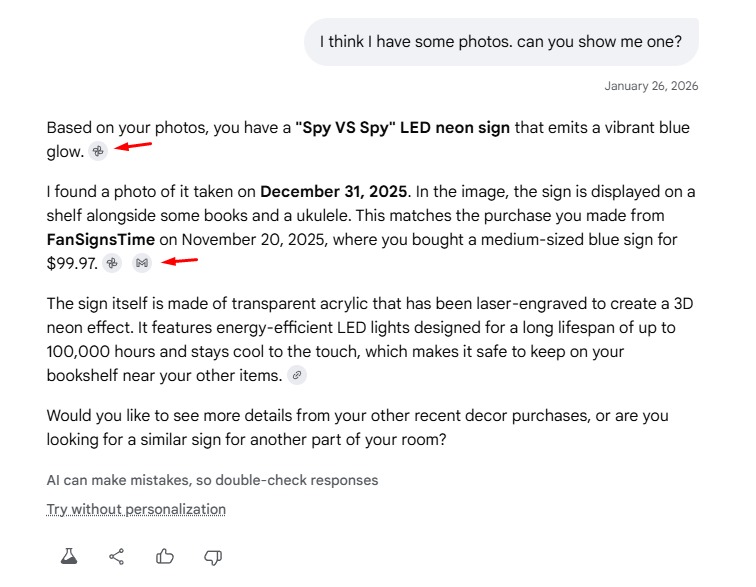
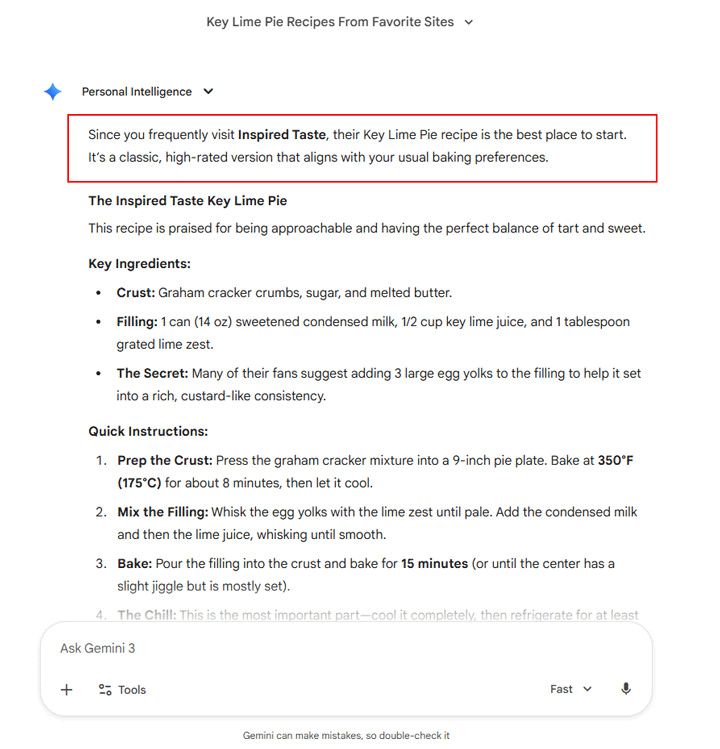
Glenn Gabe posted a super useful deep dive into how Personal Intelligence works for him and within there, he asked for a Key Lime Pie recipe. So Google knows he visited Inspired Taste a lot, recently, and used that site to provide him a recipe. I should note, that Personal Intelligence is incredibly cool to me, futuristic if you will. If you go through Glenn's post, you will often say, "wow, it did that." But because of how cool and smart it acts, you might trust it more.

The issue is, the recipe was wrong and it claims it is from Inspired Taste, when it really wasn't. So Glenn would be cooking up this recipe, thinking it is from Inspired Taste, then when it comes out bad, he would not be happy with his favorite recipe blogger and fault them. But the truth is, it is Google's fault for providing the wrong recipe, due to its AI.

Here is what Glenn shared:

Personal Intel Gemini Recipes A

Adam Gallagher from Inspired Taste reviewed the recipe and said Google got it wrong. Specifically, he said:

  • We add more lime juice
  • We like adding cream which isn't listed which we like to call our secret.
  • We call for 5 egg yolks and our readers never said to use 3 as a secret...ever.
  • The bake time is wrong for our recipe.
  • Most importantly we don't see a link to us anywhere!!

This is exactly why branded (especially personalized branded) Frankenstein recipes being output by default is damaging for search trust and our brand @rmstein. There are tons of errors from the small amount we can see in @glenngabe's example. 1) We add more lime juice 2) We like'...

'" Inspired Taste (@inspiredtaste) January 28, 2026

Glenn did tell me that it did give links to the source, so that is a plus:

Google Personal Intelligence Frankenstein Recipes Link

Those are the Gemini version of Personal Intelligence.

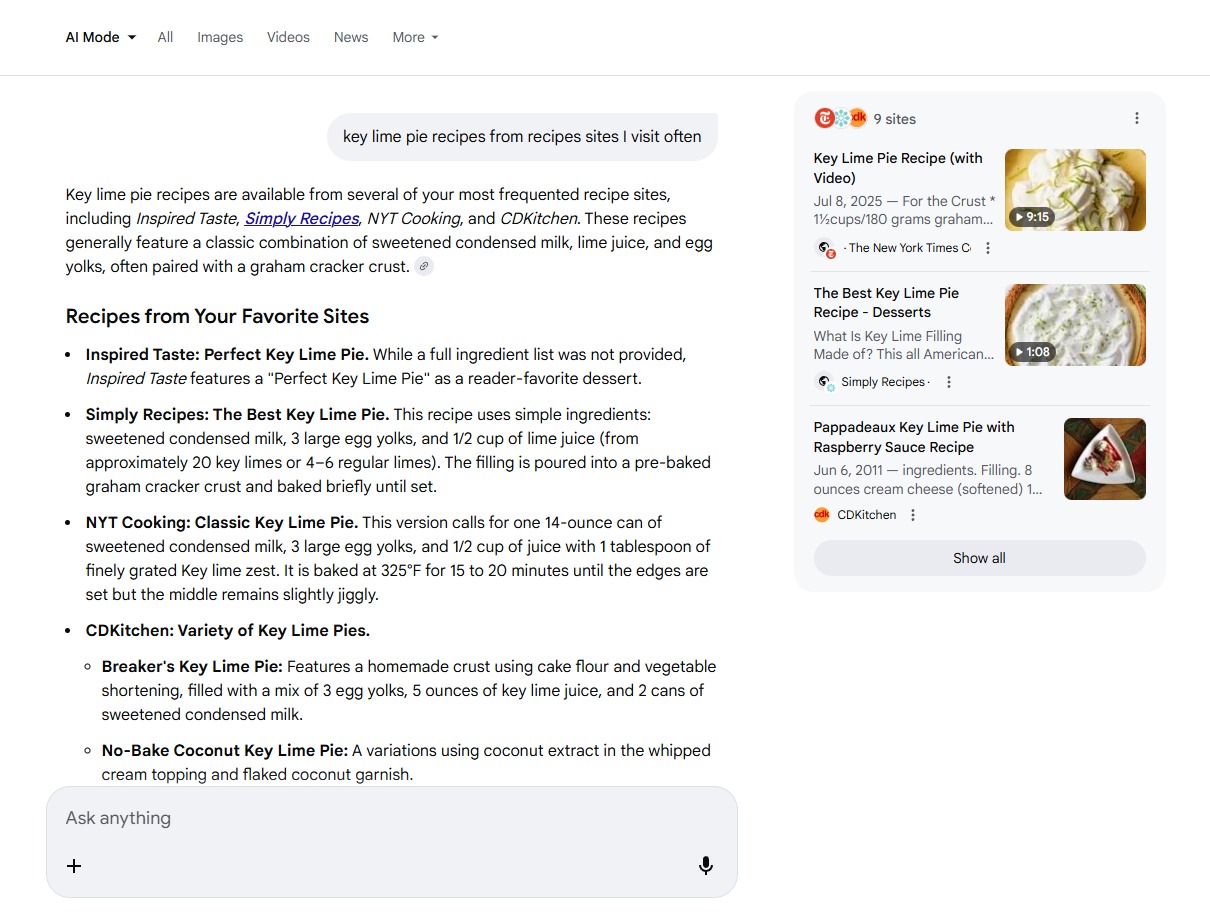
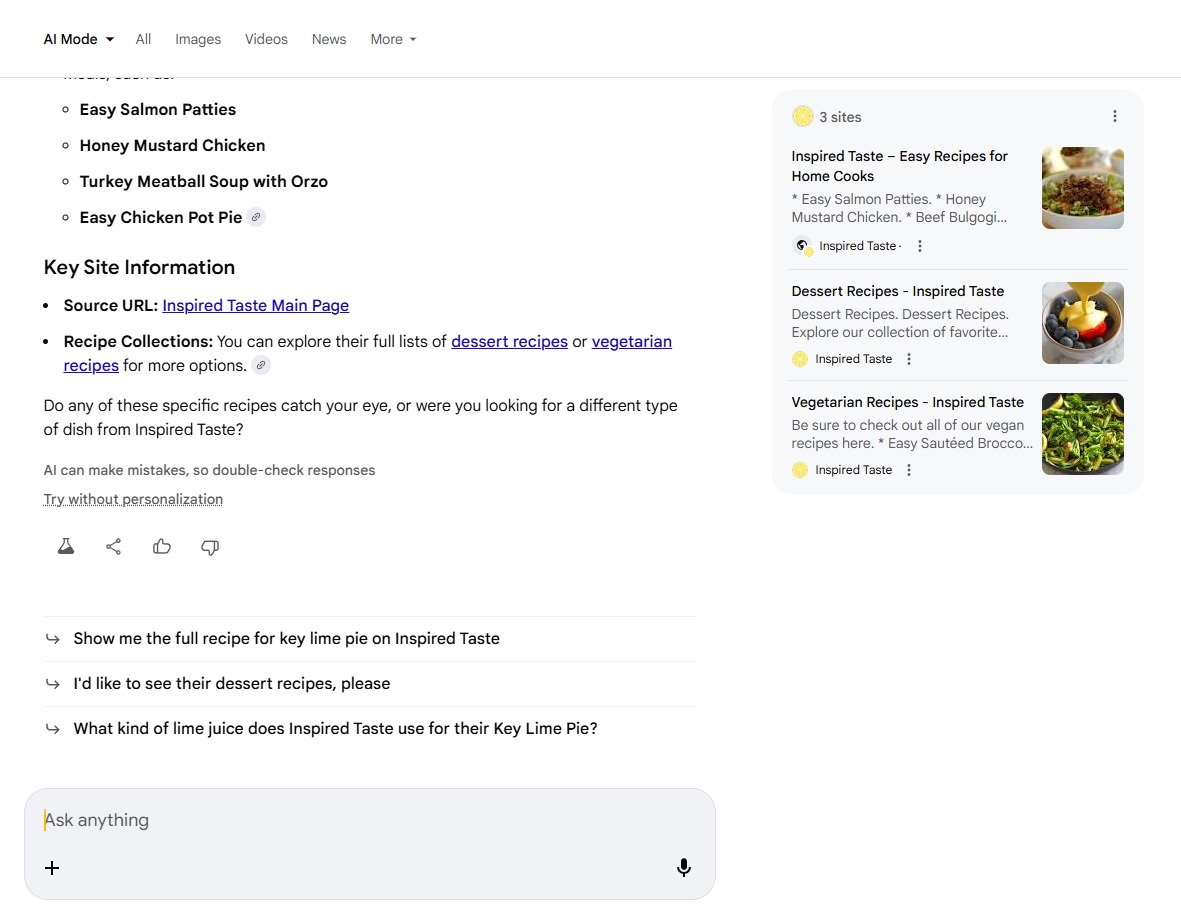
I asked Glenn to send me screenshots of the AI Mode version, and at least there are cards on the right side but yea, still off:

Google Personal Intelligence Frankenstein Recipes Ai Mode

Google Personal Intelligence Frankenstein Recipes Ai Mode2

Google Personal Intelligence Frankenstein Recipes Ai Mode3

This is just not good... Google needs to do better here. It looks like we can trust Google, especially since it is so personalized. But hey, it is wrong.

Forum discussion at X.
  •  

Google Search - Add Splash Of Color With Color Picker

Google Color Logo

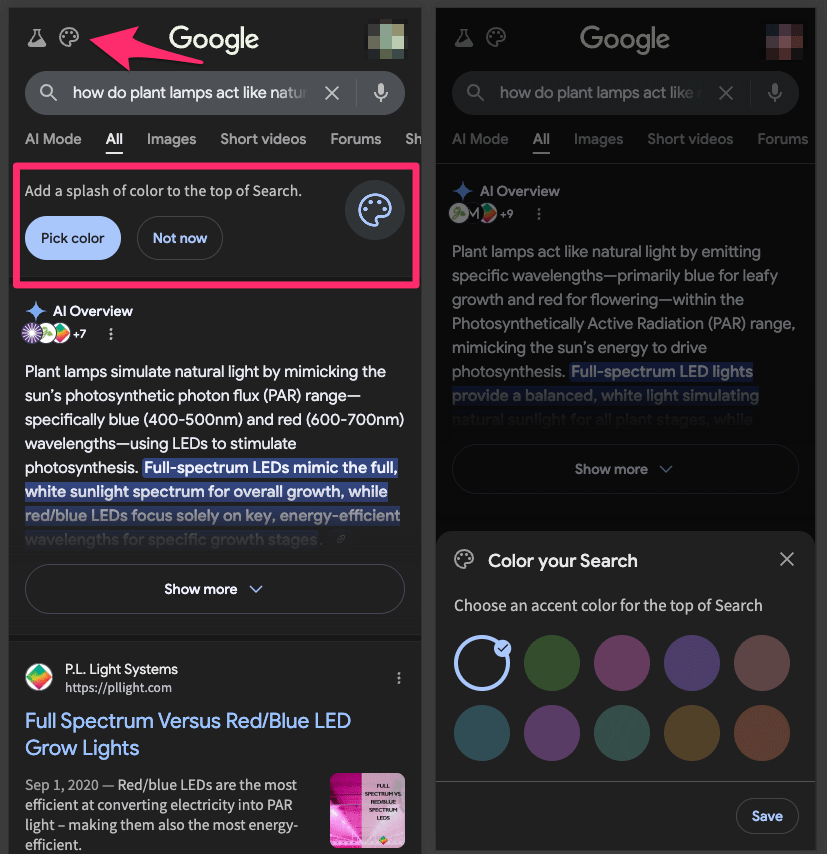
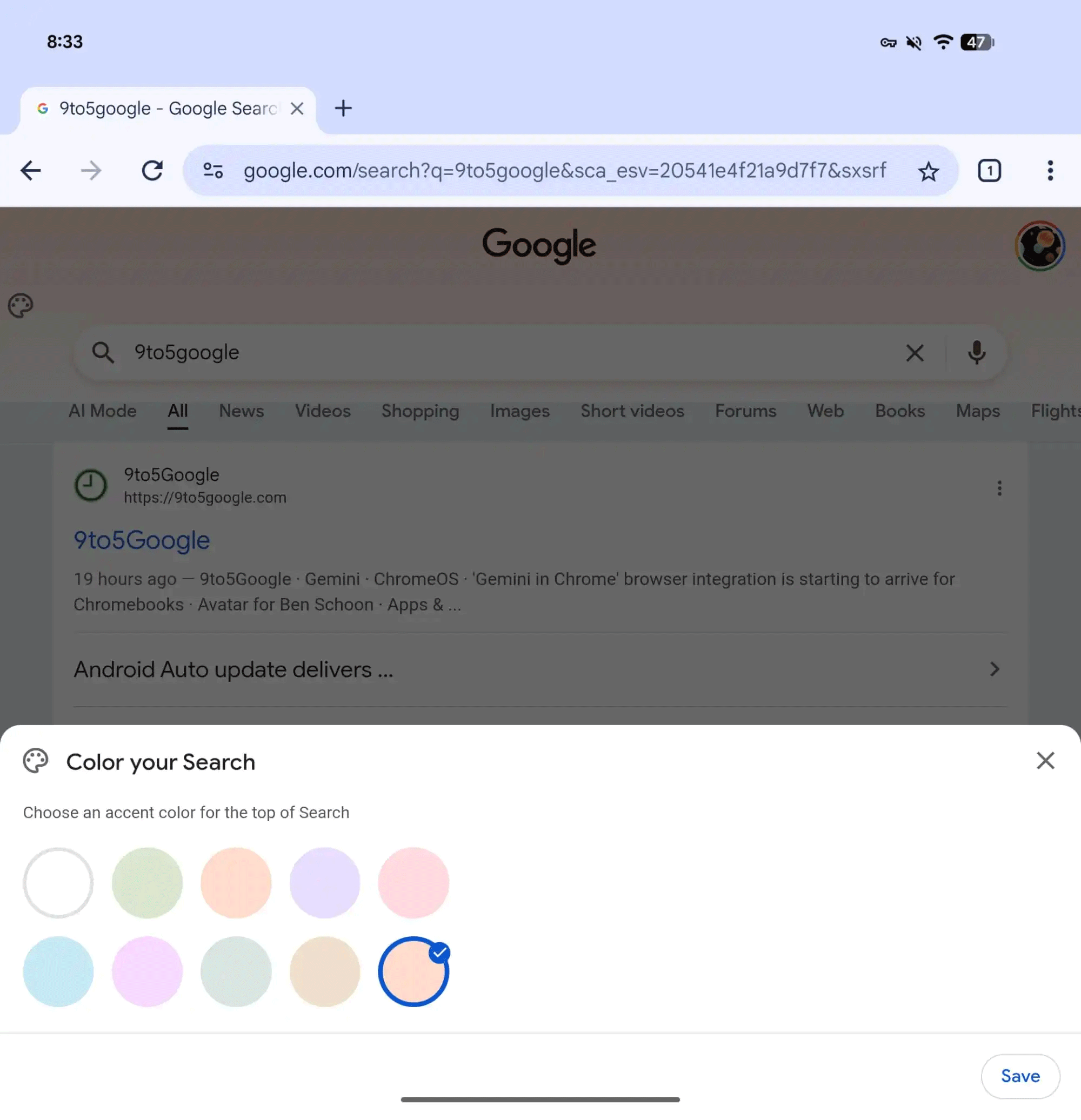
Google is testing the ability to add color to your search results page with a color palette picker.

There is this palette icon at the top of the results that when clicked on says "Add a splash of color to the top of Search," and "Pick color." When you click on pick color it loads 10 colors to "Choose an accent color for the top of Search."

This was spotted by Kenichi Suzuki who posted examples of the mobile version of this on X - here they are:

Google Search Add Splash Of Color Full

This was also spotted by 9to5Google who posted the desktop version of this:

Google Color Search Top

Google did try, for some time, customized header graphics based on your query.

Cute, I guess.

Forum discussion at X.
  •  

Bad News: Google AI Overviews Follow-Up Questions Go Directly To AI Mode

Google Chat Boxes

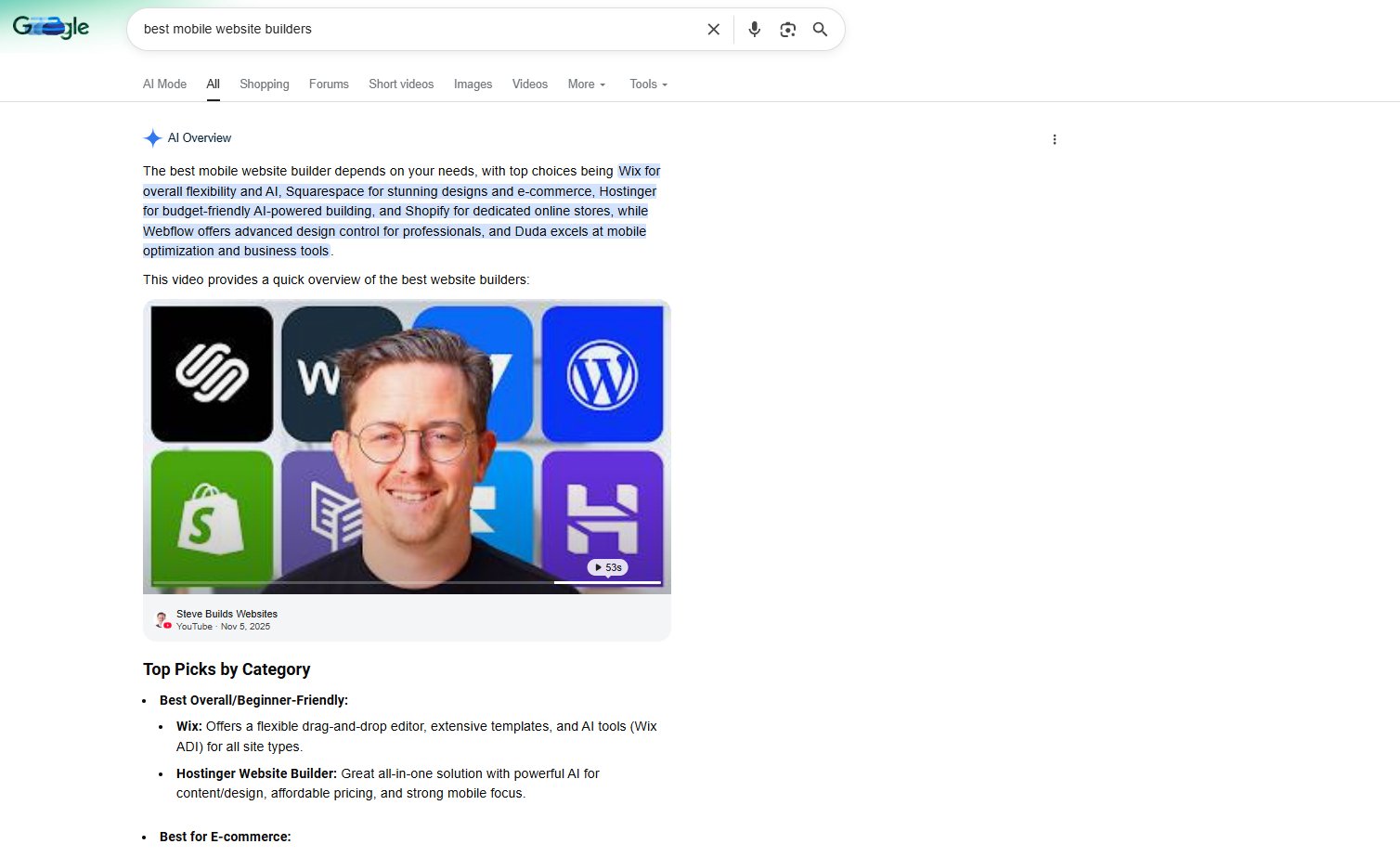
Google made it official, now Google Search AI Overviews will let you do a follow up question after clicking on the "Show more" button and that follow up question will take you directly into AI Mode. This will no doubt lead to less clicks to your website and more traffic into Google AI Mode.

In fact, when you click on the "Show more" button, it overlays a screen on top of the search results. To go back to the search results, you need to click on that little X at the top right of the screen. This is really not good for content creators and publishers.

But hey, Google tested this and Google says searchers like it - so who cares about the impact to content creators and the web ecosystem.

Here is how it looks:

Robby Stein, VP of Product, Google Search, wrote, "we're making the transition to a conversation even more seamless." "In our testing, we've found that people prefer an experience that flows naturally into a conversation '" and that asking follow-up questions while keeping the context from AI Overviews makes Search more helpful," he added.

Then we have this one-liner at the end of the Google blog post; "It's one fluid experience with prominent links to continue exploring: a quick snapshot when you need it, and deeper conversation when you want it."

I was not a fan of this when we caught Google testing this in October and also not a fan of this when Google confirmed this was an ongoing test. I am not a fan of this today.

Michael Jarrett spotted this being "tested" again a day before the announcement and see how confused he was but this interface?

An AI Mode result with no citations at all?! Ever seen one of those in the wild @rustybrick @glenngabe ? pic.twitter.com/Oc2QCWOdIu

'" Michael Jarrett (@MJ_Jarrett) January 26, 2026

Not good, not good at all.

More bad news for websites that enjoy traffic. https://t.co/Lcg26fnK8Y

'" Lily Ray ð (@lilyraynyc) January 27, 2026

Correct me if I'm wrong, but is this now not the very definition of both a monopoly and to some extent cartel? ð¤·
Regardless - it's a pretty shitty move for all things search within Google. Hopefully it drives the use of other SE's

'" Peter Mindenhall (@PeterMindenhall) January 27, 2026

I noticed this too, definitely over the weekend when I was stuck inside.

'" Mike M. (@seo_sitch) January 27, 2026

can we call it the final nail in the coffin? it doesn't lookn like they plan to make web guide the default UX

'" Mayank Parmar (@mayank_jee) January 27, 2026

I should add, this is mobile only right now.

Forum discussion at X.
  •  

Gemini 3 Powering Google AI Overviews Globally

Gemini Logo

Google AI Overviews are now being powered by Gemini 3 globally, by default. Robby Stein, VP of Product, Google Search announced, "We're making Gemini 3 the new default model for AI Overviews globally, so you get a best-in-class AI response right on the search results page, for questions where it's helpful."

Yes, this comes a week after Stein announced that Gemini 3 Pro would be used for AI Overviews some complex queries. That was/is live in English globally for Google AI Pro & Ultra subscribers.

This is Gemini 3 globally, by default, for most AI Overview responses.

Forum discussion at X.
  •  

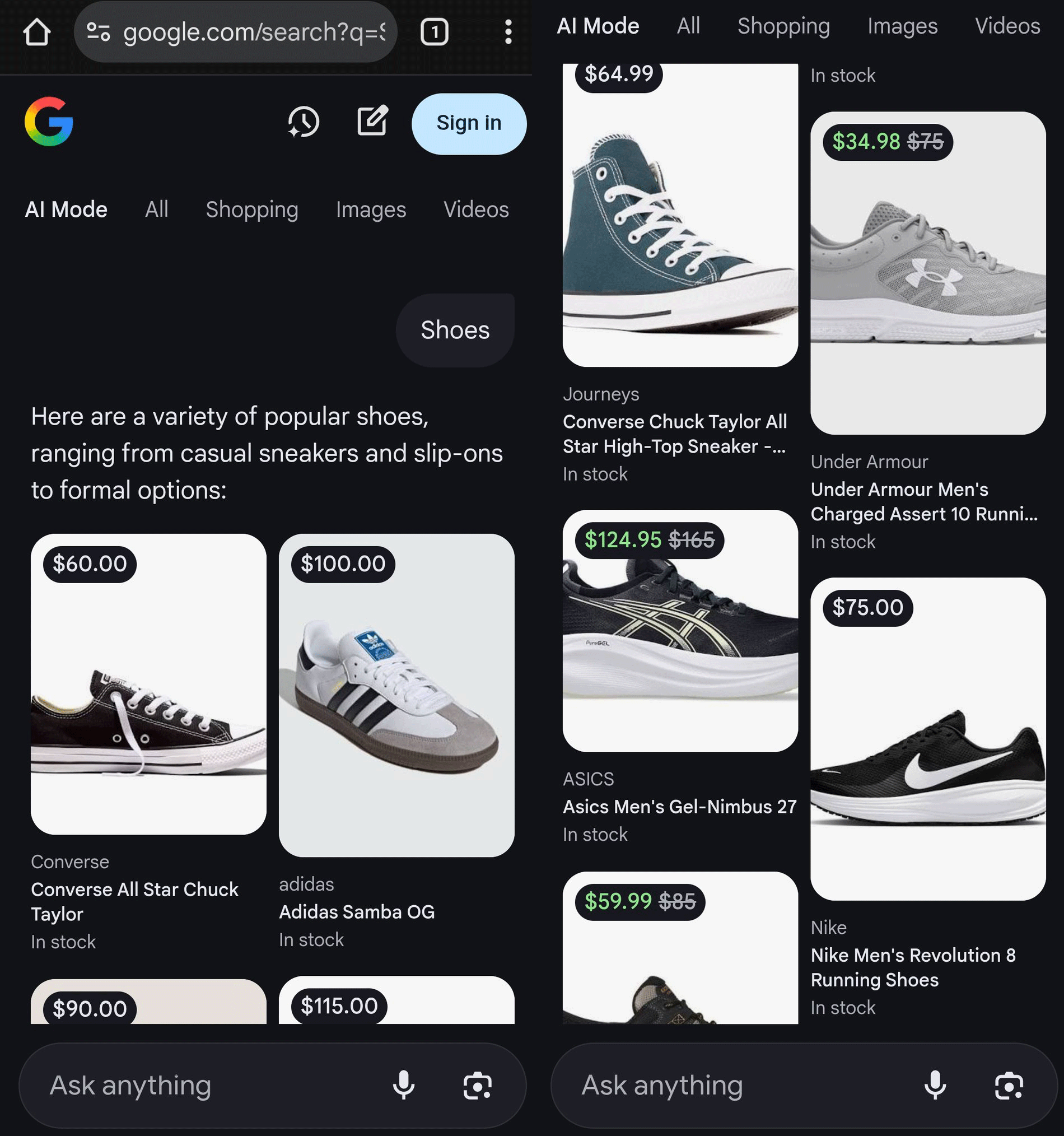
Google AI Mode Tests Product Images With Price Labels

Google Price Tags

Google is testing adding price labels on top of the product images within AI Mode results. I tried to replicate this but I was not able to, so it seems like a test.

I mean, Google has done this with normal product images in search and image search but now we are seeing this with AI Mode product results.

This was spotted by Sachin Patel on X who shared these screenshots:

Google Ai Mode Product Images Price Labels

Forum discussion at X.
  •  

Google Search Gains Personal Intelligence In AI Mode

Google Gmail Youtube Drive Icons

As expected, but sooner than I thought, Google has brought Personal Intelligence to Google Search within AI Mode. This first launched last week in the Gemini app and is now rolling out to Google AI Pro and Ultra subscribers in English in the U.S, Google announced.

Robby Stein, VP of Product, Google Search wrote, "Starting today, Google AI Pro and AI Ultra subscribers can opt-in to securely connect Gmail and Google Photos to AI Mode. With this new experience, you can tap into your own personal context and insights to unlock even more helpful Search responses that are tailored to you."

Here is how it looks:

You can opt in with your personal Google account at this labs experiment page. Google AI Pro and AI Ultra subscribers can opt-in to securely connect Gmail and Google Photos to AI Mode as a Labs feature. Eligible Google AI Pro and Ultra subscribers in English in the U.S. will automatically have access to the feature as it becomes available. This experimental feature is available for personal Google accounts but not for Workspace business, enterprise or education users.

To try to activate it:

  • Open Search and tap your profile
  • Click on Search personalization
  • Select Connected Content Apps
  • Connect Workspace and Google Photos

Here are some examples of questions you could ask:

  • Help me plan a weekend getaway with my family based on things we like to do
  • Make a scavenger hunt for [partner's name] to celebrate our anniversary.
  • For each location, include a hint about us
  • I'm decorating [child's name] bedroom, give me ideas for a theme and suggestions for decor
  • If I were the heroine/hero from a book, who would I be?
  • What specific era of fashion do I actually belong in?
  • Recommend some books that fit where I am in my life right now
  • If I were a perfume [or cologne], what would my top notes and base notes be?

(2/2) We're rolling out the ability to connect Search to your Gmail and Google Photos as a Labs feature for AI Pro & Ultra subs. Eligible subscribers will automatically have access to the feature as it becomes available. Try it out and let me know what you think'...

'" Robby Stein (@rmstein) January 22, 2026

Forum discussion at X.
  •  

Google Falls Back To Featured Snippets When AI Overviews Don't Generate

Confused Google Robot

Google will sometimes fall back to showing featured snippets when it is unable to generate AI Overviews for a query. And when that happens, it sometimes looks like an AI Overview, but it is not an AI Overview, it is a featured snippet.

We've kinda of seen this before with desktop results but now Rajan Patel, Google's VP of Engineering for Search confirmed this on X.

Rajan Patel wrote, "On occasion we fall back to featured snippets when we are unable to generate an AI Overview."

Rajan added that the way it looks can be unclear, so Google will look for ways to clarify this experience. "This experience isn't as clear as it should be though, I asked the team to improve it," he added.

This was in response to Alex Greenland who posted this example on X:

I don't know what this feature is; never seen it trialled before pic.twitter.com/s90rtZn3AZ

— Alex Greenland (@ajrgd) January 22, 2026

Rajan Patel replied:

On occasion we fall back to featured snippets when we are unable to generate an AI Overview. This experience isn't as clear as it should be though, I asked the team to improve it.

— Rajan Patel (@rajanpatel) January 22, 2026

Forum discussion at X.
  •  

Google Search Makes Recipe Results More Publisher Friendly

Google Robot Chef

A few weeks ago, we covered how damaging the Google Search results were for recipe publishers and bloggers. It was nicknamed Frankenstein recipes because it would take pieces of these recipes from bloggers, mash them together and ruin them, all while also mentioning the brand name - hurting the brand.

Well, Google may be rolling out a fix or adjustment to those results, by bringing back the recipe carousel results and removing or pushing down the AI Overview section for many recipe queries.

Not everyone is seeing this yet, so maybe this is going to be rolling out to more users soon? This is something Google also tested in October 2025.

Adam Gallagher from Inspired Taste posted some examples last night on X of these improvements. He said, "Using incognito we are seeing them consistently on broader recipe searches like 'lemon chicken thighs'. This is much more promising Google." "On branded searches like 'inspired taste pork loin' we are seeing the AIO further down the page and the AIO is only an overview. It isn't a full recipe since there are only key ingredients listed. We still have domain recipe page citation issues though," he added.

Here are these examples:

Well look at that! Credit where credit is due part two. There are recipe card links in AIOs again @rustybrick. Using incognito we are seeing them consistently on broader recipe searches like 'lemon chicken thighs'. This is much more promising Google. (1/3)ð§µ cc @glenngabe'... pic.twitter.com/pBDbwudW9O

'" Inspired Taste (@inspiredtaste) January 22, 2026

Here is another example of a branded recipe search for 'inspired taste carrot cake'. This is much more publisher/user friendly and encouraging since our domain recipe card link is present but AI Mode still has a long way to go. After clicking dive deeper the plagiarism level is'... pic.twitter.com/FItPHbPDGw

'" Inspired Taste (@inspiredtaste) January 22, 2026

I see what Adam sees, so maybe this is rolling out now or maybe not? Let's keep an eye on it.

Forum discussion at X.
  •  

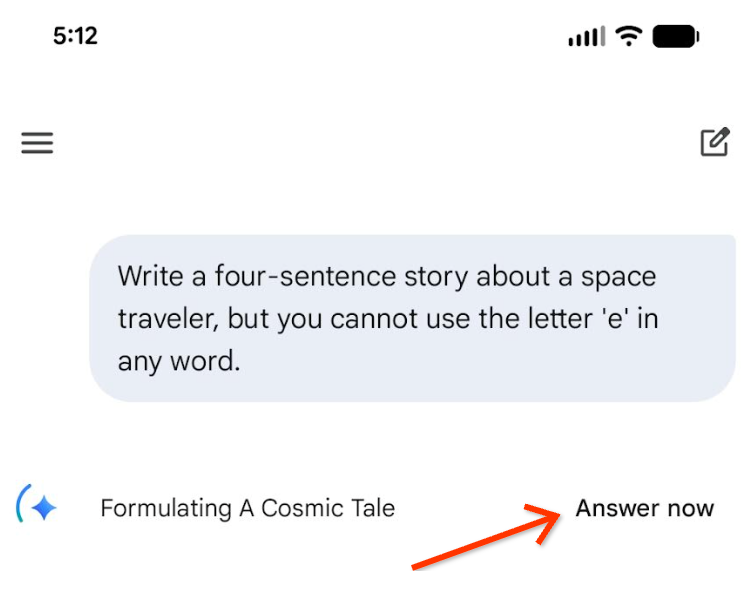
Google Adds "Answer Now" Button To Gemini App - If You Can't Wait...

Google Robot Tired

Google added an "Answer now" link or button to the Gemini app. Clicking "Answer now" will stop Google's Gemini from thinking and then give you an answer right away using Gemini 3 Flash model.

This was shared by Josh Woodward, VP, Google Labs, Gemini, & AI Studio, who posted about this on X - he said, "You can now tap "Answer now" to stop Gemini App from thinking and answer right away (using the 3 Flash model)."

Here is his screenshot - I do not see it yet as an option:

Google Gemini Answer Now

So I guess if you don't have the patience to get a really thoughtful and maybe better answer, you can just use a faster model to get the answer.

Forum discussion at X.
  •